









For finance teams, month-end close is often the most stressful period of the accounting cycle. Teams may spend 5–10 or more days chasing approvals, preparing journal entries, reconciling accounts, consolidating data, and generating reports. Month-end close automation can help reduce this workload and, depending on the starting process and level of automation, bring the close cycle down to 2–4 days.
Instead of relying on spreadsheets, emails, and repetitive manual work, finance teams can use automation to standardize workflows, automate journal entries, accelerate reconciliations, and improve visibility across the close.
This guide explains how month-end close automation works, what parts of the close can be automated, and how record to report automation, AI, RPA, and workflow technologies fit into the broader finance function. We’ll also cover the tools involved, potential ROI, real-world results, and practical steps for getting started.
What is month-end close automation?
Month-end close is the process finance teams use to finalize accounting records at the end of a reporting period. It typically includes recording journal entries, calculating accruals, completing account reconciliations, performing intercompany activities, consolidating financial information, reviewing variances, and preparing financial statements and management reports.
Traditionally, much of this work depends on spreadsheets, emails, manual data entry, and individual follow-ups. Accountants may spend hours posting recurring journal entries, matching transactions, checking supporting documentation, updating close checklists, and waiting for approvals.
Month-end close automation uses technologies such as AI, robotic process automation (RPA), workflow automation, and close management software to reduce this manual effort.
For example, recurring journal entries can be generated and posted automatically according to predefined rules. Reconciliation software can match transactions and route exceptions to the appropriate person. Workflow tools can automatically assign close tasks, monitor deadlines, send reminders, and maintain an audit trail. Reports can also be generated from standardized templates and connected financial data.
The objective of financial close automation is not simply to make accounting faster. It is to make the close process more standardized, controlled, transparent, and repeatable.
Organizations with highly manual processes may target a 50–70% reduction in close-cycle time and 70–90% automation of eligible journal entries. In some cases, this can help move a close from 5–10+ days toward a 2–4 day cycle.
The month-end close process
The month-end close process consists of several connected activities. The exact sequence varies by organization, but most finance teams follow a similar framework.
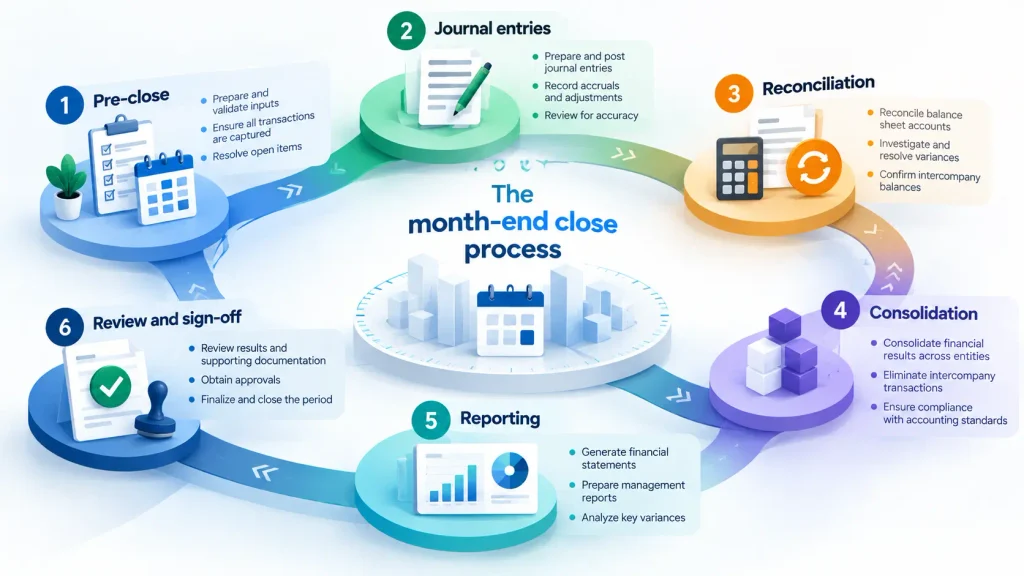
1. Pre-close
Before the books are closed, finance teams gather information required for accruals, estimates, cut-off procedures, and other period-end adjustments.
Manual: Accountants may collect information from different departments, calculate estimates in spreadsheets, and follow up through email.
Automated: Workflow systems can assign pre-close tasks, establish deadlines, send reminders, and centralize supporting information. AI-assisted tools can also help identify recurring accrual patterns and prepare calculations for review.
2. Journal entries
Journal entries record adjustments required to accurately reflect the organization’s financial position. These can include recurring entries, allocations, accruals, depreciation, reclassifications, and other adjustments.
Manual: Accountants calculate amounts, prepare entries, enter them into the ERP, attach supporting documentation, and obtain approvals.
Automated: Rules-based systems can create recurring entries automatically, calculate predefined allocations, route entries for approval, and post approved entries to the ERP.
3. Reconciliation
Reconciliation ensures that account balances agree with supporting records and that discrepancies are identified before the books are finalized.
This can include bank, credit card, accounts receivable, accounts payable, intercompany, and general ledger reconciliations.
Manual: Teams compare records, investigate differences, prepare reconciliation files, and obtain sign-offs.
Automated: Matching engines can compare large volumes of transactions automatically, identify exceptions, and route unresolved items to the appropriate reviewer.
For a more profound look at this part of the process, see our guide to reconciliation automation.
4. Consolidation
Organizations with multiple entities need to combine financial results into consolidated statements.
Manual: Finance teams may perform entity-level roll-ups, foreign exchange calculations, and elimination entries using spreadsheets or separate systems.
Automated: Consolidation engines can automate multi-entity consolidation, FX translation, intercompany eliminations, and consolidation adjustments according to predefined rules.
5. Reporting
Once the books are closed, finance teams prepare management accounts, financial statements, variance reports, and other reporting packages.
Manual: Reports may require exporting data, manipulating spreadsheets, copying information between templates, and manually calculating variances.
Automated: Connected reporting systems can pull data directly from financial systems, populate standardized templates, and generate reports automatically.
6. Review and sign-off
The final stage involves controller and CFO review, completion of outstanding tasks, investigation of unusual variances, and formal sign-off.
Manual: Controllers often rely on spreadsheets, email threads, and status meetings to determine whether everything has been completed.
Automated: Close management platforms provide dashboards showing task status, ownership, dependencies, exceptions, and approvals in one place.
When these activities are connected through a single workflow, finance teams can create a more predictable and controlled close rather than treating each activity as a separate manual task.
What can be automated in the close?
Not every accounting decision should be fully automated. However, a significant portion of repetitive, rules-based close work can be automated while keeping human review for exceptions and judgment-based activities.
| Close task | Manual process | Automated process | Automation level |
| Recurring journal entries | Manual posting each period | Auto-post on schedule | 95–100% |
| Accruals and estimates | Manual calculation and posting | AI-assisted calculation, auto-posting | 70–90% |
| Reconciliations | Manual matching and sign-off | Auto-matching, exception routing | 80–95% |
| Intercompany matching | Manual matching and elimination | Auto-match, auto-eliminate | 80–95% |
| Consolidation | Manual roll-up, FX translation | Automated consolidation engine | 90–100% |
| Close checklist | Spreadsheet tracking, manual follow-up | Automated checklist, task routing, reminders | 90–100% |
| Reporting | Manual report generation | Auto-generate from templates | 90–100% |
| Variance analysis | Manual calculation, narrative | AI-generated variance commentary | 60–80% |
These percentages represent potential automation levels for suitable, rules-based activities rather than guarantees for every organization.
The biggest time savings often come from automating journal entries, reconciliations, and close checklist management. These activities happen every month and can consume substantial accounting resources when handled manually.
With an automated month-end close, accountants can spend less time moving information between systems and more time reviewing exceptions, investigating unusual activity, and analyzing financial performance.
Record-to-report automation explained
Record-to-report, commonly called R2R, is broader than the month-end close. It describes the end-to-end finance process that begins with recording financial transactions and ends with producing financial and management reports.
Record to report automation applies automation across this complete cycle.
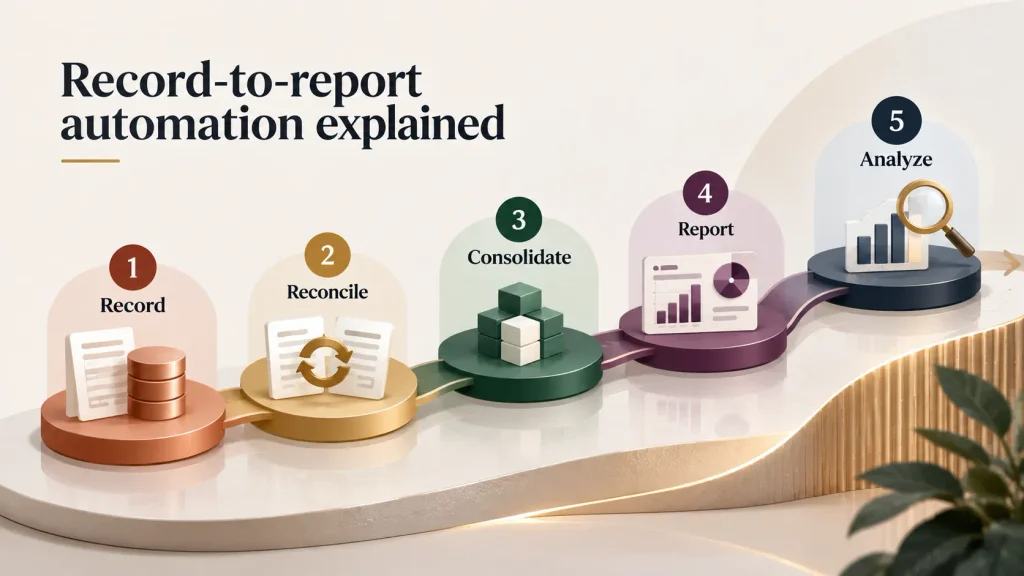
1. Record
The process begins with capturing and recording transactions. This can include information originating from accounts payable, accounts receivable, payroll, expenses, banking systems, and other financial applications.
Automation can capture data, apply predefined rules, and post eligible transactions to the ERP with limited manual intervention.
2. Reconcile
The next stage involves ensuring that recorded transactions and account balances agree with supporting data.
Automated matching, exception management, and reconciliation workflows can reduce the amount of manual investigation required by finance teams.
3. Consolidate
For companies operating across multiple entities or regions, consolidation involves combining financial results, translating currencies, and recording eliminations.
R2R automation can standardize these processes and reduce spreadsheet dependency.
4. Report
Once financial information has been validated and consolidated, reporting tools can generate financial statements, management reports, dashboards, and other reporting packages.
5. Analyze
Modern R2R platforms increasingly incorporate AI for variance analysis, anomaly detection, and financial commentary. Instead of simply presenting a variance, AI-enabled systems can help identify unusual movements and provide a starting point for investigation.
This makes R2R automation broader than close automation. Month-end close is an important phase within the R2R framework, while R2R covers the full journey from transaction recording through reporting and analysis.
As organizations move toward broader finance transformation, finance transformation consulting can help connect R2R automation initiatives with wider process, technology, and operating-model improvements.
Month-end close automation tools
A modern close environment typically combines several technology categories rather than relying on one tool.
1. Close management software helps finance teams manage checklists, task assignments, approvals, dependencies, documentation, and sign-offs. Platforms such as FloQast, BlackLine, and Trintech provide capabilities in this area.
2. RPA for journal entries can automate repetitive activities such as recurring journal entries, allocations, and data transfers between systems.
3. AI for variance analysis can help identify unusual changes and surface anomalies and generate initial variance commentary for accountants to review.
4. Consolidation engines such as OneStream, Oracle HFM, and SAP Group Reporting support multi-entity consolidation, foreign exchange translation, and elimination activities.
5. Workflow orchestration connects these activities by routing tasks, monitoring dependencies, tracking deadlines, and sending reminders automatically.
Popular platforms include FloQast, BlackLine, Trintech/Adra, and OneStream. Pricing models vary, so organizations should check directly with vendors for current pricing and licensing structures.
When evaluating a solution, finance teams should look beyond individual features. Key considerations include ERP integration, close checklist automation, reconciliation capabilities, consolidation functionality, reporting templates, audit trails, user permissions, scalability, and ease of implementation.
Organizations that also implement broader shared services automation can connect close automation with other finance processes to create a more standardized operating model.
For organizations that need help evaluating processes, designing an automation roadmap, or selecting technology, automation consulting can provide additional support.
ROI of month-end close automation
The ROI of close automation comes from more than simply shortening the number of days it takes to close the books.
Manual close processes commonly take 5–10 or more days, while well-designed automation programs can target a 2–4 day close. Journal entry automation can reach 70–90% for eligible entries, while overall close-cycle reductions of 50–70% may be achievable depending on the starting point, process complexity, and technology environment.
The financial impact can come from several areas:
- Lower overtime and temporary staffing costs
- Fewer hours spent on repetitive accounting work
- Faster reconciliation and exception resolution
- Reduced spreadsheet dependency
- Improved audit readiness and documentation
- Better visibility into close status
- More time available for financial analysis
Auxiliobits client results illustrate the potential scale of these improvements, with reported outcomes including 40–60% cost reductions, $200K+ in annual savings, 9,700+ hours recovered, and 73% cycle-time reduction in relevant automation engagements.
These figures are client-specific results rather than universal benchmarks, and actual ROI depends on transaction volumes, process maturity, automation scope, labor costs, and technology investments.
Finance teams should therefore calculate their automation ROI using measurable baseline data.
Other finance processes can also influence the close. For example, AR automation can improve the speed and accuracy of cash application, collections, and receivables processing, giving finance teams cleaner and more timely information before the close.
Ultimately, the strongest business case combines labor savings with faster reporting, better controls, improved audit readiness, and more productive use of accounting talent.
Case studies
What does close automation look like in practice?
Auxiliobits has reported client outcomes including 40–60% cost reduction, more than $200,000 in annual savings, 9,700+ hours recovered, and a 73% reduction in cycle time across relevant automation engagements.
These results demonstrate several of the practical benefits organizations can target when automating close and R2R activities. Reducing repetitive manual work can shorten the close cycle, while automated workflows can reduce the amount of time accountants spend chasing approvals and reconciling information across spreadsheets.
Automation can also improve audit readiness by creating standardized workflows, maintaining supporting documentation, and providing greater visibility into who completed each task and when.
Results vary based on the organization’s existing processes, systems, transaction volumes, and automation scope. More client examples and implementation outcomes are available on the Auxiliobits case studies page.
Getting started with month-end close automation
Successful close automation usually starts with process analysis rather than immediately purchasing software.
Step 1: Baseline your current close
Document how the close works today. Measure:
- Number of close-cycle days
- Journal entry volume
- Percentage of recurring journal entries
- Time spent on reconciliations
- Number of manual spreadsheets
- Overtime hours
- Number of late or overdue tasks
- Time required for reporting and review
Without a baseline, it becomes difficult to measure the impact of automation.
Step 2: Identify the highest-impact opportunity
Do not try to automate everything simultaneously. Look for repetitive, high-volume activities with clearly defined rules. Recurring journal entries and reconciliations are often strong starting points because they happen frequently and consume significant manual effort.
Step 3: Choose technology that integrates with your ERP
Your automation platform should work with the systems finance already uses. Consider ERP compatibility, data connectivity, security, user permissions, audit trails, scalability, and integration capabilities before selecting a solution.
Step 4: Run a proof of concept
A 4–6 week proof of concept can demonstrate whether a particular automation opportunity delivers the expected results.
For example, a company could select a group of recurring journal entries or a specific reconciliation process and compare automated performance with the existing manual process.
Step 5: Scale to full close automation
After validating the approach, expand automation across additional close activities. With the right implementation approach and partner, implementation can typically take around 6–8 weeks for an appropriately scoped automation initiative. More complex environments may require additional time.
Step 6: Measure and optimize
Automation should be treated as an ongoing improvement program.
Track metrics such as:
- Close-cycle days
- Journal entry automation rate
- Reconciliation completion time
- Exception volume
- Overtime hours
- Number of manual interventions
- Reporting turnaround time
Use these measurements to identify additional opportunities and continuously improve the process.
Ready to automate your month-end close?
If your finance team is still spending 5–10 days closing the books, automation can help reduce repetitive work, accelerate reporting, and improve visibility across the close. Book a discovery call to explore how close automation could target a 3-day close, automate 70–90% of eligible journal entries, and reduce close-cycle time by 50–70%.