








Reconciliation is one of the most time-consuming activities in the finance close process. Accountants often spend days pulling data from different systems, comparing transactions, investigating discrepancies, updating spreadsheets, collecting supporting documents, and completing sign-offs. For organizations handling multiple entities, accounts, currencies, and transaction volumes, this work can consume a significant part of every month-end close.
Reconciliation automation changes that equation by using automation, AI, matching engines, and workflow orchestration to handle repetitive reconciliation work with minimal manual intervention. Instead of spending five to ten days working through reconciliations, finance teams can potentially reduce the active reconciliation workload to one or two days, with people focusing primarily on genuine exceptions.
This guide explains what reconciliation automation is, the types of reconciliation it can cover, how the automated workflow works, which technologies and tools are involved, how to measure ROI, and how finance teams can get started with an implementation.
What is reconciliation automation?
Reconciliation is the process of comparing two sets of financial records to confirm their agreement and to identify any differences that require investigation. A common example is comparing a company’s bank statement with the corresponding cash account in its general ledger. Other examples include comparing subledger balances with GL accounts, matching transactions between subsidiaries, or verifying balance sheet account balances against supporting documentation.
Traditionally, reconciliation involves several manual steps. Accountants download data from ERP systems, bank portals, spreadsheets, and subledgers. They then compare records, identify mismatches, investigate variances, document explanations, and obtain approvals.
Reconciliation automation uses technologies such as artificial intelligence, robotic process automation (RPA), rules-based matching, machine learning, and workflow automation to perform these activities automatically.
An automated reconciliation process can:
- Extract data from ERP, banking, and accounting systems
- Standardize and validate financial records
- Match transactions using configurable rules
- Identify unmatched or out-of-tolerance items
- Automatically resolve common exceptions
- Route complex exceptions to the appropriate reviewer
- Generate supporting documentation and audit trails
- Track approvals and reconciliation status
This is the foundation of account reconciliation automation: replacing repetitive spreadsheet-based work with a controlled, repeatable digital workflow.
The objective isn’t to remove accountants from reconciliation. It is to remove accountants from the parts of reconciliation that require repetitive comparison rather than financial judgment.
Organizations implementing automation can target significant reductions in reconciliation effort and error rates, although actual results depend on transaction volume, data quality, system integration, matching complexity, and process design.
Types of reconciliation
Reconciliation automation isn’t limited to one financial process. Organizations can automate multiple reconciliation activities across the finance function, starting with high-volume processes and gradually expanding into more complex areas.
1. Bank reconciliation
Bank reconciliation compares transactions recorded by the bank with transactions recorded in the company’s accounting system or general ledger.
For example, the automation platform may receive a bank statement containing deposits, withdrawals, fees, transfers, and other transactions. It compares those records with the corresponding cash transactions in the ERP.
The system can identify:
- Transactions that match exactly
- Transactions that match within defined tolerances
- Bank transactions missing from the ledger
- Ledger transactions missing from the bank statement
- Duplicate transactions
- Timing differences
- Bank charges and interest
- Unusual or unexpected transactions
Bank reconciliation is often one of the best starting points for reconciliation automation because the process is repetitive, transaction volumes can be high, and matching rules are relatively straightforward.
The matching engine can compare transaction amounts, dates, references, descriptions, account numbers, and other attributes. More sophisticated systems can also use fuzzy matching and historical patterns when the records aren’t identical.
The same principle of configurable matching logic appears in other finance automation processes. For example, organizations evaluating matching approaches can learn more about 2-way vs 3-way matching and how automated matching engines use rules and tolerances.
2. Intercompany reconciliation
Intercompany reconciliation involves comparing transactions between two or more entities within the same organization.
Consider a multinational company with dozens of subsidiaries. One entity may record an intercompany receivable while another records an intercompany payable. If the amounts, currencies, dates, or transaction references don’t agree, finance teams must investigate the differences before they can consolidate the accounts.
Manual intercompany reconciliation becomes particularly difficult when organizations have:
- Multiple legal entities
- Different ERP systems
- Multiple currencies
- High transaction volumes
- Different accounting calendars
- Complex transfer-pricing arrangements
Automation can compare intercompany transactions across entities, identify mismatches, categorize differences, and route exceptions to the appropriate finance teams.
This is particularly valuable for global business services and shared finance organizations. Shared services automation can extend reconciliation automation beyond individual accounts and create standardized workflows across multiple finance processes.
3. GL reconciliation
GL stands for general ledger, the central accounting record containing an organization’s financial transactions.
GL reconciliation automation ensures that general ledger accounts are supported by the underlying transaction records and subledgers.
Common GL reconciliation areas include:
- Accounts payable
- Accounts receivable
- Inventory
- Fixed assets
- Accrued expenses
- Prepaid expenses
- Payroll
- Tax accounts
- Cash and bank accounts
- Intercompany accounts
A common example is reconciling an accounts payable subledger total against the corresponding GL control account. If the two balances don’t agree, the system identifies the difference and provides information that helps the accountant investigate it.
Automating these comparisons helps finance teams identify discrepancies earlier instead of discovering them immediately before financial statements need to be finalized.
4. Balance sheet reconciliation
Balance sheet reconciliation focuses on verifying that balance sheet accounts are accurate, supported, and properly documented.
This can involve comparing account balances with:
- Bank statements
- Subledger records
- Contracts
- Invoices
- Schedules
- Fixed asset registers
- Accrual calculations
- Other supporting documentation
Balance sheet reconciliation is especially important for audit readiness and close integrity. An automated workflow can require appropriate supporting documentation, route accounts for review, track preparer and reviewer sign-offs, and maintain an audit trail.
Rather than treating reconciliation as a spreadsheet exercise at the end of the month, organizations can create a standardized process where account owners continuously monitor and resolve exceptions.
How reconciliation automation works
A modern reconciliation workflow typically follows five major stages: extract, match, flag exceptions, auto-resolve, and report.
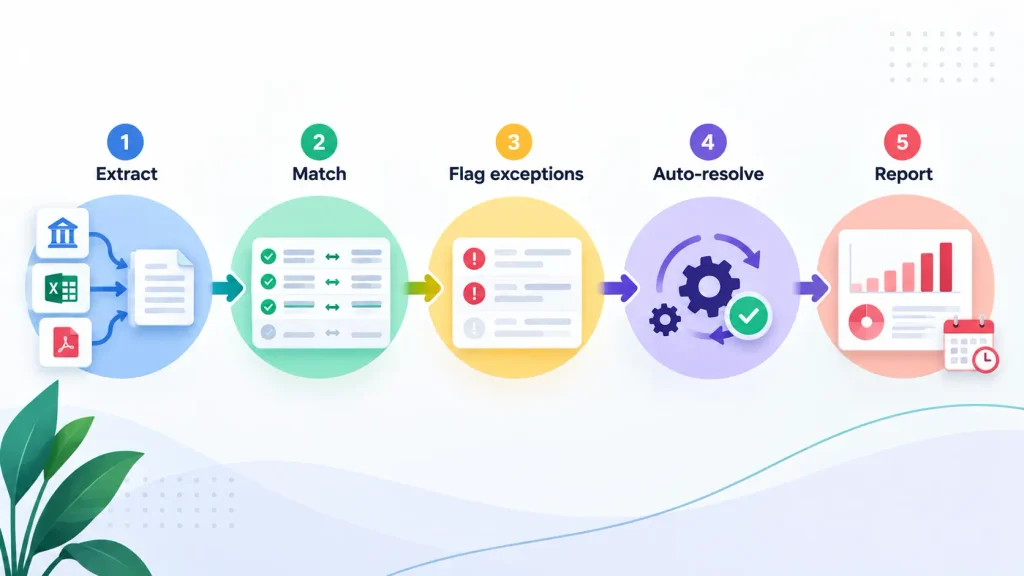
1. Extract
The process starts by collecting information from the systems where financial data resides.
These may include:
- ERP platforms
- Banking systems
- Accounting applications
- Subledgers
- Data warehouses
- Spreadsheets
- Payment platforms
APIs can be used where integrations are available. RPA can help extract information from legacy applications, portals, or systems that don’t provide suitable APIs.
The objective is to eliminate the need for accountants to manually download and consolidate multiple files.
2. Match
The matching engine compares records using predefined business rules and increasingly sophisticated techniques.
A simple rule might require the transaction amount and reference number to match exactly.
More advanced matching can consider:
- Amount
- Date
- Transaction reference
- Customer or vendor
- Account
- Description
- Currency
- Historical matching patterns
- Configured tolerances
Machine learning can also help identify probable matches when the data isn’t perfectly aligned.
This matching engine is the core of automated reconciliation. Instead of asking an accountant to review every transaction, the system processes large volumes and determines which records can be confidently matched.
3. Flag exceptions
Not every transaction will match automatically. The system identifies unmatched, incomplete, or out-of-tolerance items and sends them into an exception workflow.
Depending on the process and data quality, only a smaller percentage of transactions may require human review. The exact percentage varies by organization and reconciliation type.
Instead of reviewing 10,000 transactions manually, an accountant might only need to investigate the transactions that the system couldn’t confidently reconcile.
4. Auto-resolve
Some exceptions follow predictable patterns.
For example:
- Bank fees may appear in the bank statement but not the ledger.
- Transactions may have timing differences.
- Minor rounding differences may occur.
- A known recurring transaction may use a slightly different description.
- Certain payment patterns may consistently produce the same variance.
Once appropriate rules are established, the system can automatically resolve eligible exceptions.
This doesn’t mean every discrepancy should be auto-approved. Financial controls should determine which differences can be resolved automatically and which require human judgment.
5. Report
The final stage is documentation and reporting.
A reconciliation platform can generate:
- Reconciliation reports
- Exception reports
- Supporting documentation
- Approval records
- Audit trails
- Aging reports
- Account status dashboards
This process creates a clear record of what was matched, what was manually reviewed, what was resolved automatically, and who approved the final reconciliation.
The result is a reconciliation process where humans spend their time investigating genuine exceptions rather than performing repetitive data comparison.
Reconciliation automation tools
A successful automation environment usually combines several technologies rather than relying on one application.
1. Matching engines
Matching engines compare transactions using rules-based logic, tolerances, fuzzy matching, and AI/ML capabilities.
Common platforms used for financial close and reconciliation include BlackLine, FloQast, Trintech, OneStream, and ReconArt. Pricing models vary by vendor, deployment model, transaction volume, modules, and implementation requirements, so organizations should check directly with vendors.
2. RPA for data extraction
RPA is useful when source systems don’t provide modern APIs. Bots can log into portals, download files, retrieve reports, move data between applications, and trigger downstream workflows.
This makes RPA particularly useful in environments containing legacy systems alongside modern ERPs.
3. AI and machine learning
AI/ML can support exception classification, pattern recognition, probable matching, and resolution recommendations.
Over time, historical reconciliation decisions can provide additional information about recurring patterns. However, finance teams should still establish appropriate controls around automated decisions, especially for material accounts.
4. Workflow orchestration
Workflow orchestration connects the different stages of reconciliation. For example, an exception can automatically be routed to the account owner, escalated if it remains unresolved, sent for reviewer approval, and recorded in the audit trail once completed.
When reconciliation connects with accounts receivable and cash application, AR automation can help automate payment matching, cash application, exception handling, and reconciliation activities.
Reconciliation also plays a critical role in financial close. This is why it is often an important component of month-end close automation.
When evaluating reconciliation software, look beyond the feature list. Important considerations include:
- ERP integration
- Matching accuracy
- Exception management
- Audit trail capabilities
- Security and access controls
- Workflow flexibility
- Scalability
- Reporting
- Implementation time
- Total cost of ownership
The best platform is not necessarily the one with the longest feature list. It is the one that fits the organization’s data, controls, processes, and existing technology environment.
Reconciliation automation ROI
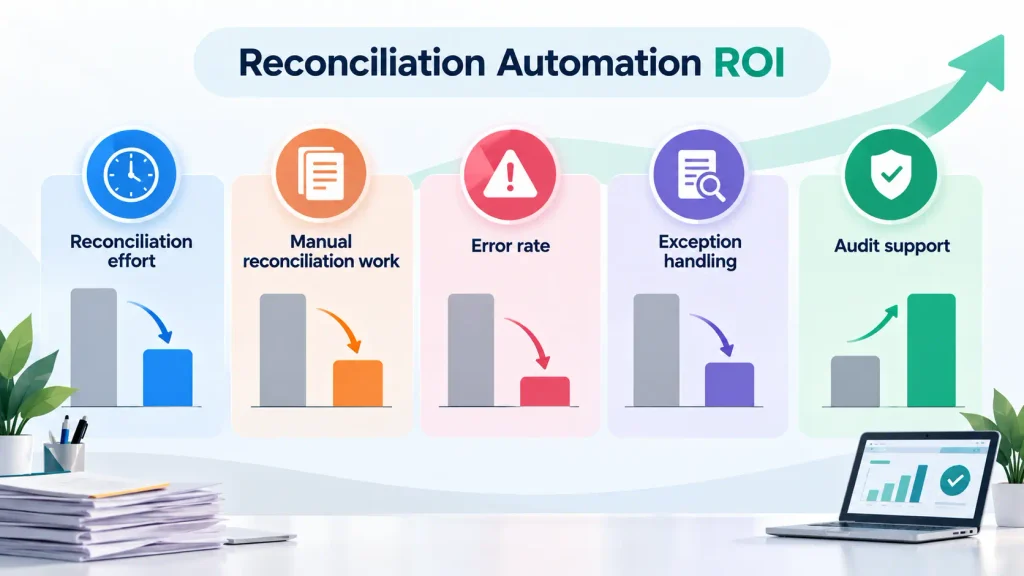
The business case for reconciliation automation is usually built around four areas: time savings, error reduction, faster close, and better use of finance capacity.
A manual reconciliation process can take several days each month, particularly when teams manage numerous accounts and entities. With a well-designed automation workflow, organizations can reduce the amount of manual reconciliation work substantially.
Common targets include:
| Metric | Manual / Legacy | Automated Target |
| Reconciliation effort | 5–10 days/month | 1–2 days/month |
| Manual reconciliation work | High | 60–80% reduction target |
| Error rate | 2–5% | Below 0.5% target |
| Exception handling | Manual investigation | Automated routing and prioritization |
| Audit support | Manually assembled | System-generated audit trail |
These are benchmarks and targets rather than guaranteed results. Actual performance depends on the quality of source data, reconciliation complexity, transaction volumes, integration architecture, and how well the automation is configured.
The financial impact can be significant. Auxiliobits reports outcomes across its finance and shared-services automation engagements, including 40–60% reductions in manual effort across targeted processes, 9,700+ hours recovered annually, and a 73% reduction in monthly close processing time.
The broader business case should also consider the value of faster financial close, fewer errors, improved audit readiness, and the ability to handle increasing transaction volumes without proportionally increasing manual work.
For a structured framework for calculating the business value of automation, see the guide on automation ROI.
The key is to establish a baseline before implementation. Without knowing how many hours are currently spent on reconciliation, how many exceptions occur, and how much rework is required, it becomes difficult to demonstrate the actual return.
Case studies
What does reconciliation automation look like in practice? The answer is often broader than simply matching bank transactions. Reconciliation sits within a larger network of finance processes, including AP, AR, financial close, reporting, and shared services.
Auxiliobits’ published finance automation engagements demonstrate the potential scale of these improvements. Its finance shared-services work reports 40–60% reduction in manual finance work across automated processes, 2–3× faster processing across high-volume finance workflows, 9,700+ hours recovered annually, and 73% reduction in close time for clients extending automation into financial close.
Its case-study portfolio also includes a luxury apparel manufacturer that reduced monthly close processing time by 73% through automation and a large marketing network that recovered 9,700 hours annually and saved $200K through automating vendor invoice processing.
These examples illustrate an important point: reconciliation automation can create value beyond the reconciliation task itself. When reconciliations finish faster and exceptions surface earlier, downstream close activities also move faster.
You can explore the broader Auxiliobits case studies for examples of automation across finance and enterprise operations.
Getting started with reconciliation automation
The biggest mistake organizations can make is trying to automate every reconciliation at once. A phased approach is usually easier to control, measure, and scale.
Step 1: Baseline your current reconciliation process
Before selecting a platform, document the current process.
Measure:
- Hours spent on reconciliation each month
- Number of accounts reconciled
- Number of transactions processed
- Exception volume
- Average exception resolution time
- Current error rate
- Number of spreadsheets used
- Number of systems involved
- Time required for approvals
- Time spent preparing audit evidence
This baseline becomes the benchmark for measuring the automation project’s impact.
Step 2: Start with bank reconciliation
Bank reconciliation is often a practical starting point because it is repetitive, high-volume, and relatively standardized.
Automating a process with clear rules allows the organization to demonstrate value quickly while building experience with data extraction, matching, exception management, and workflow automation.
Step 3: Choose technology that integrates with your ERP
Your reconciliation platform should fit into the existing finance technology environment.
Evaluate how it connects with:
- ERP systems
- Banks
- Accounting platforms
- Subledgers
- Data warehouses
- Payment platforms
Avoid choosing a platform simply because it has sophisticated AI. Integration and data quality often have a greater impact on the success of reconciliation automation.
Step 4: Run a proof of concept
A focused proof of concept can validate the technology before broader deployment.
A typical POC can run for approximately four to six weeks and should use real reconciliation data where possible.
Measure:
- Match rate
- Exception rate
- False matches
- Processing time
- Manual effort
- Resolution time
- Audit trail quality
The objective is not simply to demonstrate that the software works. It is to prove that it works on your actual data and produces measurable improvement.
Step 5: Scale to intercompany, GL, and balance sheet reconciliation
Once bank reconciliation is stable, expand into more complex areas.
Potential next steps include:
- Bank reconciliation
- Intercompany reconciliation
- GL reconciliation
- Balance sheet reconciliation
- Subledger-to-GL reconciliation
- AR and cash reconciliation
A phased approach allows the organization to reuse integrations, matching logic, governance standards, and exception workflows.
Step 6: Measure and optimize
Automation is not a one-time implementation. Track performance continuously.
Important KPIs include:
- Reconciliation time
- Match rate
- Exception rate
- Exception resolution time
- Error rate
- Number of manual touches
- Accounts completed on time
- Days required for close
- Audit preparation time
Use these metrics to identify additional opportunities for optimization.
With the right process and technology partner, an initial automation solution can often be developed and stabilized within 6–8 weeks, although complex ERP environments, multiple entities, data-quality issues, and extensive controls can extend the timeline. Auxiliobits currently describes a six-to-eight-week engagement model covering process discovery, automation build, stabilization, and scale.
Ready to automate your reconciliation process?
Reconciliation shouldn’t require accountants to spend most of every month comparing spreadsheets and chasing discrepancies. With the right combination of automation, matching logic, AI, and workflow controls, finance teams can shift their attention from repetitive reconciliation work to meaningful exceptions and analysis.
Ready to automate your reconciliation process? Book a discovery call to see how reconciliation automation can reduce your monthly reconciliation workload and recover valuable finance capacity.