






Key Takeaways
- Automation ROI goes beyond licence costs: A realistic automation cost benefit analysis should include implementation, integration, training, internal effort, and time to value.
- Measure multiple sources of value: Capacity reclaimed, error reduction, and revenue protected through faster processing can all contribute to automation ROI.
- Volume determines whether automation makes financial sense: High-volume, repetitive processes generally reach payback faster, while low-volume processes may require a different approach.
- Compare total investment against measurable business value: The cheapest automation platform is not necessarily the most cost-effective if implementation is slow or integration is complex.
- Run the numbers before you buy: Calculate your current process costs, expected annual value, ROI, and payback period to determine whether automation is the right investment now.
You’re no longer evaluating whether automation works. You already know it can reduce manual effort, improve accuracy, and accelerate processes.
The harder question comes later: does the automation cost benefit make sense for our business, at our current volume, budget, and growth stage?
That is the question that should drive the buying decision. Automation can deliver an impressive ROI on paper, but it may still be the wrong investment if implementation costs are too high, transaction volumes are too low, or the business cannot realistically use the platform’s capabilities.
A credible automation business case therefore needs to look beyond the licence price. It needs to account for implementation, integration, training, time saved, errors avoided, revenue protected, and how quickly the investment pays back.
Here’s how to evaluate the cost vs value of automation before you commit.
The Real Cost of Automation: Look Beyond the Licence Fee
Automation vendors often lead with a platform price. But the licence is only one part of the first-year investment.
A more useful automation cost benefit analysis includes the total cost of ownership: platform fees, implementation, training, integrations, and the time required to get the first process live.
A representative tiered model looks like this:
| Cost Component | Starter | Growth | Enterprise |
| Platform fee (annual) | $4,800 | $14,400 | Custom, typically $30K–$60K |
| Implementation | $0 (self-serve) | $2,500 (guided) | $8,000–$15,000 |
| Training | Self-serve documentation | 2 live sessions | Dedicated onboarding team |
| Integration | Native connectors | Native + 3 custom | Unlimited custom |
| Time to first automation | 3–5 days | 2–3 weeks | 4–8 weeks |
This distinction matters because a $14,400 annual licence does not necessarily mean a $14,400 first-year investment. For the Growth tier, for example, the Year 1 cost is approximately $16,900 once guided implementation is included.
That is the number you should compare against the value created — not simply the platform fee.
The same principle applies to enterprise automation. A larger upfront investment can make sense when the business has complex workflows, multiple integrations, and enough transaction volume to generate substantial returns.
The Value Side of the Equation: What Are You Actually Getting Back?
The value of automation should not be reduced to “hours saved”. A strong business case typically combines three major value pools:
- Capacity reclaimed
- Errors and rework avoided
- Revenue protected through faster processing
The key is to make the assumptions visible so your team can replace them with actual numbers.
1. Time Reclaimed
Suppose the fully loaded cost of the employees performing a manual process is $45 per hour. If automation eliminates 15 hours of repetitive work every week, the annual capacity released is:
15 hours × $45 × 52 weeks = $35,100
That does not necessarily mean eliminating employees. The more useful way to view this benefit is redeployed capacity. The team can handle more transactions, support customers, manage exceptions, or take on additional responsibilities without requiring proportional headcount growth.
That becomes particularly valuable as transaction volumes increase.
2. Error Cost Avoidance
Manual processes also create costs that are easy to overlook because they rarely appear as a single “automation opportunity” line item.
Consider a process with:
- 500 transactions per month
- 3% manual error rate
- $120 average cost per error
That produces approximately $1,800 in monthly error-related costs, or $21,600 annually. Those costs can include rework, refunds, delayed processing, customer service intervention, compliance exposure, or duplicate effort.
Automation can reduce the frequency of these errors while also making exceptions easier to identify and manage.
3. Revenue Protected Through Faster Turnaround
Speed can also have financial value. If faster processing reduces customer churn by just 1% across a $500,000 retained-revenue base, that represents $5,000 in protected annual revenue.
It may not be the biggest number in your model, but it illustrates why automation value extends beyond labour savings.
The real question is not “How much work can we automate?”
It is “What financial value does a faster, more accurate process create?”
What Does the Automation Cost Benefit Look Like in Practice?
Using the assumptions above:
- Capacity reclaimed: $35,100
- Error cost avoidance: $21,600
- Revenue protected: $5,000
- Total modeled Year 1 value: $61,700
Against a growth-tier Year 1 cost of approximately $16,900, the modeled return is substantial.
Using the standard ROI formula: ROI = (Value − Investment) ÷ Investment × 100
That gives ($61,700 − $16,900) ÷ $16,900 × 100 ≈ 265% ROI
The important point is not the percentage itself. It is the methodology. Your own automation cost benefit will depend on transaction volume, labour costs, error frequency, process complexity, and the value of faster turnaround.
That is why a vendor should be able to show you the assumptions behind an ROI projection rather than simply promising “3x ROI”.
Three Customers, Three Very Different Outcomes
A realistic automation business case should also acknowledge that not every customer gets the same result.
Case 1: The Clear Win
A 40-person logistics operation automated manual shipment-status updates involving three employees and approximately 40 combined hours of work per week.
On the Growth plan:
- Year 1 cost: $16,900
- Measured Year 1 value: $71,000
- Payback: 11 weeks
The result worked because the process had enough volume and repetitive effort to create meaningful savings quickly.
“The ROI call before we bought was more useful than most demos we sat through. They showed us where it wouldn’t help as much as where it would.”
— Operations Director
Case 2: The Moderate Win
A 12-person professional services firm automated client intake and scheduling. Because transaction volume was lower, the absolute financial benefit was smaller:
- Year 1 value: $18,000
- Year 1 cost: $9,600
- ROI: 87%
- Payback: approximately 7 months
That is still a positive business case, but it is fundamentally different from the logistics example. This is why automation should not be sold using a universal ROI benchmark.
Case 3: When Automation Wasn’t the Right Fit
One customer evaluated automation for a process requiring fewer than five hours of manual work per week. The numbers did not work.
At that volume, the platform investment would not have achieved payback within 18 months. Rather than forcing the business case, the recommendation was to wait.
Nine months later, transaction volume had increased threefold, and the economics changed. That is an important lesson: the right automation investment is determined by process economics, not enthusiasm for automation.
How to Compare Automation Options Before You Buy
Price is only one decision factor. A cheaper platform can become expensive if implementation takes months, integrations require extensive development, or error rates remain high.
| Decision Factor | Manual Process | Basic Tools | Enterprise Automation |
| First-year cost transparency | N/A | Often limited | Itemised by tier |
| Time to first automation | N/A | 4–8 weeks typical | 3 days–3 weeks by tier |
| Error reduction | Baseline | Limited | Designed for measurable reduction |
| Contract flexibility | N/A | Often annual | Flexible options by plan |
| Data portability | N/A | Varies | Export support |
| Pre-sale ROI modelling | N/A | Uncommon | ROI-led evaluation |
The right comparison is therefore not simply automation price vs manual labour cost.
It is:
Total automation investment vs measurable business value.
That is the difference between buying software and making an investment decision.
For organisations evaluating broader process transformation, Auxiliobits Agentic Process Automation can help extend automation beyond isolated tasks, while Auxiliobits Intelligent Enterprise Automation focuses on connecting automation across enterprise workflows.
The Objections Buyers Raise Before Signing
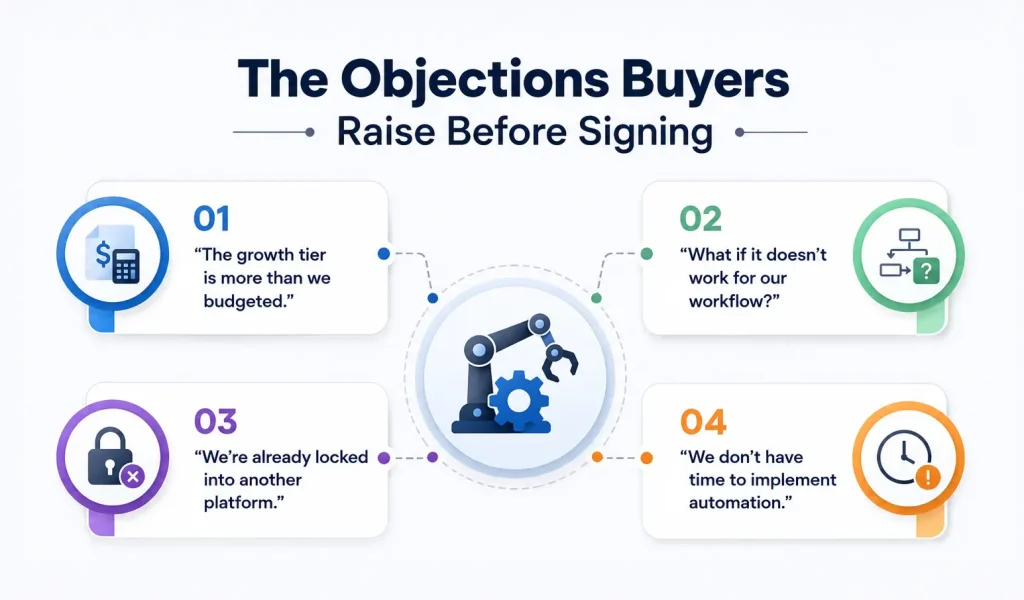
1. “The growth tier is more than we budgeted.”
Start with your actual process economics. Calculate the hours spent, cost of errors, transaction volume, and potential capacity released. If the numbers do not support an acceptable payback period, a smaller implementation may be the better starting point.
The objective is not to buy the most automation. It is to buy the right amount of automation for the economics of your process.
2. “What if it doesn’t work for our workflow?”
This is where measurable success criteria matter. Rather than relying on a generic demonstration, define the expected reduction in processing time, manual effort, errors, or exceptions before implementation.
A performance-based evaluation gives both sides a clearer definition of success.
3. “We’re already locked into another platform.”
Switching costs belong in the automation cost benefit analysis too. Include remaining contract commitments, migration effort, retraining, integration work, and the expected benefits of switching.
A platform that looks cheaper on paper may not be cheaper once you include migration costs.
4. We don’t have time to implement automation.”
Implementation time is itself a cost. If a process can be automated in days rather than months, the organisation begins realising value sooner. Conversely, highly customised enterprise deployments may require more planning, as they involve multiple systems, workflows, and stakeholders.
The important metric is therefore not simply implementation cost. It is time to value.
Run Your Own Automation Cost Benefit Analysis
Before booking another generic automation demo, run the numbers against your own process.
Start with four inputs:
1. Manual effort
How many hours per week does the process consume?
2. Labour cost
What is the fully loaded hourly cost of the employees involved?
3. Error cost
How often do mistakes occur, and what does each one cost to resolve?
4. Business impact
What financial value comes from faster turnaround, improved customer experience, or increased capacity?
Then compare that value against the complete first-year investment:
Platform + implementation + integration + training + internal change-management effort
From there, calculate:
Annual Value = Labour Capacity + Error Avoidance + Revenue Protected
ROI = (Annual Value − Year 1 Cost) ÷ Year 1 Cost × 100
Payback Period = Year 1 Cost ÷ Monthly Value
If your projected payback is attractive, you have a business case worth taking forward. If it is not, that is valuable information too. You may need a lower-cost starting point, a higher-volume process, or a different automation strategy.
The Bottom Line: Automation Should Earn Its Place in the Budget
The strongest automation decisions are not based on promises that automation is ‘the future.’ They are based on numbers that make sense for your business.
A process consuming 40 hours a week may justify automation immediately. A process that consumes five hours a week may not justify automation. A complex enterprise workflow may require a larger upfront investment but generate significantly more value over time.
That is why the automation cost benefit should be evaluated at the process level, not through generic ROI claims.
The best vendor conversation is not “Which automation package should we buy?”
It is “Here is what our process costs today. Show us what changes after automation, what it will cost to get there, and how quickly we recover the investment.”
If the numbers work, automation becomes more than a technology purchase. It becomes a measurable business investment.
And if the numbers do not work yet, the right answer may simply be not yet.
That is what a useful automation business case should tell you.