








Finance teams looking to reduce manual invoice processing usually face an important decision: should they buy an AP automation platform or work with an implementation partner to build automation around their existing systems? Understanding AP automation software vs implementation is critical because the right approach depends on how complex your accounts payable outsourcing process actually is.
AP automation software can quickly automate invoice capture, approvals, matching, reporting, and other standard workflows. But when finance teams operate across multiple entities, legacy ERP systems, custom approval rules, or highly variable invoice formats, a pre-built platform may not cover every requirement.
That is where implementation services become relevant.
The choice between AP automation software vs services is not simply a question of buying software versus hiring consultants. It is about understanding what your AP process requires, what your existing technology can support, and how much customization your finance team needs.
For some organizations, software is enough. Others need AP automation implementation services to connect systems, build custom workflows, and automate exceptions. Many larger finance organizations ultimately use both.
The Two Paths to AP Automation
There are two common paths finance teams can take when automating accounts payable.
Path 1: Buy AP automation software
Finance teams can purchase a pre-built AP automation platform from providers such as Corpay, Stampli, Bill.com, or Medius. These platforms provide ready-made functionality for invoice capture, data extraction, approvals, matching, payments, reporting, and related AP activities, helping organizations build a stronger AP automation business case around efficiency, cost savings, and process visibility.
The main advantage is speed. Instead of building an automation framework from scratch, the finance team configures an existing platform around its processes.
Path 2: Hire an implementation partner
The second option is to work with an implementation partner that builds automation around the company’s existing ERP, RPA platform, document-processing technology, and finance workflows.
This approach can support custom AP automation for organizations with requirements that do not fit neatly into a standard software workflow.
The distinction matters because many finance teams initially assume that buying software automatically solves AP automation. It may solve the standard 80% of the process, but complex ERP integration, custom approval workflows, multi-entity structures, and unusual invoice formats can require additional technical work.
The right decision depends on three major factors:
- AP process complexity
- ERP and technology environment
- Level of customization required
Before making the decision, finance leaders should evaluate both the capabilities and limitations of each approach.
What AP Automation Software Does Well
AP automation software handles several routine accounts payable tasks efficiently, especially when the finance process follows standard workflows. The main capabilities include:
- Invoice capture and OCR: Extracts key data from invoices, such as vendor details, invoice numbers, dates, and amounts, reducing manual data entry.
- Basic approval routing: Automatically routes invoices to the appropriate approvers based on predefined approval rules.
- Supplier portal: Gives vendors a way to submit invoices online, making invoice submission more organized and reducing manual intake.
- Standard ERP integrations: Connects with commonly used ERP and accounting systems such as QuickBooks, NetSuite, and SAP through out-of-the-box integrations.
- Dashboard and reporting: Provides dashboards and reports that help finance teams monitor invoices, approvals, processing status, and other AP activity.
- Best for: AP automation software works particularly well for simple AP processes, a single ERP, standard approval workflows, and small-to-mid-size companies that do not require extensive customization.
For teams evaluating different platforms, our guide to the best AP automation software can help compare available options and understand which features to look for.
What AP Automation Software Can’t Do
AP automation software can handle many standard accounts payable tasks, but it can have limitations when finance teams operate with complex processes, multiple entities, or non-standard systems. This is where AP automation software vs implementation becomes an important consideration.
- Complex ERP integrations: Out-of-the-box integrations may not be enough for legacy SAP environments, custom Oracle configurations, or Sage systems with custom fields and processes.
- Unstructured invoice processing: Invoices can come in different formats, languages, layouts, and structures. Standard OCR may not reliably handle every type of invoice, especially when the documents fall outside predefined formats.
- Intercompany reconciliation and matching: Organizations managing multiple entities may need customized reconciliation and matching across entities that standard AP workflows do not fully support.
- Integration with non-standard systems: Custom procurement platforms, legacy document management systems, and other non-standard applications may require additional development rather than a simple software integration.
- Handling exceptions and edge cases: Every AP process has invoices or transactions that do not fit the standard workflow. Software may require manual intervention when these exceptions occur.
When you reach these limitations, there are usually three options:
- Work around the software’s limitations: Teams rely on manual workarounds, which can bring back the manual effort that AP automation was supposed to eliminate.
- Customize the software: Custom development may address specific requirements, but it can become expensive, fragile, and difficult to maintain.
- Hire an implementation partner: An implementation partner can build custom workflows, integrations, and automation around the software to handle requirements that the standard platform cannot support.
What AP Automation Implementation Services Do
AP automation implementation services go beyond configuring a pre-built tool. They allow finance teams to build automation around their specific AP processes, systems, and business requirements. This is particularly useful when standard software cannot handle complex workflows or integrations.
- Build custom invoice capture and processing: Develop invoice capture and processing workflows designed around your specific invoice formats, data requirements, and validation rules.
- Integrate with any ERP: Connect AP automation with legacy, custom, or multi-ERP environments, including systems that do not have straightforward out-of-the-box integrations.
- Create custom approval workflows: Build approval workflows using your exact business rules, including multi-entity structures, multiple cost centers, and threshold-based approvals.
- Handle unstructured invoices with AI-powered document processing: Use AI-powered document processing to extract and process information from invoices with different layouts, formats, and structures.
- Automate exception handling and escalation: Identify invoices that do not follow standard rules and automatically route exceptions to the appropriate team or approver for resolution.
- Build reconciliation automation alongside AP: Extend automation beyond invoice processing by connecting AP workflows with reconciliation processes, reducing manual matching and validation.
- Integrate with your existing RPA platform: Connect the automation with existing RPA platforms such as UiPath and Power Automate, allowing finance teams to build on their current automation environment rather than replacing it.
A real-world AP automation case study demonstrates what this approach can achieve. In a vendor invoice processing project, Auxiliobits used LangGraph agents and Gemini 2.5 Flash across 14 entities, reducing invoice reconciliation time from 4.2 days to 18 hours. This shows how custom implementation can address requirements that standard AP software may not handle on its own.
Comparison: Software vs. Implementation
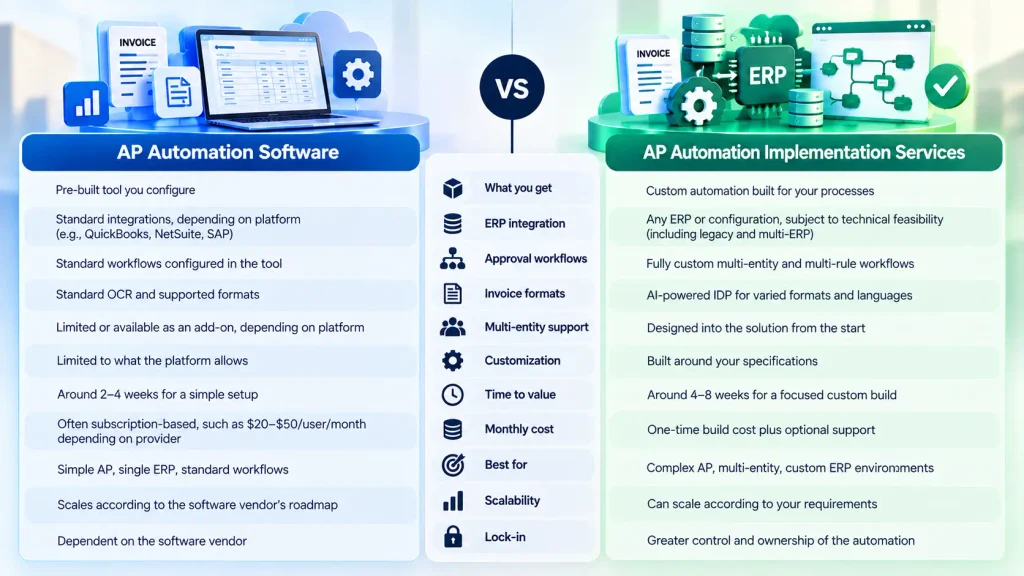
The difference between AP automation software and implementation becomes clearer when the two approaches are compared across capabilities, cost, timeline, and ownership
| Dimension | AP Automation Software | AP Automation Implementation |
| What you get | Pre-built tool you configure | Custom automation built for your processes |
| ERP integration | Standard integrations, depending on platform | Any ERP or configuration, subject to technical feasibility |
| Approval workflows | Standard workflows configured in the tool | Fully custom multi-entity and multi-rule workflows |
| Invoice formats | Standard OCR and supported formats | AI-powered IDP for varied formats and languages |
| Multi-entity support | Limited or available as an add-on, depending on platform | Designed into the solution from the start |
| Customization | Limited to what the platform allows | Built around your specifications |
| Time to value | Around 2–4 weeks for a simple setup | Around 4–8 weeks for a focused custom build |
| Monthly cost | Often subscription-based, such as 20–50/user/month depending on provider | One-time build cost plus optional support |
| Best for | Simple AP, single ERP, standard workflows | Complex AP, multi-entity, custom ERP environments |
| Scalability | Scales according to the software vendor’s roadmap | Can scale according to your requirements |
| Lock-in | Dependent on the software vendor | Greater control and ownership of the automation |
The biggest difference is what you are buying. With software, you are buying access to a platform that already exists. Your team configures that platform around its AP process.
With implementation, you are paying for technical execution. The automation is designed, developed, integrated, tested, and deployed around your specific requirements.
Cost and timeline also work differently.
Software may have a lower initial setup cost but creates an ongoing subscription expense. Implementation may require a larger upfront investment but can provide a solution tailored to the organization’s environment.
Neither approach is automatically better for every finance team.
A small company with one ERP and standardized invoices may gain little from a highly customized implementation. Conversely, a global organization with 14 entities, multiple ERP environments, and complex approval rules may struggle if it tries to force every requirement into a standard software workflow.
The AP automation software vs services decision should therefore be based on process fit rather than simply comparing subscription price with implementation cost.
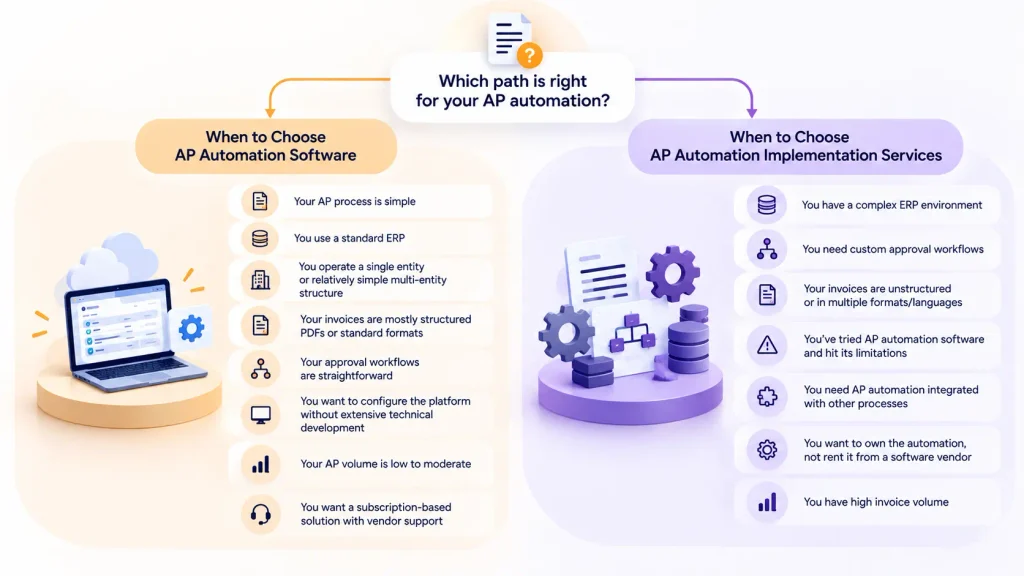
When to Choose AP Automation Software
AP automation software is generally a practical starting point when the underlying AP process is relatively straightforward.
Consider software when your process looks something like this:
Invoice received → invoice captured → approval routed → invoice matched → payment processed.
You may be a good candidate for software if:
- Your AP process is simple
- You use a standard ERP
- You operate a single entity or relatively simple multi-entity structure
- Your invoices are mostly structured PDFs or standard formats
- Your approval workflows are straightforward
- You want to configure the platform without extensive technical development
- Your AP volume is low to moderate
- You want a subscription-based solution with vendor support
Invoice volume is also important. If you process fewer than approximately 5,000 invoices per month and the workflows are relatively standardized, a pre-built platform may provide sufficient functionality.
The key is to evaluate the process before purchasing the best AP automation software. Look at your invoice formats, approval rules, ERP configuration, exception rate, matching requirements, and integration needs.
Do not choose a platform simply because it has a long feature list. A tool may have excellent OCR and approval capabilities but still be a poor fit if it cannot integrate with the ERP configuration your finance team actually uses.
Finance teams comparing platforms should also review the [best AP automation software] available and evaluate each option against their own process requirements. For organizations with standard requirements, software can provide a faster path from manual AP to automated invoice processing.
When to Choose AP Automation Implementation Services
AP automation implementation services are a better fit when your accounts payable environment requires more customization, integration, and control than a standard software platform can provide. Consider implementation services when:
- You have a complex ERP environment: Your finance team works with legacy SAP, custom Oracle configurations, or multiple ERP systems that require customized integrations.
- You need custom approval workflows: Your organization requires approval rules based on multiple entities, cost centers, departments, or invoice amount thresholds.
- Your invoices are unstructured or in multiple formats/languages: Standard OCR may not consistently process invoices with different layouts, document structures, or languages.
- You’ve tried AP automation software and hit its limitations: If your existing software cannot support your workflows, integrations, or exception-handling requirements, custom implementation can address those gaps.
- You need AP automation integrated with other processes: If AP needs to connect with reconciliation, financial close, procurement, or other finance workflows, implementation services can build these connections.
- You want to own the automation, not rent it from a software vendor: Custom automation gives your organization greater control over how the workflows are built, maintained, and expanded.
- You have high invoice volume: Processing 5,000+ invoices per month can make customized automation valuable, particularly when manual exceptions and complex workflows create significant operational effort.
If your requirements match these scenarios, explore AP automation implementation services or learn how broader invoice automation can streamline the complete invoice processing workflow.
When You Need Both
For many finance teams, the choice is not actually software or implementation. It is software and implementation. A hybrid model allows the finance organization to use a pre-built AP platform for standard invoices while using implementation services for processes that require additional customization.
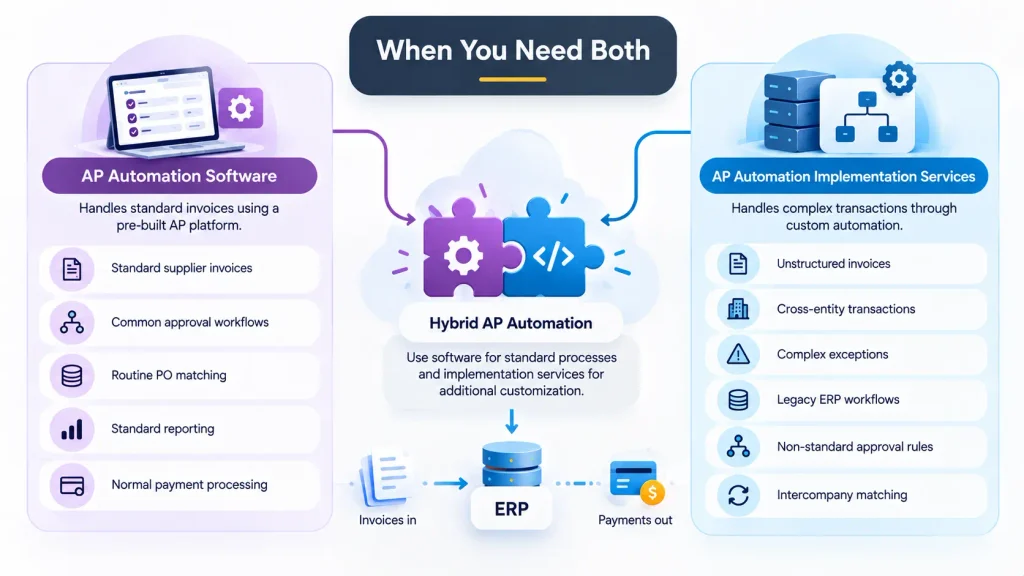
For example, software could handle the majority of standard invoices:
- Standard supplier invoices
- Common approval workflows
- Routine PO matching
- Standard reporting
- Normal payment processing
The remaining complex transactions can be handled through custom automation.
These might include:
- Unstructured invoices
- Cross-entity transactions
- Complex exceptions
- Legacy ERP workflows
- Non-standard approval rules
- Intercompany matching
In this model, software handles the predictable 80%, while custom implementation addresses the 20% that requires more sophisticated automation. This can create a practical balance between speed and flexibility.
The implementation partner can also integrate the software with the organization’s ERP and other finance systems while building workflows that the standard platform does not provide. This is where the AP automation tool vs implementation partner distinction becomes less about choosing one and more about defining responsibilities. The software is the platform. The implementation partner is the technical execution layer.
For finance teams that already have multiple automation technologies, the partner can also create automation that works alongside existing systems instead of replacing everything.
Auxiliobits describes this broader approach through intelligent enterprise automation, where AI, RPA, workflows, and enterprise systems can work together across processes. A hybrid approach can therefore provide the speed of a pre-built product while retaining the flexibility needed for complex finance operations.
Cost Comparison: Software vs. Implementation
Cost is one of the first questions finance leaders ask when comparing AP automation software with implementation services. A software platform may charge approximately 20–50 per user per month, depending on the vendor, functionality, transaction volume, and licensing model.
Implementation services typically involve a one-time build cost. A focused implementation may fall around 15K–50K per process, with optional support costs of approximately 2K–5K per month depending on the scope.
These numbers should be treated as planning ranges rather than universal market prices. Actual pricing depends heavily on invoice volume, ERP complexity, integrations, number of entities, workflow requirements, technology stack, and provider.
For example, 10 users paying $30 per month would represent $3,600 in annual software subscription costs. A $30,000 implementation would therefore have a simple subscription-cost comparison that stretches over several years.
But that calculation misses the central question.
The real issue is not simply: Which option costs less?
It is: Can the solution actually automate the AP process we have?
A cheaper platform that cannot handle critical ERP integrations or approval rules may create manual workarounds that reduce the expected savings.
Finance teams should therefore build a complete automation ROI model that includes software, implementation, support, internal labor, exception handling, integration costs, and expected efficiency gains.
The best comparison is total cost to production—not simply the price on the software proposal.
Ready to Automate AP the Right Way?
Choosing between software and implementation should start with an honest assessment of your existing AP process. Before committing to a platform or development project, identify your invoice volumes, ERP environment, approval complexity, exception rates, invoice formats, entity structure, and integration requirements.
The goal is not to buy the most features or build the most complicated automation. It is to create an AP process that reduces manual work, integrates with your existing finance environment, handles exceptions effectively, and produces measurable results.
If you’re unsure where your organization stands, start with the AP Efficiency Assessment. You can also book a discovery call to discuss your AP automation options and determine whether software, implementation services, or a combination of both is the right fit for your finance team.