






Key Takeaways
- Procure-to-pay automation eliminates disconnected manual activities across procurement and accounts payable by creating a unified, end-to-end workflow from requisition through payment.
- The biggest inefficiencies in P2P processes come from manual document handling, approval bottlenecks, exception management, and three-way matching activities that consume significant finance resources.
- True P2P automation goes beyond invoice capture and approval routing; it connects purchasing, receiving, invoicing, matching, approvals, payments, and reconciliation into a single automated process.
- Organizations achieve the greatest business value when they progress beyond basic digitization and workflow automation toward intelligent matching, AI-driven decision support, and strategic financial optimization.
- Successful P2P automation initiatives depend as much on process ownership, vendor data quality, supplier adoption, and exception management as they do on technology selection.
Here’s a scenario that plays out in finance teams every single week:
An invoice arrives. Someone emails it to AP. AP manually keys the data into the ERP. A matching specialist pulls up the PO in another tab, the GR in a third, and begins comparing line items. Something doesn’t match; maybe $47 off on shipping. An email goes out to the vendor. The vendor replies four days later. The invoice sits in a queue. Meanwhile, a 2/10 net 30 discount quietly expires.
Total time spent: two to three hours across four people. Total value of the work: negative.
This isn’t a staffing problem. It’s an architecture problem. And procure-to-pay automation is the fix, but only if you understand what it actually does, where it breaks down, and how to evaluate whether a platform will solve your specific version of this problem.
Procure-to-pay (P2P) is the end-to-end procurement process that takes an organization from requisition through purchasing, receiving, invoice processing, and payment. Unlike source-to-pay, which adds sourcing and contracting before procurement begins, procurement automation focuses on streamlining the procurement process from purchase requisition to final payment.
That’s what this guide is for.
First: Let’s Agree on What the Problem Actually Is
Most content about P2P automation starts with a process definition. We’ll get there. But it’s worth naming the more profound problem first, because it shapes everything that follows.
The procure-to-pay process fails organizations for three structural reasons, and they compound each other:
It spans a seam. P2P crosses the boundary between procurement and accounts payable, two functions with different incentives, different systems, and historically, different floors of the office. Neither owns the end-to-end process, so neither is accountable for it.
It runs on documents, not data. POs are PDFs. Invoices are PDFs. Goods receipts are paper forms or email confirmations. Every step in the process involves converting an unstructured document back into structured data, and humans have been doing that conversion manually for decades.
It’s invisible until it breaks. When P2P works, nobody notices. When it fails—late payments, duplicate invoices, missed discounts, or vendor disputes—it surfaces as a fire that finance has to put out, not as evidence that the underlying process needs redesigning.
Procure-to-pay automation addresses all three. It creates a single system of record that spans the procurement-AP seam, converts documents to structured data at the point of entry, and provides continuous visibility into the entire process, before problems become fires.
The P2P Process
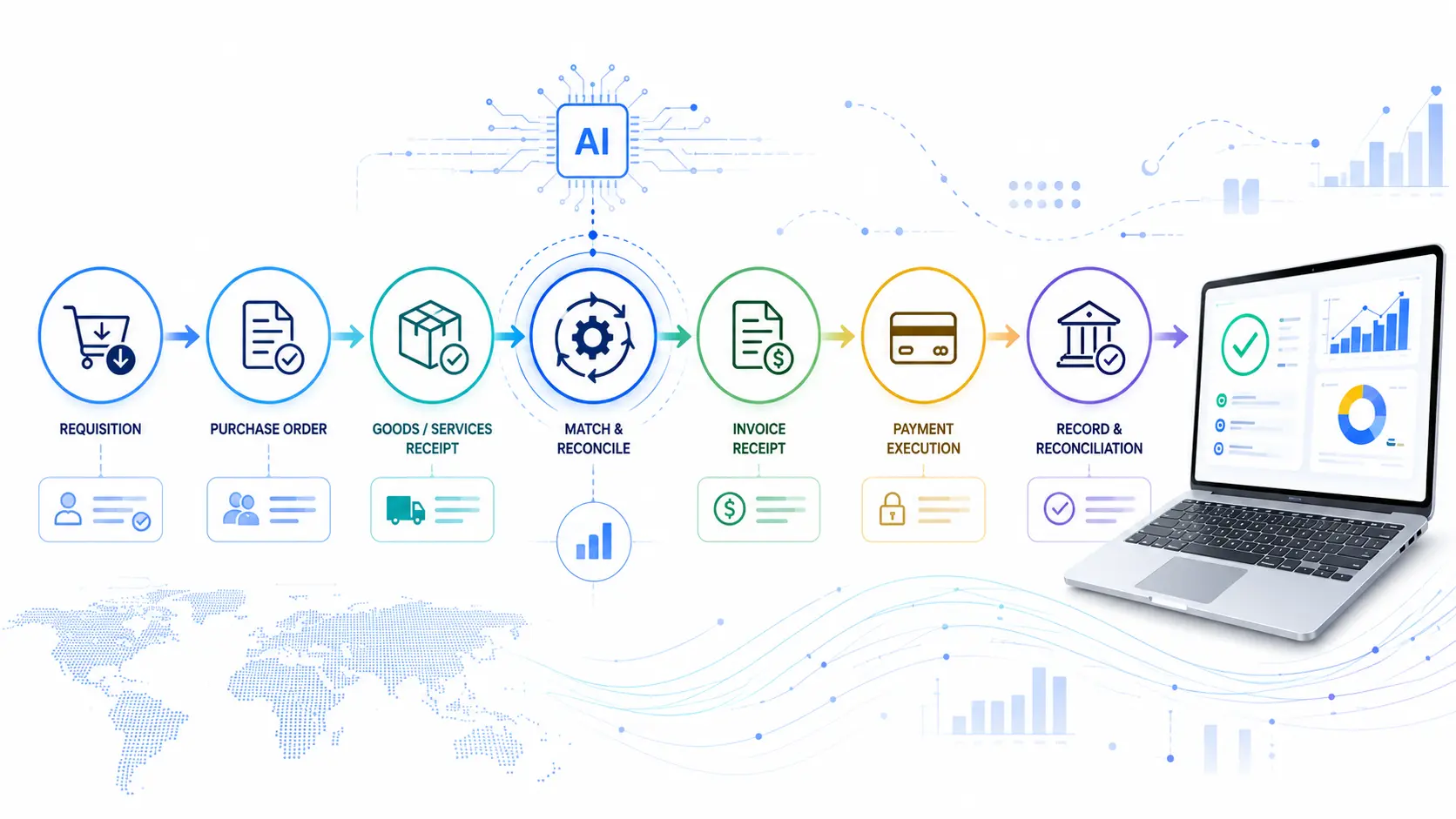
Let’s define the full cycle, but with an honest annotation of where the real failure points are. Most process diagrams make P2P look linear and rational. The reality is messier.
1. Purchase Requisition → Employee identifies a need and submits a request. The failure mode: requests happen via email or Slack instead, creating shadow purchasing that bypasses controls entirely.
2. Purchase Order Creation → Procurement approves and issues a PO to the supplier. The failure mode: POs are created after the fact, retroactively justifying purchases that already happened.
3. Goods/Services Receipt → Receiving confirms delivery. The failure mode: services have no tangible delivery moment, so GRs are often skipped or approximated, breaking downstream matching.
4. Invoice Receipt → Supplier sends an invoice. The failure mode: invoices arrive via seven different channels simultaneously , email, portal, fax, mail, and EDI , each requiring different handling.
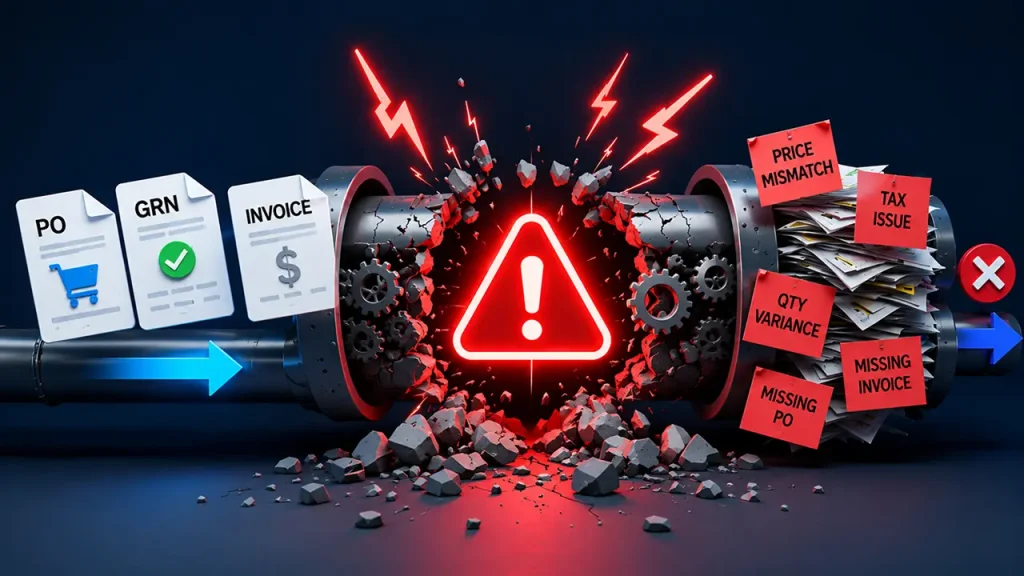
5. Three-Way Matching → Finance matches PO, GR, and invoice. The failure mode, which is done manually, is extremely error-prone and occupies a disproportionate share of AP capacity.
6. Approval Routing → Invoice reviewed by relevant stakeholders. The failure mode: approvers are out of the office, approval chains are not documented, and invoices sit in inboxes.
7. Payment Execution → Finance schedules and pays. The failure mode: payment timing is reactive rather than strategic, and early payment discounts are consistently missed.
8. Reconciliation → Transactions posted and closed. The failure mode: reconciliation lags lead to month-end crunches and reduced financial visibility.
The honest observation is that most organizations have automated one or two of these steps in isolation and called it “digital transformation.” What they haven’t done is connect the steps into a coherent, end-to-end system. That’s the actual definition of procure-to-pay automation.
The 7 Steps of the Procure-to-Pay Process
While organizations may break the P2P cycle into more or fewer stages depending on their operating model, the core process can be summarized into seven connected steps:
| Step | What happens | Common manual pain point |
| 1. Requisition | The employee identifies a need and submits a purchase request. | Paper forms, email approvals, and no real-time budget check |
| 2. Approval | The manager or designated approver reviews and approves or rejects the request. | Bottlenecks, no delegation, and inconsistent policy enforcement |
| 3. Purchase Order | An approved requisition is converted into a PO and sent to the supplier. | Manual data entry, PO errors, and maverick buying |
| 4. Goods/Services Receipt | The supplier delivers goods or services, and the organization records the receipt. | Missing documentation, delayed receipts, and no reliable link back to the PO |
| 5. Invoice Receipt | The supplier submits an invoice for the goods or services provided. | Paper invoices, manual data entry, fragmented channels, and lost invoices |
| 6. Three-Way Matching | PO, goods/services receipt, and invoice are compared to validate the transaction. | One of the most labor-intensive steps, with high error rates when performed manually |
| 7. Payment | The approved invoice is scheduled and paid to the supplier. | Late payments, missed early-payment discounts, and duplicate payments |
The important point is that these steps aren’t independent. A failure early in the process creates downstream work. A requisition that bypasses approval can become a non-PO invoice. A missing goods receipt can prevent an otherwise valid invoice from being matched. A matching exception can delay payment and trigger supplier queries.
That interconnectedness is why effective procurement automation cannot be limited to automating invoice data entry or individual approval workflows. The objective is to connect the entire procurement process, from requisition through payment, so that data, controls, approvals, and exceptions flow across each stage without unnecessary human intervention.
What Procure-to-Pay Automation Actually Does
Procure-to-pay automation is the application of software, and increasingly, AI, to digitize every step above, connect them into a single workflow, and shift human attention from data processing to exception handling and decision-making.
The key word is connect. Point solutions that automate invoice capture without connecting to the PO system, or workflow tools that route approvals without matching to the GR, create the illusion of automation while leaving the most expensive work manual. Real P2P automation means the system can trace every invoice back to a requisition and forward it to a payment without human intervention, unless something genuinely requires a human call.
In practice, this means automation can support each stage of the cycle:
- Purchase order automation: Automatically converts approved requisitions into purchase orders, applies purchasing rules, and routes POs to suppliers without repetitive manual entry.
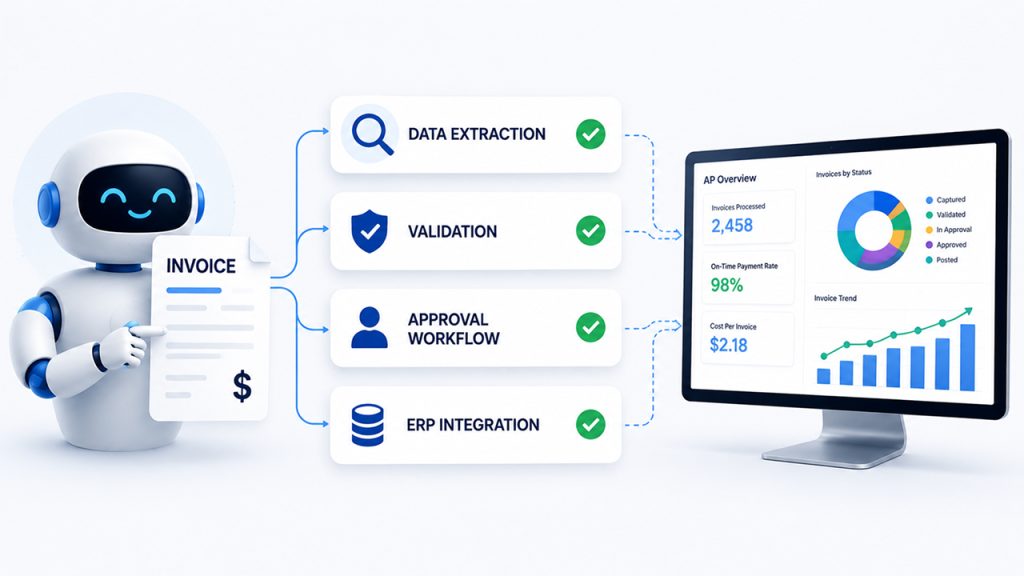
- Invoice automation: Captures invoice data from email, portals, EDI, and other channels, validates the information, and connects invoices to the relevant PO and receipt.
- Approval workflow: Automatically routes requisitions and invoices to the right approvers based on spend thresholds, departments, policies, and other business rules.
- Three-way matching: Compares the PO, goods/services receipt, and invoice to identify discrepancies and automatically clear invoices that meet predefined tolerances.
- Payment automation: Moves approved invoices into the payment process, schedules payments based on due dates and business rules, and helps capture eligible early-payment discounts.
That distinction matters enormously when evaluating vendors. Point solutions that automate only one stage can reduce manual effort at that stage, but they leave the broader process fragmented. Effective P2P automation connects these capabilities so that data and decisions flow across the entire cycle, with humans stepping in primarily when an exception, judgment call, or policy decision genuinely requires their attention.
The goal isn’t simply to automate more tasks. It’s to create an end-to-end process where a purchase request can move from requisition to purchase order, receipt, invoice validation, approval, and payment with minimal friction, while maintaining the controls, visibility, and auditability finance teams need.
Introducing the procure-to-pay automation maturity stack
Not all procure-to-pay automation is equal. Organizations implement automation at different depths, and the business outcomes vary significantly depending on how far down the stack they go.
We think about this as the P2P Automation Maturity Stack, five levels that describe how deeply automation is embedded in the process, from basic digitization to systems that actively support financial decision-making.
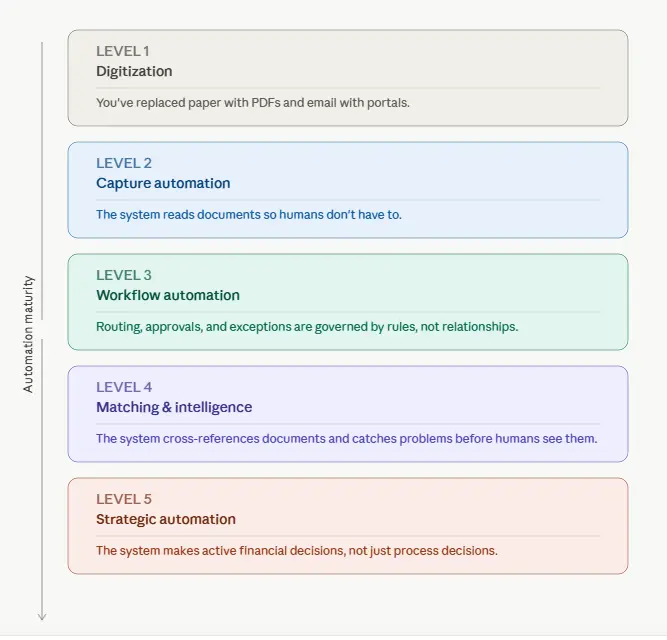
Level 1—Digitization
You’ve replaced paper with PDFs and email with portals. Most digitization initiatives start with ERP integration, connecting procurement and AP processes to the organization’s core financial system.
Invoices arrive electronically. Approvals go via email chains. Data is still manually keyed into the ERP. Most organizations think they’re automated at this level. They’re not; they’ve just moved the same manual work into a digital container. The process is digital, but the underlying work remains largely manual.
Level 2—Capture Automation
The system reads documents so humans don’t have to. OCR and AI extract invoice data automatically, eliminating manual entry and creating the foundation for invoice automation. At this stage, organizations may also introduce purchase order automation to create, route, and process POs with less manual intervention.
This is where most mid-market automation investments start. It reduces AP processing costs meaningfully and cuts error rates, but it doesn’t address the broader workflow, approval, or matching problems. The organization has automated data capture, but people still manage many of the decisions and downstream steps.
Level 3—Workflow Automation
Invoices flow through an automated approval workflow based on amount, category, vendor, department, or other business rules. Invoice automation ensures exceptions are automatically routed to the right person with relevant context attached, while purchase orders, invoices, and supporting documentation move through predefined workflows rather than sitting in inboxes waiting for someone to remember they exist. Purchase order automation also helps enforce approval policies and keep purchasing activity aligned with business rules.
This is where cycle time drops dramatically. Automation shifts from simply capturing information to coordinating the work around it, creating a more consistent and scalable P2P process.
Level 4—Matching & Intelligence
The system cross-references documents and catches problems before humans see them.
Automated three-way matching, or invoice matching, compares invoices against purchase orders and goods receipts to identify discrepancies before payment. AI-driven matching and intelligent exception handling are among the capabilities enabled by AI automation services, helping the system flag anomalies, predict GL coding, identify duplicate invoices, and surface discrepancy context for faster resolution.
Combined with payment automation, validated invoices can move from approval to payment with minimal manual intervention, reducing delays and payment errors.
Straight-through processing rates climb as fewer invoices require human intervention. This is the level at which automation starts creating material financial impact, not just operational efficiency. The system is no longer simply moving documents through a process; it is actively validating transactions and making routine decisions.
Level 5—Strategic Automation
The system makes active financial decisions, not just process decisions.
At the highest level, P2P automation extends beyond transaction processing into financial strategy. Dynamic discounting, predictive cash flow, supplier risk signals, spend analytics, and payment automation allow the system to determine not only how a transaction should be processed but also when and how it should be paid.
The P2P system becomes a source of financial intelligence rather than just a processing engine. Payment decisions can incorporate cash position, supplier terms, discount opportunities, risk signals, and other financial considerations.
Most organizations aren’t here yet. Those that have reached this level can use automation to improve working capital, strengthen supplier relationships, and make faster, more informed financial decisions.
Most mid-market organizations operate between Levels 1 and 2. The ROI case for reaching Level 4 is significant because this stage is where invoice matching, intelligent exception handling, and higher straight-through processing begin to materially affect cost and cash flow. Level 5 is where category leaders are headed, toward P2P operations that continuously optimize financial outcomes rather than simply automate transactions.
P2P Automation ROI: Benchmarks for Finance Teams
The business case for procure-to-pay automation becomes clearer when finance teams translate automation maturity into measurable operating outcomes. The benchmarks below provide a practical range for comparing a predominantly manual P2P environment with a mature, highly automated operation. Actual results will vary based on invoice volume, ERP complexity, supplier mix, PO coverage, exception rates, and the level of automation implemented. For more insight, see our P2P automation ROI guide.
Beyond processing efficiency, mature P2P automation can also improve spend visibility by connecting purchasing, supplier, invoice, and payment data across the process. This gives finance and procurement teams a clearer view of where money is being spent, which suppliers are receiving, and where opportunities exist to control costs or improve purchasing decisions. For a deeper look at how automation can improve spend visibility and turn fragmented transaction data into actionable insights, see Auxiliobits’ spend analytics guide.
| Metric | Manual P2P | Automated P2P | Improvement |
| Invoice processing cost | $8–15 per invoice | $1–3 per invoice | 70–80% reduction |
| Invoice cycle time | 10–15 days | 2–3 days | ~75% faster |
| Touchless rate | 10–20% | 60–80% | 3–4x improvement |
| Three-way match rate | 60–70% | 95%+ | 25–35% improvement |
| Early payment discounts captured | 20–30% | 80%+ | 2–3x more savings |
| Duplicate payment rate | 0.5–1% of spend | <0.1% | ~90% reduction |
| FTE hours per 1,000 invoices | 40–60 hours | 5–10 hours | 80–85% reduction |
These benchmarks illustrate why the ROI from P2P automation extends well beyond reducing data-entry effort. Industry research consistently identifies invoice processing cost and cycle time as core measures of AP performance. Ardent Partners’ research, for example, tracks cost per invoice, invoice cycle time, straight-through processing, match rates, and early-payment discount capture as key P2P and AP metrics. Its recent benchmark data puts average invoice processing cost at approximately $9.84 and average processing time at 8.2 days, while best-in-class organizations achieve substantially better performance.
The economics become more compelling as automation moves beyond document capture into matching, workflow, exception handling, and payment processes. Hypatos reports a benchmark range of $8–15 for fully loaded manual AP processing versus $1–3 at high automation rates, while mature environments can achieve significantly higher touchless processing rates. Faster processing also creates value that does not appear in a simple cost-per-invoice calculation: finance teams have more time to capture early-payment discounts, reduce duplicate payments, improve controls, and increase spend visibility across the P2P lifecycle.
The same pattern appears in Auxiliobits‘ client outcomes. Across its finance and AP automation engagements, Auxiliobits reports 40–60% reductions in manual effort, $200K+ in annual savings from vendor invoice automation for a large marketing network, and 9,700 hours reclaimed annually through automation. These results demonstrate how P2P automation can translate operational efficiency into measurable cost savings, rather than simply replacing one manual interface with another.
For finance leaders building an automation business case, the important question is therefore not simply “How much does automation cost?” but “How far can we move each P2P metric from its current baseline?” A Level 2 capture solution may reduce data-entry costs, while Levels 3 and 4 can materially improve cycle time, touchless processing, invoice matching, and exception rates. At Level 5, payment automation and financial intelligence can extend the value into working capital optimization and supplier strategy.
How to Implement Procure-to-Pay Automation in 7 Steps
P2P automation works best as a phased transformation rather than a technology replacement project. The objective is not to automate every activity at once, but to identify where manual work creates the greatest cost, delay, and control risk, then build automation progressively around the existing ERP and procurement ecosystem. A structured business automation consulting approach can help organizations analyze existing processes, prioritize high-value automation opportunities, and establish a practical roadmap before implementation begins.
1. Map your current P2P process
Document every step from requisition through purchase order, receipt, invoice, approval, matching, and payment. Identify where employees manually enter data, chase approvals, reconcile documents, resolve exceptions, or move information between systems.
The goal is to establish a baseline before introducing automation. Measure invoice cycle time, touchpoints per transaction, exception volume, manual hours, and current approval bottlenecks. Automating a poorly understood process can simply make existing inefficiencies harder to see.
2. Audit your data sources
Create an inventory of the systems that participate in the P2P process, including your ERP, AP system, procurement platform, supplier portal, and expense tools. Document what data each system owns, how information moves between them, and where duplicate or inconsistent records exist.
This step is particularly important because P2P automation rarely operates within a single application. Modern P2P environments typically connect ERP, procurement, AP, supplier, and payment systems, making data and integration architecture critical to the implementation.
3. Choose your ERP integration approach
Define your ERP integration strategy before selecting or configuring automation technology. An API-first approach is generally appropriate where the ERP exposes reliable APIs and integration capabilities. RPA can be useful where legacy applications lack suitable APIs or where automation needs to interact with existing interfaces. A hybrid approach combines APIs for core data exchange with RPA for processes that cannot be integrated cleanly through APIs.
The right architecture depends on your ERP environment, including platforms such as SAP, Oracle, NetSuite, and Microsoft Dynamics. The objective is to keep the ERP as the system of record while allowing automation to orchestrate processes across procurement, AP, supplier, and payment systems.
4. Start with invoice capture and matching
Begin with one of the most labor-intensive parts of P2P: invoice processing. Automate invoice capture and data extraction, then introduce two-way or three-way matching against purchase orders and receipts.
This creates an immediate foundation for invoice automation while reducing manual data entry and accelerating exception identification. Once the basic flow is stable, expand automation to handle coding, duplicate detection, validation, and increasingly complex exceptions. Automated matching is a core component of modern P2P workflows because invoices can be validated against purchase orders and receipts before payment.
5. Automate approval workflows
Move approvals from email chains and manual follow-ups into a rules-based workflow. Configure routing based on factors such as spend amount, department, category, vendor, cost center, and purchasing policy.
Build delegation rules and escalation paths into the process so invoices do not stall when an approver is unavailable. This creates an auditable approval workflow that makes ownership visible and applies policies consistently. Modern P2P platforms can combine configurable approval workflows with automatic escalation and delegation to keep transactions moving.
6. Add vendor onboarding and supplier onboarding
Once core transaction workflows are stable, automate vendor onboarding and supplier onboarding to strengthen the upstream side of P2P. Standardize supplier data collection, validate tax and banking information, check required documentation, and route new suppliers through the appropriate approval and compliance checks.
Automating onboarding also improves downstream automation because cleaner supplier master data reduces invoice exceptions, duplicate vendor records, and payment errors. Supplier portals and self-service processes can further reduce the administrative work required to maintain supplier information.
7. Measure and optimize
Treat implementation as an ongoing optimization cycle rather than a one-time deployment. Establish a dashboard that tracks the metrics that matter to finance and procurement, including touchless rate, invoice cycle time, early-payment discount capture, exception rate, matching rate, duplicate payments, and processing cost.
Use these metrics to identify the next automation opportunity. If invoice capture is performing well but exception rates remain high, improve matching and exception handling. If approvals remain the bottleneck, refine routing rules and delegation. When supplier adoption is low, enhancing the supplier onboarding experience is essential.
The most mature P2P environments continuously use operational data to improve automation coverage, control spend, and increase visibility across the procure-to-pay lifecycle.
P2P Automation vs. AP Automation: What’s the Difference?
AP automation and procure-to-pay automation are closely related, but they are not interchangeable. AP automation focuses primarily on the accounts payable side of the process, automating activities from invoice receipt through approval, matching, and payment. For finance teams specifically evaluating the financial impact of AP automation, see our guide on how to build an AP automation business case. P2P automation covers a broader process, beginning with the purchase requisition and extending through purchase order creation, receipt, invoice processing, matching, and payment.
For organizations that primarily need to eliminate manual invoice processing, AP automation can deliver faster time to value and a shorter implementation. For organizations that want to integrate procurement and finance into a single controlled process, P2P automation offers a more comprehensive transformation opportunity. The right starting point depends on where the largest operational bottlenecks and financial risks exist.
| AP Automation | P2P Automation | |
| Scope | Invoice to payment | Requisition to payment |
| Starts at | Invoice receipt | Purchase requisition |
| Includes procurement | No | Yes |
| Includes PO creation | No | Yes |
| Includes three-way matching | Sometimes | Always |
| Implementation time | 6–8 weeks | 10–16 weeks |
| ROI timeline | 3–9 months | 6–12 months |
If the immediate priority is reducing invoice processing costs, improving approval speed, and eliminating manual AP work, AP automation is often the logical first step. Auxiliobits’ AP automation services cover invoice capture, data extraction, matching, approval workflows, exception handling, vendor communication, payment preparation, and audit trails, without requiring organizations to replace their existing ERP.
For finance leaders building the business case, the broader P2P model can deliver additional value by connecting procurement decisions with downstream AP execution. That creates greater control over purchasing, supplier data, matching, approvals, and payments while improving visibility across the entire transaction lifecycle. For a more profound look at the financial case for starting with AP automation, see AP automation business case guide.
The Five Questions That Separate Good P2P Implementations from Great Ones
After working through this evaluation with dozens of finance teams, we’ve found that the difference between a good implementation and a great one usually comes down to five questions asked — or not asked — before the project begins.
1. Who owns P2P end-to-end? If your answer is “procurement owns requisition-to-PO and AP owns invoice-to-payment”, you don’t have an owner; you have a handoff. Designate a single process owner — usually a director of finance operations or equivalent — before implementation begins.
2. What does your vendor master look like right now? Duplicate vendors, missing payment details, and stale records in your ERP become your new system’s problem on day one. Audit and clean your vendor master before migration, not after.
3. How will you handle the suppliers who won’t change? Some suppliers — often your largest or most legacy ones — will resist changing how they submit invoices. What’s your strategy for them? The best platforms have onboarding support built in. The best implementations have a supplier change management plan before go-live.
4. What are your top five exception types today? If you can’t name them, you haven’t mapped your process well enough to configure automation effectively. The best configurations are built around your actual exception patterns, not a vendor’s default templates.
5. How will you measure success at 90 days, 6 months, and 12 months? Define the metrics and targets before go-live, not after. Post-hoc success definitions are how mediocre implementations get declared victories.
Is Your Organization Ready?
The readiness question isn’t really about size or industry. It’s about whether the pain of staying manual exceeds the friction of changing. Here are the honest signals:
You’re ready if:
- AP staff spend more time on data entry than on anything that requires judgment
- You’ve missed early payment discounts in the last 90 days
- Your CFO is working from a cash position that’s more than a week stale
- Your last audit had findings related to invoice controls or approval documentation
- A meaningful percentage of your invoices require some form of rework
You might not be ready yet if:
- Your PO coverage rate is below 60% (garbage in, garbage out — automation can’t three-way match invoices with no PO)
- Your ERP is scheduled for a major upgrade in the next 12 months (timing matters)
- You don’t have a designated process owner willing to lead the change
If you’re in the first group, the question isn’t whether to automate — it’s which platform fits your environment and at what depth.