







Key Takeaways
- Invoice processing automation becomes essential as invoice volumes increase, helping organizations reduce costs, eliminate bottlenecks, and improve payment accuracy.
- Modern automation combines AI-powered data extraction, automated matching, workflow routing, ERP integration, and audit tracking into a single end-to-end process.
- The most important evaluation criteria include touchless processing rates, exception management capabilities, ERP integration depth, supplier onboarding experience, and AI accuracy.
- Successful implementations depend as much on change management, supplier data quality, and phased deployment strategies as they do on technology selection.
- Organizations that implement invoice processing automation effectively often achieve payback within 9–14 months while freeing AP teams to focus on higher-value financial activities.
When your AP team is drowning in thousands of invoices per month, the question isn’t whether to automate — it’s how to do it without disrupting what already works.
If your accounts payable team processes hundreds — or thousands — of invoices each month, you already know the pain points: missed early-payment discounts, frustrated suppliers, approval bottlenecks, and audit trails that are a nightmare to reconstruct.
Invoice processing automation isn’t just a productivity hack. At high volumes, it’s a structural necessity. This guide breaks down how modern automation works, what to look for when evaluating solutions, and what real-world implementations actually look like — including where teams hit unexpected friction.
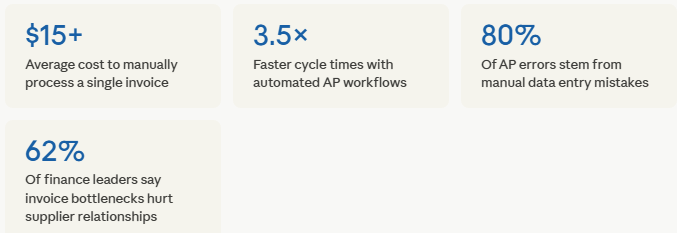
Why manual invoice processing breaks down at scale
The problems that feel manageable at 200 invoices a month become unworkable at 2,000. Manual workflows hit four specific failure modes as volume grows:
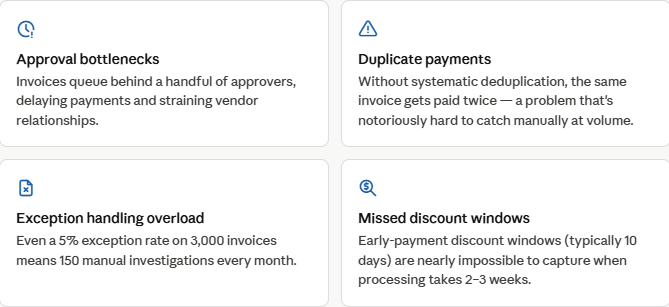
Finance teams that stick with manual processing past the 500 invoices/month threshold typically see their per-invoice cost rise — not fall — because exception handling and error correction consume increasingly more time per processed invoice.
How invoice processing automation actually works
Modern invoice processing automation combines several technologies into a single pipeline. Understanding each layer helps you evaluate vendors and set realistic expectations for what the system will and won’t handle on its own.
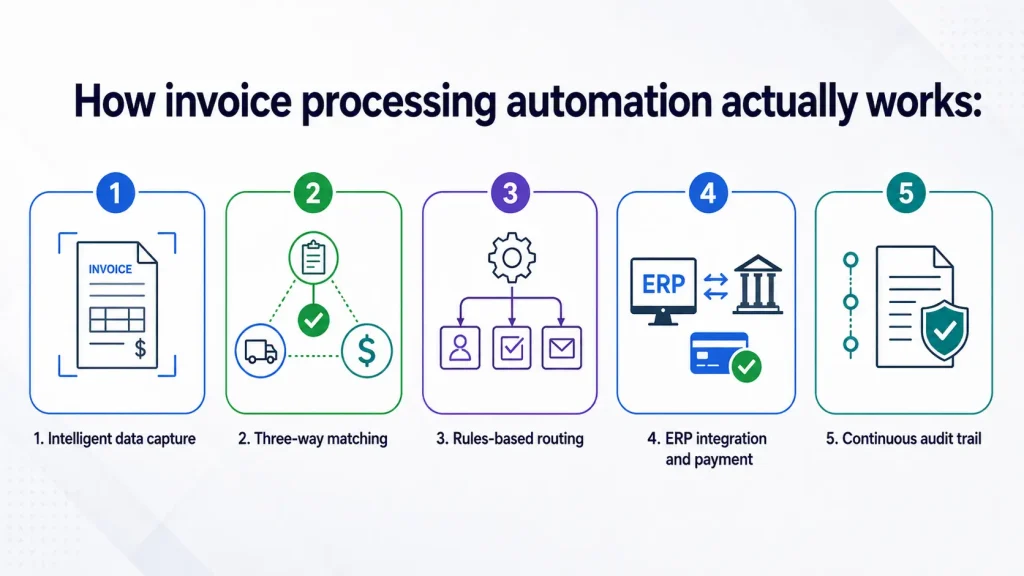
1. Intelligent data capture
Invoices arrive via email, supplier portals, EDI feeds, or scanned PDFs. OCR (optical character recognition), combined with AI-driven extraction, pulls structured data from unstructured documents: vendor name, invoice number, line items, tax, and due date. Modern systems handle formats that vary across hundreds of suppliers without requiring per-supplier templates.
2. Three-way matching
The system automatically matches the invoice against the corresponding purchase order (PO) and goods receipt. Matched invoices move to payment; mismatches are flagged as exceptions with a clear reason code — price variance, quantity mismatch, or missing PO — so reviewers spend time only on genuine discrepancies.
3. Rules-based routing
Approved invoices are routed to the right approver based on configurable rules: invoice amount, department, cost center, vendor category, or GL code. Multi-level approval chains, escalation timers, and delegation settings are managed automatically.
4. ERP integration and payment
Approved invoices post directly to your ERP (SAP, Oracle, NetSuite, Dynamics, etc.) with the correct accounting codes, ready for the payment run. Payment terms are tracked, and early-pay discount opportunities are surfaced proactively.
5. Continuous audit trail
Every action — capture, match, approval, exception, and payment — is logged with a timestamp and user identity. This makes internal audits and external compliance reviews significantly less painful.
Manual vs. automated: a direct comparison
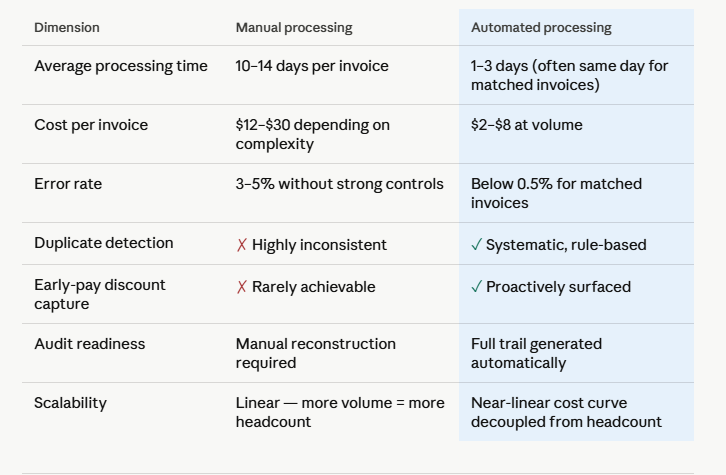
Before committing to any solution, it helps to map out exactly what you’re replacing. The table below compares the two approaches across the dimensions that matter most at high invoice volumes.
What a real implementation looks like
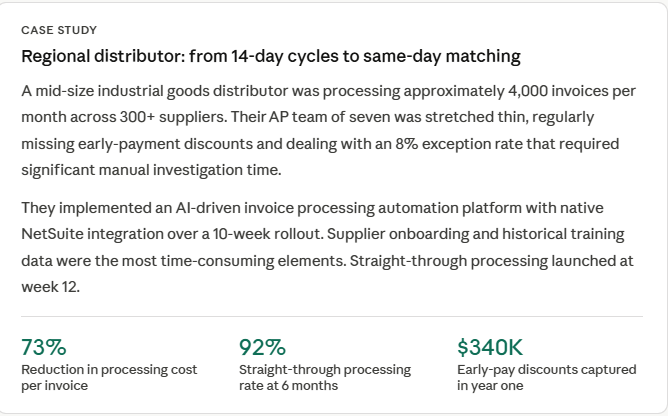
“The ROI calculation was straightforward. What surprised us was how much time we recovered for strategic work — supplier negotiations, cash flow forecasting — things our team was too busy to do before.”
What to evaluate when choosing a solution
The market for invoice processing automation has matured, but solutions vary significantly in how they handle complexity. Here are the evaluation criteria that matter most for high-volume environments:
1. Touchless (straight-through) processing rate
This is the percentage of invoices that move from capture to payment without any human intervention. Vendors often quote headline numbers – ask for the STP rate specifically for your invoice mix (non-PO invoices, multi-currency, and variable formats). Best-in-class systems reach 85–95% STP after a learning period.
2. Exception management workflow
No system eliminates exceptions entirely. What matters is how the platform handles them: clear reason codes, contextual information for the reviewer, easy escalation paths, and SLA tracking. A clunky exception workflow can offset the gains from high STP rates.
3. ERP and procurement stack integration
Native, certified integrations with your ERP matter more than generic API connectivity. A native connector handles field mapping, error handling, and reconciliation logic that you’d otherwise have to build and maintain yourself. Always ask for the integration architecture documentation, not just the integration list.
4. Vendor onboarding and supplier portal
If your supplier base is large, structured invoice submission (via a portal or EDI) dramatically improves data quality and reduces capture errors. The onboarding process — how you migrate suppliers and train them — is often the hardest part of deployment and deserves detailed scrutiny during evaluation.
5. AI/ML model transparency
For systems using machine learning to extract invoice data, ask how the model is trained, how it handles new supplier formats, and what happens when confidence scores are low. Black-box extraction that silently produces incorrect data is worse than an error that gets flagged for review.
During vendor evaluation, request a proof-of-concept using a sample of your actual historical invoices — not demo data. The difference in extraction accuracy between demo-optimized and real-world performance is often significant.
Common implementation pitfalls (and how to avoid them)
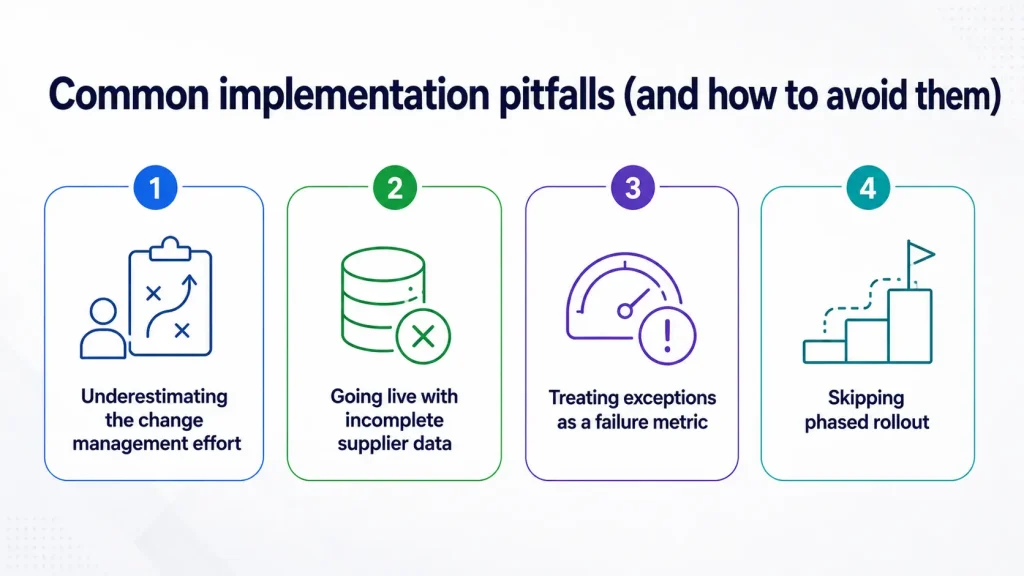
1. Underestimating the change management effort
AP teams that have operated manual workflows for years will need time and support to trust the system’s automated decisions. Plan for a parallel-run period, clear escalation paths, and visible leadership endorsement. Automation without change management rarely achieves its targeted STP rates.
2. Going live with incomplete supplier data
Master vendor data quality — correct bank details, payment terms, PO associations — directly affects how well the matching engine performs. A data cleanup sprint before go-live is almost always worth the time investment.
3. Treating exceptions as a failure metric
A 10% exception rate sounds bad, but if those exceptions catch real mismatches and prevent incorrect payments, it’s the system working as designed. Define success metrics around payment accuracy, cycle time, and cost per invoice — not just straight-through rate.
4. Skipping phased rollout
For organizations processing 5,000+ invoices monthly, a phased rollout by supplier tier, business unit, or invoice type is almost always safer than a big-bang go-live. It limits blast radius, accelerates learning, and builds internal confidence before broader deployment.
What ROI looks like over time
Finance teams often ask for an ROI timeline before committing. While every organization is different, the pattern across documented implementations follows a reasonably consistent curve:
Months 1–3: Setup and stabilization
Data migration, supplier onboarding, and integration testing. Processing costs may temporarily increase while teams run parallel workflows.
Months 4–6: Ramp and optimization
STP rates climb as the model learns supplier patterns. Cost per invoice begins falling. Early-pay discounts start being captured.
Months 7–12: Full value realization
Most organizations hit payback within 9–14 months. AP headcount is redeployed, not reduced — enabling strategic capacity in the finance function.
Frequently asked questions
- Do we need to replace our ERP to implement invoice automation?No. Invoice processing automation platforms sit in front of your ERP as a pre-processing layer, not a replacement. Most enterprise ERPs (SAP, Oracle, NetSuite, and Dynamics) have certified integrations available. You’re adding a layer, not rebuilding your core system.
- How does the system handle non-PO invoices?
Non-PO invoices (utilities, professional services, recurring subscriptions) are handled through configurable approval workflows rather than three-way matching. Most platforms support both PO and non-PO invoice types natively, with separate routing logic for each. - What happens when the AI makes a mistake?
Well-designed systems use confidence thresholds: when the extraction model is uncertain, the invoice is routed for human review rather than processed automatically. Human reviewers correct the error, and that correction data feeds back into the model’s training. Over time, the system gets better at your specific invoice formats. - How long does implementation typically take?
For mid-market organizations (1,000–10,000 invoices/month), expect 8–16 weeks from contract to go-live. Enterprise implementations with complex ERP environments or large supplier bases often run 6–12 months to reach full deployment.




