








Key Takeaways
- Manual AP remains common not because enterprises lack technology, but because fragmented workflows, legacy systems, and disconnected processes continue to create operational bottlenecks.
- The hidden cost of manual invoice processing extends far beyond labor expenses, including delayed approvals, missed early-payment discounts, duplicate payments, compliance risks, and poor cash-flow visibility.
- The biggest AP challenges are unstructured invoice intake, three-way match exceptions, approval delays, inconsistent vendor data, lack of real-time visibility, and audit documentation gaps.
- Modern AP automation platforms can be deployed alongside existing ERP systems, helping organizations achieve higher touchless processing rates, faster invoice cycle times, and significant cost savings without replacing core systems.
- When evaluating AP automation vendors, focus on proven touchless rates, ERP integration maturity, intelligent exception handling, supplier adoption capabilities, and realistic implementation timelines rather than marketing claims alone.
Your finance team is smart. Your ERP cost millions. Your IT team has patched, upgraded, and integrated for two decades. And yet — someone is still printing invoices, keying data into a spreadsheet, and chasing approvals over email.
This is not a capability problem. It is a structural one. And understanding exactly why manual AP persists, even in sophisticated enterprises, is the first step toward finally fixing it.
The real cost of “good enough”
Most AP leaders know manual processing is expensive. Few realize just how much invisible cost is embedded in processes that have been normalized over years. Here’s what the numbers actually look like when you benchmark manual vs. automated AP:
| Metric | Manual AP | Automated AP |
| Cost per invoice | $12–$30 | $2–$4 |
| Invoice cycle time | 10–14 days | 2–4 days |
| Exception rate | 25–30% | 5–8% |
| Early payment discount capture | ~15% | ~65% |
| Duplicate payment risk | High (1–3% of invoices) | Near-zero |
For an enterprise processing 50,000 invoices a year, this spread translates to $500,000–$1.3M in excess annual processing costs— before factoring in late payment penalties, missed discounts, and audit risk.
“We assumed our ERP was handling most of the heavy lifting. When we actually mapped the process, we found 11 manual handoffs for a single three-way match.”
— VP of Finance Operations, Multinational Manufacturing Company
The 6 real bottlenecks keeping AP manual
The following are not theoretical pain points. They are the specific failure modes that show up repeatedly across enterprises of all sizes — and that AP automation is specifically designed to eliminate.
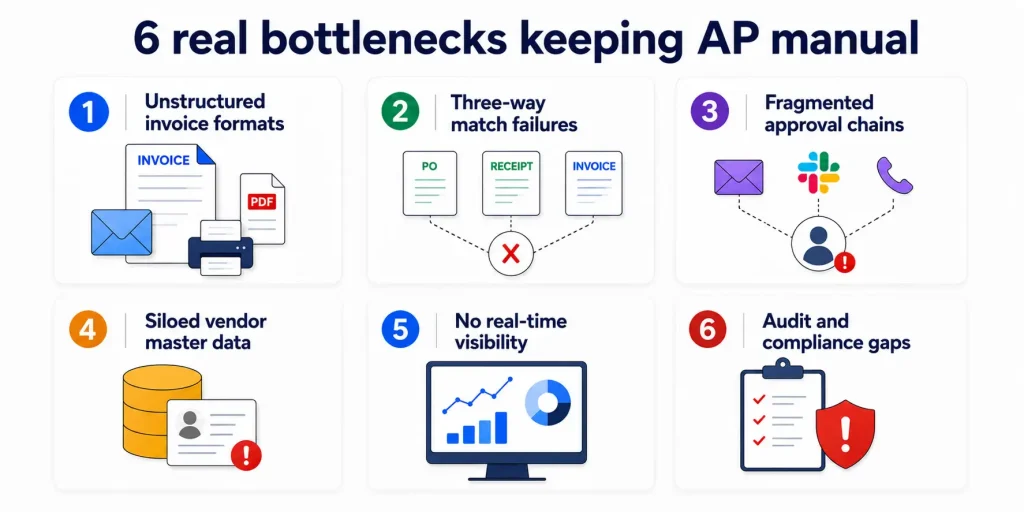
1. Unstructured invoice formats
Invoices arrive as PDFs, emails, faxes, EDI, and paper. No single intake process can handle them consistently, so humans step in for every edge case.
2. Three-way match failures
PO, receipt, and invoice data are stored in different systems, each with different field labels. Matching them manually generates a 25–30% exception rate that is entirely avoidable.
3. Fragmented approval chains
Approvals routed over email, Slack, and phone calls create no audit trail and no accountability. One absent approver stalls the entire chain.
4. Siloed vendor master data
Duplicate vendor records, stale bank details, and inconsistent naming conventions cause payment errors, rejected transactions, and compliance flags.
5. No real-time visibility
Without a live dashboard, finance leaders operate on aged data. Cash flow forecasting suffers, and accruals are perpetually inaccurate.
6. Audit and compliance gaps
Manual processes leave no native audit trail. SOX, GDPR, and local tax compliance require expensive retroactive documentation when auditors arrive.
Why legacy systems are the real culprit
Most enterprises have not avoided AP automation because they lack awareness. They have avoided it because they underestimate how deeply legacy infrastructure shapes and constrains their options.
Here is how that legacy debt compounds over time:
1. The ERP trap
SAP, Oracle, and legacy ERPs were not built for modern AP automation. Their native AP modules require significant customization to support touchless processing, and IT backlogs can turn even small changes into a 6-month project.
2. The integration spaghetti problem
Most enterprises have 5–12 systems that touch the AP process: ERP, procurement platform, expense tool, banking portal, vendor portal, document management. Point-to-point integrations between them are brittle and break frequently.
3. The data quality death spiral
Legacy systems accumulate years of dirty data. Automation projects get scoped, then stall when the data cleansing requirement becomes clear. The project never restarts.
4. The IT dependency bottleneck
Every AP process change requires an IT ticket. Finance teams without engineering support simply work around broken systems manually — indefinitely.
5. The “good enough” paralysis
When manual processes have been normalized for years, the organizational appetite for change is low. The cost of inaction is invisible precisely because everyone is used to absorbing it.
“Every year we said we’d fix AP in the next budget cycle. After eight years of that, we finally calculated what eight years of manual processing had actually cost us. The number was sobering.”
— CFO, Global Logistics Enterprise
What AP automation actually delivers — real outcomes
These are not projected outcomes from vendor pitch decks. These are results from enterprises that have deployed purpose-built AP automation against real legacy environments.
| Case study — Manufacturing enterprise, 80,000 invoices/year h3 |
| Challenge: A Three-way match process averaging 12 days, a 28% exception rate, and no ERP-native solution viable without a 18-month IT project. Solution: Cloud-native AP automation platform deployed alongside existing SAP instance via pre-built connector. No ERP migration required. 83%Touchless invoice rate within 90 days $1.1MAnnual processing cost reduction 4.2 daysAverage cycle time (down from 12) 18 monthsROI payback period |
| Case study — Retail chain, 200+ locations, fragmented AP ownership |
| Challenge: Invoices processed locally at store level, zero central visibility, no audit trail, frequent duplicate payments across locations.Solution: Centralized AP automation with location-aware routing and a unified vendor portal replacing 200+ email inboxes. 100%Audit trail coverage on day one $380KDuplicate payments recovered in year one 62%Reduction in AP headcount redeployment need |
The ROI case — where the savings actually come from
When your CFO asks for the business case, here is where to direct the conversation. These are the proven, measurable return drivers:
Figures represent median improvement rates reported by enterprises post-deployment across published case studies and analyst benchmarks.
Addressing your final objections
Figures represent median improvement rates reported by enterprises post-deployment across published case studies and analyst benchmarks.
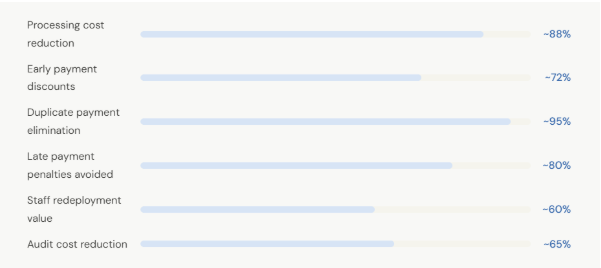
Figures represent median improvement rates reported by enterprises post-deployment across published case studies and analyst benchmarks.
Addressing your final objections
If you are seriously evaluating AP automation, these are the questions that typically come up in the final stages – and they are answered directly.
“Our ERP vendor says they have a native AP module – why use a third party?’
Native ERP AP modules are built for general coverage, not AP-specific intelligence. They typically lack OCR with high accuracy thresholds, AI-based exception routing, supplier self-service portals, and pre-built connectors to procurement and banking systems. Purpose-built AP automation platforms deliver 3–5x higher touchless rates than ERP-native modules in head-to-head benchmarks.
“We do not have the IT resources for another integration project.”
Modern AP automation platforms deploy alongside your ERP — not instead of it. Pre-built connectors for SAP, Oracle, NetSuite, and Microsoft Dynamics typically reduce implementation timelines to 8–12 weeks. Leading platforms offer implementation support that does not require internal IT involvement for the core deployment.
“We tried to automate AP five years ago, and it failed.”
Five years ago, AP automation required significant customization, brittle on-premise infrastructure, and expensive OCR that topped out at 70% accuracy. Modern platforms use machine learning that trains on your invoice corpus and reaches 95%+ accuracy within weeks. The deployment model, the technology, and the integration approach are categorically different from what you evaluated five years ago.
“How do we handle the change management side with AP staff?”
Successful AP automation programs reposition AP staff from data entry and exception-chasing into vendor relationship management and strategic analysis. In surveys of post-deployment teams, AP staff satisfaction consistently improves. The goal is to eliminate drudge work, not to eliminate headcount — and that framing changes the change management conversation entirely.
What to evaluate before you decide
If you are at the point of comparing AP automation vendors, here is the evaluation framework that separates platforms worth deploying from those that underdeliver in production:
1. Touchless rate — demand proof, not projections
Any vendor can claim high touchless rates. Ask for audited numbers from customers in your industry with your invoice volume and complexity. A platform achieving 70% touchless on simple invoices is not the same as one achieving 85%+ across complex multi-line PO-backed invoices.
2. ERP connector maturity — not just compatibility
Confirm that the connector to your ERP is bidirectional, covers your specific version, and does not require middleware. “Compatible with SAP” can mean anything from a full-featured pre-built connector to a CSV file export. Get specifics.
3. Exception handling intelligence
The quality of a platform is revealed in how it handles the 10–15% of invoices that are not straight-through. Does it route by exception type? Does it learn from resolution patterns? Does it give the reviewer enough context to resolve without leaving the platform?
4. Supplier adoption model
A platform that requires your suppliers to change their invoicing behavior creates friction that stalls ROI. Prioritize platforms that accept invoices in any format and offer a self-service supplier portal for status checks — eliminating the inbound “where is my payment?” call volume that consumes AP team time.
5. Implementation timeline — and who owns it
Understand who is responsible for the implementation: the vendor, a partner, or your IT team. Ask for a realistic timeline from contract signature to first live invoice. Anything over 16 weeks for a standard deployment warrants scrutiny.
Ready to make the business case internally?
Get a tailored ROI analysis for your invoice volume and current processing costs — no commitment required. For more details, feel free to contact us. We will be more than happy to assist you.




