








Key Takeaways
- Manual AP processes increase costs, create errors, and slow down invoice approvals, making finance operations less efficient and more expensive.
- Lack of automation leads to duplicate payments, fraud risks, missed early-payment discounts, and weakened supplier relationships.
- Limited visibility into liabilities and cash flow makes it difficult for finance leaders to make informed financial decisions.
- Organizations with automated AP processes achieve significantly lower cost-per-invoice, stronger compliance, and greater scalability without increasing headcount.
- The most effective way to overcome AP challenges is through intelligent invoice processing automation that combines OCR, AI, workflow automation, and ERP integration.
Accounts payable sounds like a back-office function. In reality, it’s a strategic pressure point — one where inefficiency compounds daily into missed early-payment discounts, strained supplier relationships, audit risk, and finance teams buried in manual work that should have been automated years ago.
If you’re evaluating whether invoice processing automation is right for your organization, you’re likely already living at least several of the challenges below. This guide names them clearly, connects them to real business costs, and shows you what a path forward looks like.
The 10 Challenges Holding AP Teams Back
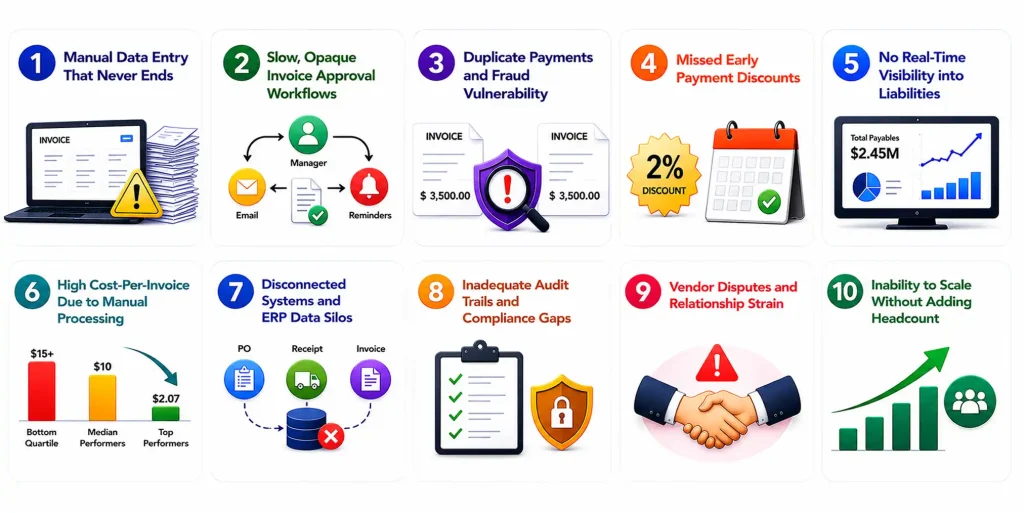
1. Manual Data Entry That Never Ends
The average mid-size company processes thousands of invoices each month. When AP staff manually key in vendor names, invoice numbers, line items, and amounts — across PDFs, emails, paper, and portals — errors are inevitable. A single transposed digit can trigger a cascade of rework, delayed payments, and supplier complaints.
More critically, the time spent is time your team can never get back. Every hour spent on data entry is an hour not spent on exception handling, vendor negotiations, or strategic analysis.
What automation changes: Modern invoice processing automation uses OCR and AI-driven data extraction to capture invoice fields with 95–99% accuracy — instantly, regardless of their format.
2. Slow, Opaque Invoice Approval Workflows
How many invoices are sitting in someone’s inbox right now, waiting for approval? Most AP teams can’t answer this question in real time — and that’s the problem. When approval routing is manual (forwarding emails, chasing managers, re-sending reminders), processing cycles stretch from days to weeks.
Late approvals cause late payments. Late payments trigger penalty fees and damage vendor trust — two outcomes that directly increase your cost of doing business.
What automation changes: Rule-based routing automatically assigns invoices to the right approver by amount, department, or GL code — with escalation triggers built in. No chasing required.
3. Duplicate Payments and Fraud Vulnerability
Duplicate invoice payments are more common than most finance leaders realize — industry research suggests up to 0.1–0.5% of all invoices may result in duplicate payments. At scale, that’s material. And it’s almost always a symptom of manual processing: the same invoice comes in via email and portal, or a vendor resubmits, and without automated deduplication logic, both get paid.
Fraudulent invoices — including business email compromise (BEC) schemes — exploit the same gap. When humans are reviewing hundreds of invoices manually, spotting anomalies is nearly impossible.
What automation changes: AI-powered matching flags duplicate invoice numbers, amounts, and vendor details before payment runs — and anomaly detection surfaces unusual patterns for human review.
4. Missed Early Payment Discounts
Many vendors offer 1–2% discounts for payment within 10 days (net-10 terms). For a company spending $10M annually with suppliers, capturing those discounts consistently could mean $100,000–$200,000 in savings per year. But you can only capture discounts if you know the invoice arrived, it’s been validated, and it’s approved in time.
With manual AP, this window closes before the process can even begin. Most organizations don’t just miss the discount — they miss it and pay late.
What automation changes: Automated invoice processing surfaces discount-eligible invoices immediately, accelerating the approval cycle so finance can act before the window closes.
5. No Real-Time Visibility Into Liabilities
How much does your company owe vendors right now? What’s the aging breakdown of open invoices? Which suppliers are approaching payment terms? If answering these questions requires pulling a report, waiting for month-end, or asking someone to “check the spreadsheet” – your AP function is operating blind.
This lack of real-time visibility directly impacts cash flow forecasting, working capital management, and the CFO’s ability to make confident financial decisions.
What automation changes: Centralized AP dashboards provide real-time liability visibility, aging reports, and cash flow projections — all updated as invoices move through the workflow.
6. High Cost-Per-Invoice Due to Manual Processing
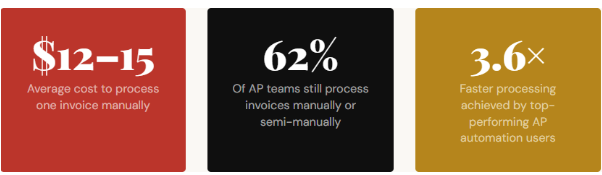
According to APQC benchmarking data, top-performing organizations spend around $2.07 to process a single invoice. Median performers spend closer to $10. Bottom quartile? $15 or more. The gap is almost entirely explained by automation adoption.
For a company processing 5,000 invoices per month, the difference between top and bottom quartile performance is over $780,000 per year — in processing costs alone, before accounting for errors, late fees, or missed discounts.
What automation changes: Invoice processing automation eliminates the labor-intensive steps that drive per-invoice cost, moving organizations toward top-quartile benchmarks.
7. Disconnected Systems and ERP Data Silos
Invoice data lives in one system. Purchase orders in another. Receiving confirmations somewhere else. And the ERP that’s supposed to tie it all together requires manual reconciliation. The result: AP staff spend hours every week simply moving data between systems — a task that creates zero value and introduces significant error risk.
This fragmentation also makes three-way matching (PO → receipt → invoice) a manual, time-consuming exercise rather than an automated quality check.
What automation changes: Modern AP automation platforms integrate natively with major ERPs (SAP, Oracle, NetSuite, Dynamics) to enable automated three-way matching and eliminate rekeying.
8. Inadequate Audit Trails and Compliance Gaps
When an auditor asks “who approved this payment and when?” — can your team answer in minutes, or does it trigger a multi-day document hunt? Manual AP processes rarely generate complete, timestamped audit trails by default. Approvals happen over email. Notes get lost. Documentation isn’t attached to the right records.
For organizations in regulated industries or those subject to SOX compliance, this isn’t just inconvenient — it’s a material risk.
What automation changes: Every action in an automated AP workflow is logged with user identity, timestamp, and decision rationale — creating an immutable, audit-ready trail automatically.
9. Vendor Disputes and Relationship Strain
Suppliers track payment performance. Late payments — even by a few days — accumulate into relationship damage that eventually affects credit terms, pricing negotiations, and the willingness of key suppliers to prioritize your orders during constrained periods.
Most vendor disputes trace back to the same root causes: invoices that were lost, invoices that sat unapproved, or invoices where data didn’t match and no one flagged it proactively. These are process failures, not people failures.
What automation changes: Faster processing and automated exception alerts mean fewer late payments and faster dispute resolution — protecting supplier relationships that took years to build.
10. Inability to Scale Without Adding Headcount
As companies grow, invoice volume grows proportionally. In a manual AP environment, the only way to handle more invoices is to hire more people. This creates a linear cost structure that finance leaders increasingly cannot justify — especially when automated alternatives can handle 10× the volume with the same team.
This scalability ceiling becomes especially painful during acquisitions, seasonal peaks, or rapid growth phases — exactly when AP needs to perform at its best.
What automation changes: Invoice processing automation enables AP teams to scale invoice volume without scaling headcount — absorbing growth without adding operational cost.
The Pattern Beneath Every Challenge
Look across all ten challenges, and a single thread emerges: manual processes are the root cause. Data entry errors, approval delays, compliance gaps, duplicate payments, missed discounts — all of these trace back to humans performing work that machines can do more accurately, faster, and at scale.
This isn’t about replacing your AP team. It’s about freeing them from low-value, error-prone work so they can focus on exceptions, relationships, and strategic financial decisions. The highest-performing AP functions today aren’t the ones with the most staff — they’re the ones that have invested in invoice processing automation and made their people more capable as a result.
Before evaluating solutions, it’s worth auditing your AP operation:
- What is your current cost-per-invoice?
- How many invoices does your team process monthly?
- What % arrive in non-standard formats?
- How long does a typical approval cycle take?
- How often do duplicate payments occur?
- Are you consistently capturing early-pay discounts?
- Can you produce a full audit trail on demand?
- What ERP/systems do invoices need to connect to?
These answers will define your automation requirements — and determine which solution categories are worth evaluating.
Ready to See What Automation Looks Like for Your AP Team?
We’ve helped finance teams reduce invoice processing costs by up to 70% and cut cycle times from weeks to hours. Get a personalized walkthrough of how invoice processing automation maps to your specific challenges. So wait no more, and contact us today. We will be pleased to assist you.




