








Key Takeaways
- Shared services centers face unique AP challenges due to multiple entities, currencies, approval structures, and ERP systems, making specialized automation essential.
- Automating invoice capture, approval routing, matching, and exception handling can significantly reduce processing costs while improving speed and accuracy.
- Real-time visibility into invoice status, liabilities, exceptions, and SLA performance enables better financial control and more informed decision-making.
- A phased implementation approach that includes process assessment, pilot testing, change management, and continuous optimization delivers the highest chance of success.
- The strongest ROI comes from a combination of lower operating costs, improved discount capture, reduced payment errors, enhanced compliance, and the ability to scale operations without adding headcount.
You’ve already made the strategic move to consolidate accounts payable into a shared services center. You’ve centralized the team, standardized some processes, and taken on invoice processing for multiple business units. But if your AP team is still manually keying invoices, chasing approvals over email, and reconciling exceptions by hand, you’ve only completed half the job.
Shared services AP automation is the multiplier that turns your SSC from a cost center into a competitive advantage. This guide goes beyond the basics. We’ll show you what’s possible, what to evaluate, and how to build a compelling business case for the investment.
Why shared services AP automation is different
eneric AP automation is designed for a single entity processing its own invoices. Shared services AP automation operates in a fundamentally more complex environment — and the solution you choose needs to be purpose-built for that complexity.
In a shared services center, you are simultaneously
- Processing invoices for multiple legal entities, each with different ERP instances, GL codes, and cost centers
- Managing dozens to hundreds of approval workflows, often customized per business unit or geography
- Handling intercompany transactions and eliminations in real time
- Reporting SLA performance back to internal customers — who have rising expectations
- Operating under a shared cost allocation model, where efficiency gains must be clearly attributable
This means the automation platform you select must handle multi-entity processing natively, provide granular workflow configurability, and integrate with the full ecosystem of ERP systems your business units run — whether that’s SAP, Oracle, Microsoft Dynamics, NetSuite, or a combination.
Key insight: Organizations that automate AP within a shared services model achieve 4× the cost savings compared to those automating within standalone business units, primarily because they leverage economies of scale in both licensing and headcount. — Institute for Financial Operations
The top challenges SSCs face without automation
If you’re evaluating shared services AP automation, you’re likely experiencing at least several of these pain points:
1. High cost per invoice
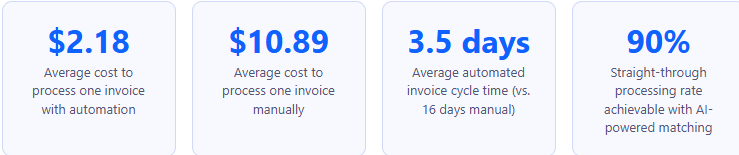
Manual invoice processing in SSCs typically costs $8–$15 per invoice when you account for staff time, error remediation, and overhead. At scale, this becomes unsustainable — especially as your SSC absorbs more business units.
2. Approval bottlenecks and late payments
Without automated routing, invoices sit in email inboxes waiting for approvers who are traveling, on leave, or simply overwhelmed. The result: missed early payment discounts worth 1–2% per invoice and strained supplier relationships that matter when you need favorable credit terms.
3. Lack of visibility across entities
When invoices spread across emails, shared drives, and paper, your AP team lacks a real-time view of liability exposure. Finance leadership loses the ability to accurately forecast cash requirements — a direct hit to working capital management.
4. Compliance and audit risk
Manual processes are audit nightmares. Invoices get lost, approvals are undocumented, and duplicate payments go undetected until a supplier flags them. In a multi-entity SSC environment, the risk compounds because each entity may have different controls — or none at all.
5. Inability to scale without adding headcount
When a new business unit joins the SSC, the default response is to hire more AP clerks. That model doesn’t scale. Automation flips the equation: each additional entity should add volume without proportionally increasing cost.
Core capabilities to look for in shared services AP automation
Not all AP automation platforms are created equal. Here is the capability checklist that SSC leaders should use when evaluating solutions:
1. AI-powered invoice capture and data extraction
Modern platforms use machine learning OCR and large language models to extract data from invoices in any format, including PDF, scanned paper, EDI, or e-invoice. Look for vendors who report field-level accuracy rates above 97% and can handle structured and unstructured invoice layouts without manual template setup.
2. Multi-entity and multi-currency support
The system must natively support processing invoices across multiple legal entities and currencies, with automated intercompany allocation and GL coding. Ask vendors specifically: “Can one invoice be split and allocated across five entities with different base currencies simultaneously?”
3. Configurable, rules-based approval workflows
Look for drag-and-drop workflow builders that allow your team to configure approval routing by entity, amount threshold, cost center, vendor category, or GL account — without requiring IT involvement. Escalation logic, delegation rules, and out-of-office rerouting should be standard.
4. 3-way and 2-way PO matching
Automated matching of invoices against purchase orders and goods receipts eliminates the single largest source of manual exception handling. Solutions with AI-assisted fuzzy matching — handling tolerances, partial receipts, and quantity variances — deliver the highest straight-through processing rates.
5. Vendor portal and self-service
A vendor-facing portal where suppliers can submit invoices, check payment status, and resolve exceptions without contacting your AP team can reduce inbound supplier calls by 60–70%.
6. ERP integration depth
Pre-built, bidirectional integrations with your ERP(s) are non-negotiable. Shallow integrations that require custom middleware will fail during upgrades. Evaluate the depth: Does the connector sync master vendor data? Does it write back payment confirmations? Does it handle GL validation at the point of capture?
7. Real-time dashboards and SLA reporting
For an SSC, reporting is as important as processing. Look for dashboards that give AP managers real-time visibility into processing queues, exception rates by entity, approval cycle times, and SLA adherence, all of which can be segmented by business unit for internal chargebacks.
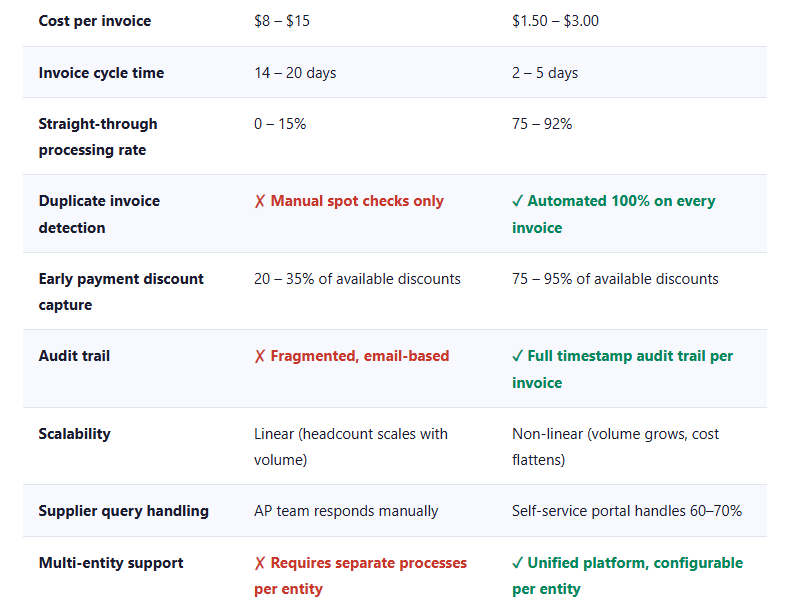
Manual vs. automated AP processing: a direct comparison
How to implement AP automation in your shared services center
Here is a five-phase framework drawn from successful enterprise deployments:
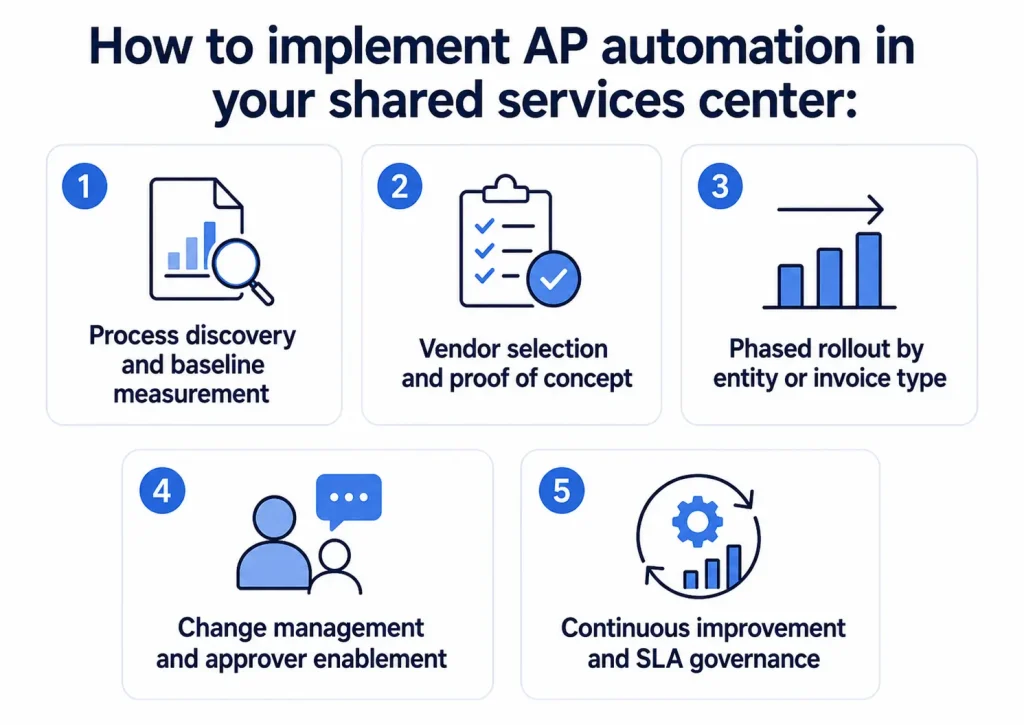
1. Process discovery and baseline measurement
Before selecting any technology, document your current state: invoice volumes by entity and invoice types (PO vs. non-PO, EDI vs. paper); current cycle times; exception rates; and cost per invoice. This baseline is your ROI benchmark — and the data that justifies budget approval.
2. Vendor selection and proof of concept
Run a structured RFP with your top 3–4 shortlisted vendors. Require a live proof of concept using 500–1,000 of your actual invoices, not a demo environment. Measure extraction accuracy, exception handling, and ERP write-back reliability. Don’t rely on reference calls alone.
3. Phased rollout by entity or invoice type
Start with one pilot entity or one invoice type (e.g., PO-backed invoices only). Run in parallel with your manual process for 30 days to validate accuracy before switching off the legacy process. Use this phase to refine workflow configurations before scaling.
4. Change management and approver enablement
he biggest implementation risk is not technology — it’s approver adoption. Develop role-specific training for AP clerks, approver managers, and business unit controllers. Define clear escalation paths and SLAs in the new environment before go-live.
5. Continuous improvement and SLA governance
Post-deployment, establish a monthly AP performance review cadence with each business unit. Use dashboard data to identify bottlenecks, refine matching rules, and progressively push your straight-through processing rate higher. Best-in-class SSCs treat automation as an evolving capability, not a one-time project.
Evaluating and selecting the right solution: 10 critical questions
When shortlisting shared services AP automation vendors, use these questions to distinguish genuine enterprise platforms from single-entity solutions that are marketed as enterprise.
- How does your platform handle invoices that need to be split and coded across multiple entities and cost centres simultaneously?
- What is your live extraction accuracy rate for unstructured invoices across 50+ languages and layouts? Can you provide data from current customers with similar profiles?
- How are approval workflows configured when the same invoice requires different approval thresholds in different entities?
- What does your ERP integration architecture look like — and how is it maintained through ERP upgrade cycles?
- How does your platform handle intercompany invoices and the associated eliminations?
- What is your average time-to-value (from contract signature to live processing) for an SSC of our size?
- How does your vendor portal handle supplier onboarding, and what percentage of your customers’ invoices arrive via the portal within 12 months?
- What ML model retraining capability exists — and who controls it: our team, or your professional services team?
- How is SLA performance reported, and can reports be segmented and exported by business unit for chargeback purposes?
- What does your post-implementation support model look like — and can you provide contact information for two reference customers in a similar SSC setup?
Evaluation tip: Build a scorecard with weighted criteria before you start vendor conversations. Give higher weights to multi-entity support, ERP integration depth, and extraction accuracy. Cost should account for no more than 20% of the total score – the cheapest option rarely delivers the best TCO in a complex SSC environment.
Building your business case and next steps
If you’re preparing to take an AP automation investment to your CFO or shared services leadership team, your business case should be built around four financial levers:
1. Direct cost reduction
ulate the difference between your current cost per invoice and the benchmark automated cost ($2–$3), multiplied by your annual invoice volume. For most SSCs processing 50,000+ invoices annually, this alone justifies the investment.
2. Early payment discount capture
If your organization has dynamic discounting agreements or standard net-30 terms with 2/10 discount options, quantify the value of discounts currently being missed due to slow cycle times. This is often $200K–$1M+ annually for mid-to-large SSCs.
3. Error and duplicate payment recovery
Audits consistently find that manual AP environments experience 0.1–0.5% of invoice value paid in duplicates or errors. Automated duplicate detection with 100% invoice coverage virtually eliminates this loss.
4. Headcount avoidance
If your SSC is absorbing new entities, quantify the headcount that would be required to process additional volume manually vs. the incremental licensing cost of the automation platform. Headcount avoidance is typically the most persuasive line item for finance leadership.
Ready to see what AP automation would mean for your SSC? Get in touch with us today.




