






Key Takeaways
- Banking Automation starts with eliminating clicks, not replacing core systems.
- SAP Ariba + RPA accelerates P2P by up to 80 % while improving audit readiness.
- APIs are your best friend—use UI automation only as a safety net.
- Governance is non‑negotiable: least privilege, audit logs, and segregated duties.
- AI agents are on the horizon, and RPA will orchestrate them to enable fully autonomous procurement.
Banks deal with strict rules, tight timelines, and thousands of supplier interactions each month. When a single laptop request can bounce between email chains, spreadsheets, SAP Ariba screens, and core banking portals, value leaks out of every mouse click. This guide—kept deliberately simple and jargon-free—explains how robotic process automation (RPA) turns those clicks into code, allowing procurement teams to focus on strategic sourcing instead of chasing approvals. You will learn:
- Where the friction hides inside typical Ariba workflows.
- How RPA stitches Ariba, ERP, and core-banking apps together.
- A phased roadmap tailored for Banking Automation.
- Real metrics you can present to your CFO or Chief Risk Officer.
The Hidden Pain Points in Procurement
Procurement may seem digital on the surface, but hidden manual steps still create costly delays and inefficiencies beneath the surface.
1. Manual copy-paste still rules. A sourcing analyst may open an Excel sheet, copy vendor codes, flip to Ariba, paste them, then switch again to the bank’s general ledger tool to log funding approval. Multiply that by hundreds of requests each week, and you have a silent productivity tax.
2. Approval black holes. Ariba does provide automated approval paths; however, many banks route “exceptions” via email or chat because they worry about misconfiguring the system. Result: No audit trail and numerous reminders.
3. Three-way match delays. Matching purchase orders (POs), goods-receipt notes (GRNs), and invoices often becomes a spreadsheet marathon when line items do not align. Every mismatch means a payment delay, unhappy suppliers, or even late-payment fees.
4. Data re-entry into core systems. After a PO is approved, finance teams still need to book the expense in a core banking or ERP module, such as Finacle, T24, or Oracle E-Business. That often means exporting CSV files and re-uploading them—an error-prone chore.
Each friction point costs both time and reputation. RPA removes them by acting like a junior buyer who never sleeps, never makes mistakes, and always adheres to policy.
SAP Ariba
Think of SAP Ariba as a digital marketplace and workflow engine. It offers:
- Supplier Discovery & Onboarding – find vendors and collect KYC/AML documents.
- Sourcing & Auctions – run reverse auctions or RFPs and compare bids.
- Contracts & Catalogs – store negotiated pricing and terms.
- Procure-to-Pay (P2P)—raise purchase requisitions (PR), generate POs, receive goods, and pay invoices.
Ariba accomplishes all of this in the cloud, but many tasks still require user interaction. Banks also integrate dozens of satellite applications, including risk screens, sanction lists, core bank ledgers, payment gateways, budget tools, and data warehouses. Without automation, buyers become human APIs.
Where RPA Fits into Your Ariba Stack?
| Manual Step | RPA Opportunity | Banking-Specific Angle |
| Copy PR data into ERP/core banking | Bot calls Ariba API, transforms JSON, posts to Finacle/T24 ledger | Encrypts SWIFT/BIC; masks account numbers |
| Upload invoice PDFs | Bot monitors a mailbox, classifies attachments, and calls the Ariba Invoice API | Runs vendor name through internal sanctions screen |
| Chase approvals | Bot checks the status and pings the approver via Teams every four hours | Attaches an audit stamp to the message |
| Three-way match | The bot retrieves the PO, GRN, and invoice. Uses fuzzy match; flags mismatches. | Escalates if the spend category is high-risk (e.g., cybersecurity) |
By integrating Banking Automation principles—like strong encryption, PII masking, and audit logging—RPA not only boosts speed but also strengthens compliance.
A Banking-Focused Automation Roadmap
A structured automation roadmap enables banks to transition from scattered bot pilots to scalable, intelligent procurement automation, delivering a lasting impact.
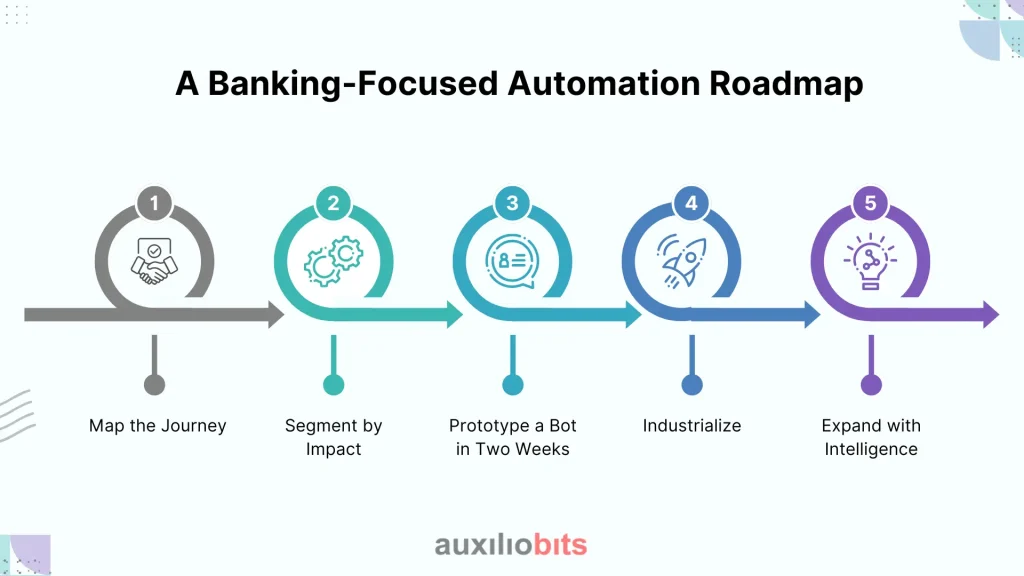
- Map the Journey. Hold a whiteboard workshop with procurement, finance, IT, and risk teams. Sketch the PR-to-payment flow and mark every copy-paste or swivel-chair action.
- Segment by Impact. Use two axes: transaction volume and regulatory risk. Quick wins typically reside in the high-volume, low-risk corner (e.g., low-value IT purchases).
- Prototype a Bot in Two Weeks. Pick one microprocess—say, invoice upload. Build a bot in UiPath Studio or Automation Anywhere—demo success to sponsors.
- Industrialize. Add queue management, error handling, and dashboards. Deploy to production in phased waves.
- Expand with Intelligence: layer optical character recognition (OCR) and NLP for clause extraction. Introduce machine-learning models that predict which invoices are likely to fail the three-way match.
Repeat this loop every quarter, gradually raising automation coverage from 10% toward 80% of procurement touches.
Step-by-Step Build Guide
This step-by-step guide walks you through the process from capture to live deployment, transforming your SAP Ariba workflow into a secure, production-ready bot.
Step 1—Record the Process
Use your RPA recorder or simply shadow a buyer. Capture every screen and field, and copy and paste. Save this as a process definition document (PDD).
Step 2 – Choose Your Integration Hook
- APIs first. Ariba’s Open API supports OAuth 2.0 and returns JSON, providing a clean and stable interface.
- UI backup. Where no API exists (for certain pop-ups and legacy screens), fall back to computer vision clicks.
- Hybrid model. Real-world bots often mix 80% API calls with 20% UI automation.
Step 3—Build in Your RPA Studio
- Drag the Ariba Connector activity.
- Store credentials in a secrets vault, never hard‑code.
- Map PR fields (cost center, GL code, supplier ID) to ERP fields.
- Write reusable functions: Create PO, Upload Invoice, Check Approval.
Step 4—Secure Banking Integration
- Call ISO 20022 APIs to book payments.
- Encrypt payloads in transit (TLS 1.3) and at rest.
- Hash vendor IDs to avoid PII exposure in logs.
Step 5 – Design Exception Handling
- Create two queues: Business Exceptions and System Exceptions.
- For missing fields, route to the Business queue; for API timeouts, retry and then push to the System queue.
- Alert owners via Teams with deep links to Ariba objects.
Step 6 – Test Thoroughly
- Functional tests: Does the bot create a PO correctly?
- Negative Tests: What if the Supplier Code is Missing?
- Load tests: Simulate 500 invoices in one hour.
- Security tests: Attempt an injection and confirm the bot blocks it.
Step 7—Deploy & Monitor
- Schedule bots on VMs or containers.
- Feed logs to ELK or Splunk.
- Track KPIs in an RPA dashboard: success rate, average. Execution time, queue length.
- Conduct weekly “bot health” stand‑ups.
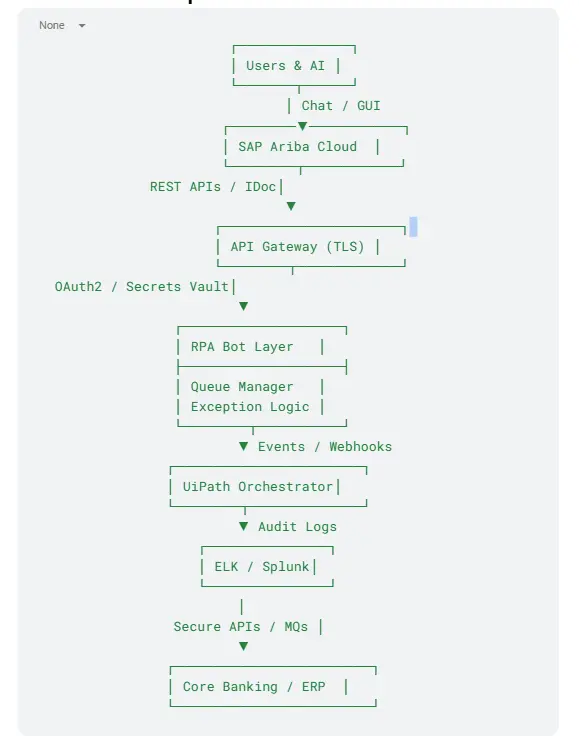
Architecture Blueprint
Measuring ROI & Compliance Wins
| KPI | Pre‑Automation | Post‑Automation | 12‑Month Impact |
| PR‑to‑PO cycle time | 4–6 days | 6–8 hours | 85 % faster |
| Manual touches per PO | 12 | 2 | 83 % reduction |
| Duplicate invoice rate | 3 % | < 0.5 % | 6× fewer errors |
| Audit prep time | 15 days/year | 2 days/year | 87 % saved |
| Regulatory fines | $25 k | $0 | — |
Beyond dollars, faster procurement means better supplier relations and stronger compliance posture—both critical for regulated banks.
Governance and Change Management
Strong governance and thoughtful change management are key to scaling procurement automation securely, sustainably, and with complete business alignment.
- Least privilege. Give bots role‑based access—nothing more.
- Segregation of duties. Separate bot developers from bot operators, both from auditors.
- Version control. Store bot code in Git; tag releases.
- Business buy‑in. Run lunch‑and‑learn sessions; show dashboards; celebrate quick wins.
- Continuous improvement. Review bot KPIs monthly; retire or refine low‑value automations.
Common Pitfalls & Quick Fixes
| Pitfall | Why It Hurts | Quick Fix |
| Unstable UI selectors | Bot clicks the wrong button; breaks at the next Ariba patch | Prefer APIs; use dynamic anchors |
| Over‑engineering | Months of development, no value | Automate the 80 % use case first |
| Shadow IT | Teams build rogue macros, a security risk | Central RPA CoE with a straightforward intake process |
| Poor exception handling | Bot stops; users lose trust | Split System vs. Business exceptions; auto‑notify |
Case Study—A Regional Bank’s Journey
Background. A mid-sized bank with 150 branches utilized SAP Ariba for managing indirect spend (≈approximately $300 million per Year). Buyers spent 40% of their time chasing approvals and uploading invoices.
Problem: Year-end audits identified missing approval timestamps and duplicate vendor entries, which posed a risk of regulatory fines.
Solution. In eight weeks, the bank deployed three UiPath bots:
- PR-to-PO Bot—converts approved requisitions to POs and updates the Finacle ledger.
- Invoice Upload Bot—reads supplier emails, classifies invoices with ABBYY OCR, and uploads PDFs to Ariba.
- Approval Reminder Bot—pings approvers via Teams every four hours until an action is taken.
Results after six months:
- PO cycle time decreased from 4 days to 6 hours.
- Invoice backlog decreased by 78%.
- No duplicate vendor entries in the next audit.
- Buyers reclaimed 5,200 staff-hours—redirected to strategic sourcing.
The project paid for itself in less than five months and became a flagship example of Banking Automation for the board.
What’s Next: AI Agents and Autonomous Intake?
RPA handles deterministic tasks well, but SAP’s 2025 roadmap adds generative AI agents that can:
- Create sourcing events based on historical spend patterns.
- Suggest preferred suppliers using market intelligence.
- Draft contract clauses that align with internal policies.
Your bots will evolve into orchestrators. A future workflow might look like this:
AI Agent: “We need 100 encrypted laptops by next month. Preferred vendor is SecureTech.”
Bot: Creates PR in Ariba, fetches budget code, and routes for approval.
AI Agent: Monitors currency rates; recommends a hedge if USD‑INR swings 2 %.
Bot: Books FX contract, flags treasury.
Intelligent orchestration is the next frontier of Banking Automation.
SAP Ariba Automation for Finance & Shared Services Teams
SAP Ariba is often a critical part of the procure-to-pay (P2P) environment, but finance and shared services teams frequently have to manage procurement data across multiple entities, ERP systems, suppliers, and approval workflows. Automating SAP Ariba processes can reduce repetitive work while improving consistency across purchasing, invoicing, supplier management, and reporting.
PO Creation and Management Across Multiple Entities
Shared services teams can use SAP Ariba automation to streamline purchase order creation, validation, approval, and management across business units and legal entities. Instead of manually transferring information between spreadsheets, SAP Ariba, and ERP systems, automated workflows can validate request information, identify the appropriate entity and approval path, create or update POs, and capture transaction details.
Automation can also help manage high-volume PO processes that involve similar transactions across departments. Exceptions such as missing information, incorrect cost centers, approval delays, or invalid supplier details can be routed to the appropriate employee.
Invoice Matching With SAP Ariba Data
Invoice processing becomes more efficient when procurement and accounts payable data are connected. Automation can compare invoice information with purchase orders and receipt records to support two-way and three-way matching.
For example, an automated workflow can retrieve the PO from SAP Ariba, compare quantities and prices against the invoice, check receiving information, and determine whether the transaction meets configured matching rules. Invoices that match can continue through the workflow, while discrepancies can be routed for review. This connects SAP Ariba automation with broader AP automation services and reduces manual effort between procurement and accounts payable.
Supplier Onboarding and Master Data Management
Supplier onboarding often involves collecting information, validating documentation, creating supplier records, and maintaining master data across systems. SAP Ariba automation can help standardize these activities by validating required fields, routing approvals, checking duplicate records, and synchronizing approved supplier information with downstream ERP platforms.
Keeping supplier information consistent is particularly important for shared services teams managing procurement across multiple entities.
Procurement Spend Visibility and Reporting
Automated procurement workflows can also improve spend visibility by consolidating purchasing information and standardizing reporting across entities. Finance and procurement leaders can analyze purchase orders, suppliers, categories, spend levels, and exceptions without relying entirely on manually consolidated spreadsheets.
This creates a stronger foundation for identifying purchasing patterns, monitoring compliance with procurement policies, and finding opportunities for cost optimization.
SAP Ariba Within a Broader P2P Automation Strategy
SAP Ariba automation should not operate as an isolated initiative. It can form part of a broader procure-to-pay automation strategy covering requisition, sourcing, purchase orders, goods receipt, invoice processing, approvals, payment, reconciliation, and reporting.
For organizations using multiple enterprise platforms, ERP integration services can connect SAP Ariba with SAP, Oracle, Sage, and other financial systems. This allows procurement information to move between applications and supports a more connected end-to-end P2P process.
For example, a purchase request can begin in SAP Ariba, result in a PO, flow to an ERP for financial processing, return receiving information for invoice matching, and ultimately support AP processing and payment. Automation can coordinate these handoffs while maintaining validation and exception controls.
Measuring the Impact of SAP Ariba Automation
Finance teams should measure automation using operational outcomes rather than simply counting automated transactions. Useful metrics include PO processing time, invoice matching rate, exception rate, manual hours recovered, supplier onboarding time, touchless processing rate, and cost per transaction.
In the relevant SAP Ariba RPA case study, automation was used to reduce manual procurement work involving PO creation and related data processing. The specific results of any implementation will depend on transaction volumes, process complexity, system integrations, exception rates, and the organization’s existing automation maturity.
The objective is to create a connected P2P environment where procurement, finance, suppliers, and ERP systems can exchange information with less manual intervention and better visibility.
Ready to Streamline Procurement and P2P?
Explore how SAP Ariba automation can streamline your procurement and P2P processes. Book a free discovery call.
About Auxiliobits
Auxiliobits does not replace your ERP or Ariba instance. We wrap intelligent bots and agentic AI around your current stack—Ariba, Finacle, Oracle, T24—to eliminate manual clicks. Our focus is automation, not digitization, delivering touchless procurement in weeks, not quarters, and ensuring every improvement aligns with banking regulations.