








Key Takeaways
- Invoice automation is built on three critical stages—capture, extraction, and validation—and weaknesses in any one stage can limit overall performance.
- Modern AI-powered extraction significantly improves invoice data accuracy, reduces manual entry, and adapts to changing invoice formats without template maintenance.
- Strong validation controls, including PO matching and business rule checks, help prevent duplicate payments, fraud, compliance issues, and costly errors.
- Organizations with mature invoice automation programs commonly achieve 75–90% straight-through processing rates, reduce invoice costs to $2–4 each, and shorten cycle times to less than three days.
- Invoice automation delivers the highest ROI when integrated into a broader procure-to-pay strategy that includes purchase orders, approvals, goods receipts, and supplier management.
Your accounts payable team didn’t sign up to babysit PDFs. Here’s how modern procure-to-pay automation turns a three-week bottleneck into a three-minute workflow — and why the three-stage pipeline is the foundation of it all.
Most mid-market finance teams process somewhere between 500 and 5,000 invoices per month. A surprising number of them still rely on a combination of shared inboxes, manual data entry, printed approval forms, and spreadsheets to do it. The results are predictably painful: late payments, missed early-payment discounts, supplier friction, and audit trails that unravel under scrutiny.
The irony is that the technology to fix this has been available for years. What’s held adoption back isn’t capability — it’s a lack of clarity on how the automation actually works and where it fits within a broader procure-to-pay (P2P) strategy.
This guide exists to close that gap. We’ll walk through the three-stage pipeline that underpins every serious invoice automation deployment, explain what each stage does technically, and provide you with the benchmarks and evaluation framework to assess whether your current setup is not maximising its potential.
$10–15
Average cost to process one invoice manually
$2–4
Average cost with full automation in place
68%
Of AP teams still using mostly manual processes (IOFM, 2024)
The 3-stage automation pipeline
At its core, invoice processing automation follows a linear but tightly integrated pipeline. Think of it as a factory floor for financial documents: raw material goes in one end (invoices in whatever format your suppliers choose to send them), and verified, structured, ready-to-pay data comes out the other.
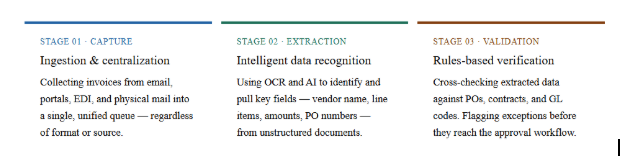
Each stage has its own technical complexity, its failure modes, and its contribution to overall cycle time. Organizations that struggle with automation have almost always underinvested in one of these three areas—usually extraction or validation— while focusing all their attention on the front-end capture layer.
Stage 1: Capture — getting every invoice into one place
Capture is the entry point of the pipeline and, for many teams, the most deceptively complex stage to get right. Suppliers don’t care about your preferred invoice format. They’ll send PDFs, scanned TIFFs, Word documents, EDI 810 transactions, XML files through supplier portals, and occasionally a fax if you’re unlucky enough to still have a fax line.
What good capture looks like
A mature capture layer handles all of these input types without requiring manual sorting or pre-processing. It should support at a minimum:
- Dedicated AP email ingestion with automatic classification (invoice vs. remittance vs. statement)
- Supplier portal uploads with acknowledgement receipts
- EDI/XML structured data import for high-volume suppliers
- Mobile or flatbed scanning for physical invoices
- ERP and procurement system integrations for PO-backed documents
Why this matters for P2P automation
Procure-to-pay automation works end-to-end only if every invoice — regardless of channel — enters the same queue. Capture fragmentation is the most common reason P2P projects fail to deliver expected ROI. A supplier who’s still emailing PDFs to three different people creates a leak in an otherwise airtight process.
Common capture pitfalls
The biggest mistake organizations make at the capture stage is centralizing most of their volume while leaving edge cases manual. That 15% of invoices that still come in through ad-hoc email threads or physical mailrooms consumes a disproportionate share of AP staff time and introduces the exact errors that automation is meant to eliminate.
The fix is usually supplier enablement: proactively migrating suppliers to a structured submission channel (typically a portal or an EDI connection) with clearly communicated requirements and onboarding support.
Stage 2: Extraction — turning documents into structured data
Once an invoice is captured, it’s typically an unstructured document: a PDF, an image, a scan. The extraction stage is where that document becomes data — specifically, the structured fields that your ERP, approval workflow, and payment system need to act on it.
How modern extraction works
Traditional extraction relied on template-based OCR: you’d define exactly where vendor name, invoice number, and total amount appeared on a given supplier’s invoice, and the system would look in those coordinates every time. This worked reasonably well for high-volume, consistent suppliers but collapsed the moment a supplier updated their invoice layout.
Modern extraction uses a combination of OCR and machine-learning models — increasingly large language models fine-tuned on invoice data — that understand context, not just position. They can correctly identify a line-item description even if the column header says “Description”, “Item”, “Service”, or nothing at all.
| Capability | Template-based OCR | AI-powered extraction |
| New supplier onboarding | Manual template creation | Automatic, zero-touch |
| Layout changes | Breaks, requires rework | Adapts automatically |
| Handwritten fields | Poor accuracy (<70%) | 85–95% with modern models |
| Line-item extraction | Fragile on multi-page invoices | Reliable across formats |
| Multi-language support | Requires per-language config | Built-in for major languages |
Key fields and why they matter
Extraction isn’t just about getting any data — it’s about getting the right fields with high confidence. The core fields that downstream validation and ERP posting depend on include: vendor name and ID, invoice number, invoice date, due date, PO/contract reference, line-item descriptions and quantities, unit prices, tax amounts, and total payable. Missing or incorrect values in any of these fields create downstream exceptions that require human review.
Extraction accuracy: a word of caution
Vendors often quote headline accuracy figures like “99.5% accuracy” — but this typically refers to character-level OCR accuracy, not field-level extraction accuracy. A field is either correct or it isn’t. Ask vendors for their field-level accuracy rates (across your specific mix of invoice formats) and their exception rate — the percentage of invoices that require human correction before they can proceed.
Stage 3: Validation — catching errors before they become problems
Extraction gives you data. Validation tells you whether that data is right. This is the stage that most directly protects your organization from overpayments, duplicate payments, fraud, and non-compliant invoices — and it’s the stage that separates sophisticated procure-to-pay automation from basic scanning tools.
The three levels of validation
1. Structural validation: Does the invoice contain all required fields? Is the invoice number present? Are dates in a valid format? Is the maths correct (line items sum to subtotal, tax applied correctly)? These checks can be run instantly and catch a surprising number of supplier errors.
2. Business rules validation: Does the invoice conform to your company’s policies? Is the vendor an approved supplier in your master vendor file? Does the currency match the contract? Is the invoiced amount within tolerance of the agreed rate? Business rules are configured per organization and can be as granular as needed.
3. PO and contract matching: This is the most valuable — and most complex — validation layer. Two-way matching (invoice vs. PO) confirms that what was invoiced was actually ordered. Three-way matching adds the goods receipt, confirming delivery. Four-way matching includes quality inspection records for relevant categories. Most organizations target 80–90% straight-through matching on PO-backed invoices as a key performance metric.
Straight-through processing: the north star metric
Straight-through processing (STP) rate measures the percentage of invoices that flow from capture to payment approval without any human touchpoint. Best-in-class AP operations achieve 85%+ STP. For most organizations starting automation, 60–70% is a realistic first-year target — enough to materially reduce AP headcount per invoice processed and accelerate payment cycles.
Exception management: making the human loop smarter
No system achieves 100% straight-through processing. What differentiates mature automation platforms is how intelligently they handle exceptions. Rather than dumping every flagged invoice into a generic queue, leading platforms route exceptions to the right reviewer with full context — the original invoice, the PO, the specific field that failed validation, and a suggested resolution — so that human review time is measured in seconds, not minutes.
What does “good” look like? Real-world benchmarks
Evaluation is challenging without reference points. Here are the benchmarks that experienced AP automation buyers use when assessing their current state and vendor claims:
| Metric | Manual / legacy | Partial automation | Full P2P automation |
| Cost per invoice | $10–15 | $5–8 | $2–4 |
| Processing cycle time | 10–20 days | 5–10 days | <3 days |
| Straight-through rate | <20% | 40–60% | 75–90% |
| Duplicate payment rate | 0.5–1.5% | 0.2–0.5% | <0.1% |
| Early payment discount capture | 20–30% | 50–65% | 80%+ |
A closer look: mini case scenario
Mid-market manufacturer — 1,800 invoices/month
Multi-entity, 3 procurement systems, mixed supplier base (EDI + email PDFs)
Before automation: 4 AP staff spending 60% of their time on data entry and exception chasing. Average cycle time of 14 days. Early payment discount capture below 25%.
After deploying a three-stage P2P automation pipeline (12 months post-implementation):
82%
Straight-through processing rate
3.2 days
Average invoice cycle time
$180K
Annual savings (cost + discounts)
How this fits into your broader P2P strategy
Invoice processing automation is part of a larger system. It sits in the middle of the procure-to-pay cycle – downstream of purchase requisition and PO creation and upstream of payment execution and supplier reconciliation. The degree to which your automation investment pays off depends heavily on what’s connected to it on both sides.
Organizations that see the highest ROI from invoice automation typically have at least partial automation in place for purchase requisition approval, PO issuance, and goods receipt confirmation. Without these upstream signals, three-way matching is impossible, and validation is limited to structural and business-rules checks only — which still delivers value but leaves the biggest efficiency gains on the table.
If your organization is earlier in the P2P maturity journey, starting with invoice automation still makes sense. It tends to have the clearest, most measurable business case, the fastest time-to-value, and the most direct supplier-facing benefit. It also creates the data foundation that makes broader P2P automation easier to justify and implement.
How to evaluate vendors and build your business case
When you’re ready to evaluate invoice automation platforms, the three-stage pipeline gives you a natural evaluation framework. Ask every vendor to demonstrate their capability at each layer specifically — not just a polished demo using their best-case invoice samples.
Questions worth asking at each stage
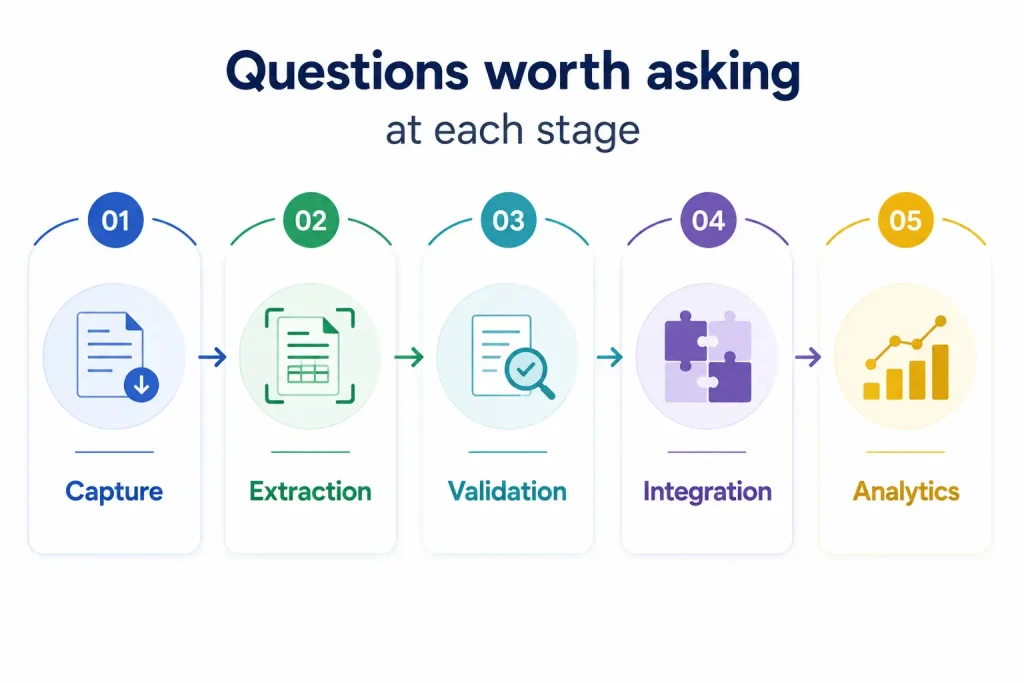
1. Capture: How does the platform handle invoices arriving through channels you didn’t configure? What’s the supplier onboarding process for EDI connections?
2. Extraction: What is your field-level accuracy rate on a mixed invoice set representative of our supplier base? What is your exception rate on first pass?
3. Validation: Which matching configurations are supported by default, and which require custom development? How are exceptions surfaced and routed to reviewers?
4. Integration: How does the platform connect to our ERP for PO data, GL codes, and payment execution? What does the implementation timeline look like?
5. Analytics: What reporting is available on cycle time, exception rates, STP rate, and early payment discount performance?
Building the business case
A credible AP automation business case has four components: current-state cost baseline (cost per invoice × volume), projected cost reduction from automation (use conservative assumptions — 60% STP rate in year one), early payment discount capture uplift (quantify the annual discount pool you’re currently missing), and implementation and ongoing licensing costs. Organizations with 500+ invoices per month typically achieve payback in 9–18 months.
A note on change management
The technical implementation of invoice automation is rarely the hardest part. Supplier enablement, AP team retraining, and ERP integration timelines are where projects slip. Budget time and resources for these accordingly—and set stakeholder expectations that first-year STP rates will increase as the system learns your invoice mix and suppliers migrate to structured submission channels.
Summing up
Invoice processing automation isn’t a single tool — it’s a three-stage pipeline, and each stage matters. Capture ensures that every invoice is accounted for. Extraction turns unstructured documents into reliable, structured data. Validation protects against overpayments, duplicates, and non-compliant invoices while maintaining an audit-ready record.
Together, these three stages are the engine of any mature procure-to-pay automation strategy. Getting them right — in sequence, with the right technology and the right process design — is what separates organizations that process invoices efficiently from those that are still firefighting at month-end.
If you’re evaluating solutions or building a business case, the benchmarks and evaluation questions in this guide give you a rigorous foundation. The next step is typically a process audit: mapping your current invoice flows, quantifying your exception rates, and identifying which of the three stages represents your biggest opportunity for improvement.
Ready to assess your current AP automation maturity?
Use our guided evaluation framework to score your capture, extraction, and validation capabilities against best-in-class benchmarks.




