








Key Takeaways
- High match rates can be misleading; exception precision is often a more reliable indicator of whether a matching solution is actually identifying costly discrepancies.
- Most GRN matching challenges stem from five recurring failure modes: quantity drift, phantom receipts, UOM mismatches, tolerance creep, and timing gaps.
- Manual matching may work at low volumes, but growing invoice counts, vendor complexity, and SKU diversity quickly create operational bottlenecks and audit risks.
- Before evaluating vendors, organizations should assess their current process using measurable criteria such as manual touch rates, matching cycle times, audit trail quality, and visibility into exceptions.
- Effective GRN matching solutions should handle cumulative receipts, unit conversions, tolerance management, exception routing, and audit-ready explainability—not just automate basic invoice matching.
If you’re reading this, manual matching has probably already cost you a few extra hours this month – chasing down a goods receipt note that doesn’t match the invoice, calling a warehouse supervisor to confirm a partial delivery, or re-keying the same PO number for the third time. You already know why automation matters. The harder question is how to evaluate it — and how to tell the difference between a vendor’s pitch and what will hold up at your volume.
This guide skips the sales-deck version. It breaks down where goods-receipt matching actually fails, gives you a way to score your process before you talk to anyone, and shows the maths you should be running yourself – not just the maths a vendor hands you.
A quick recap: what “GRN matching” really means
A Goods Receipt Note (GRN) is the internal record confirming that ordered goods have physically arrived – in what quantity, in what condition, and on what date. Goods receipt matching reconciles the GRN with the purchase order (PO) and, eventually, the supplier invoice. When all three line up, that’s three-way matching.
It sounds like simple arithmetic: ordered quantity = received quantity = invoiced quantity. It rarely is. Most of the cost in AP doesn’t come from matching that’s hard; it comes from matching that’s almost right in five specific ways.
The five ways goods receipt matching actually fails
Generic advice says, “Tolerances and partial deliveries cause problems.” That’s true but not useful. Here’s where the time actually goes:
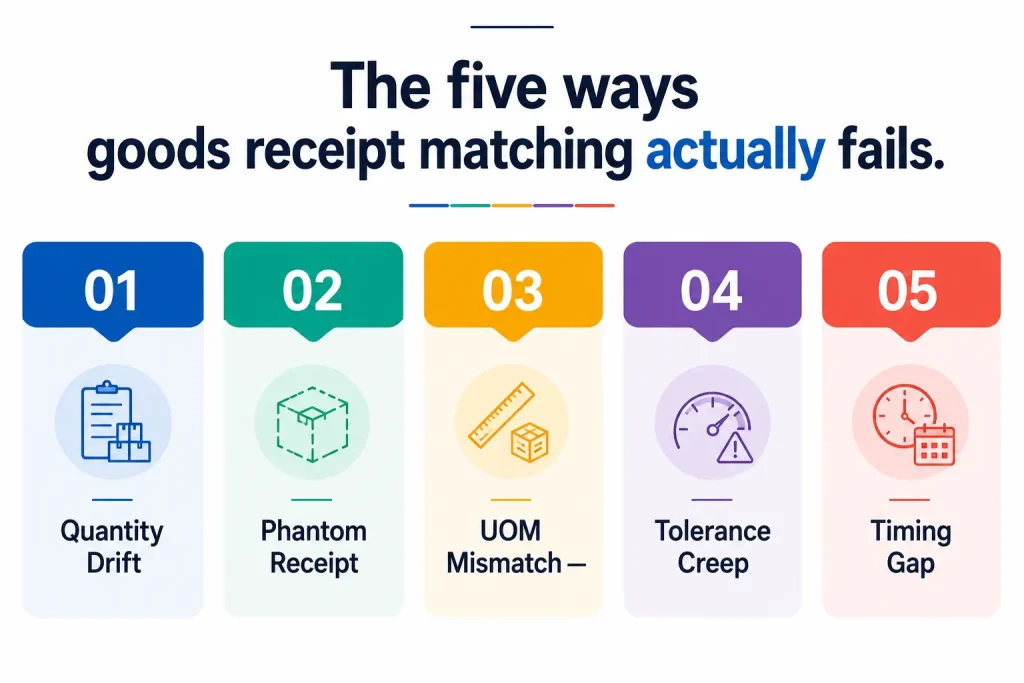
1. Quantity Drift — A single PO line gets fulfilled across multiple shipments over several weeks. Each partial GRN is correct on its own, but nothing reconciles until the last shipment lands. Automation needs to track cumulative receipt against the PO line, not match each GRN in isolation.
2. Phantom Receipt — Goods physically arrive, but the GRN gets logged late, logged against the wrong PO, or never logged at all because the receiving dock is backed up. The invoice then has nothing to match against, even though everything is technically fine. This is a process gap, not a matching-logic gap — and no matching engine fixes it without mobile or barcode-based receiving at the point of delivery.
3. UOM Mismatch — The PO says “cases”, the GRN says “units”, and the invoice says “kg”. All three are correct; none of them match without a conversion layer. This issue silently breaks more matches than price discrepancies do, and it’s the one most rule-based tools handle worst, because every vendor needs its own conversion table.
4. Tolerance Creep — Someone approves a 3% variance once. Then a 4% variance, because “it’s basically the same.” Eighteen months later, the de facto tolerance is 9%, nobody decided that on purpose, and the matching system is technically working exactly as configured — it’s just configured to ignore real cost leakage now.
5. Timing Gap — The invoice arrives before the goods receipt is entered. Reject it and you delay a valid payment; approve it and you’ve broken three-way matching’s whole premise. The right answer is usually a hold-and-notify workflow, not a binary pass/fail.
Every one of these is solvable. None of them is solved by “AI” in the abstract — they’re solved by whether a specific platform’s matching logic actually accounts for cumulative receipts, unit conversion, drift detection, and timing holds. That’s exactly what to dig into in a vendor demo, not the headline match-rate number.
The metric vendors lead with – and the one that actually matters
Most pitches open with a match-rate percentage: “94% of invoices match automatically.” It’s an easy number to make look good because the match rate goes up whenever tolerances go up. Widen the acceptable variance, and more invoices “match” — including ones that shouldn’t have.
The more honest metric is exception precision: of the invoices that should have been flagged (real quantity gaps, real price discrepancies), how many actually were? A platform with a lower headline match rate but high exception precision is usually catching real problems. A platform with a suspiciously high match rate and no tolerance creep safeguard may just be hiding them.
When you’re in a demo, ask for both numbers. If a vendor only has one of them, that tells you something too.
Why manual goods receipt matching breaks down at scale
Manual matching works at low volume. It breaks the moment you add vendors, locations, or SKUs, because the time cost is roughly linear with volume while your headcount budget isn’t.
- AP headcount scales with invoice volume, instead of staying flat
- Your most experienced AP staff spend their time on the five failure modes above, instead of higher-value work
- Early payment discounts get missed because matching takes too long to clear an invoice for approval
- Audit trails get thin — matching decisions live in an inbox or a spreadsheet comment, not a system of record
- Month-end close stretches out as unmatched invoices and accruals pile up right when finance needs clean numbers fastest
If this scenario sounds familiar, it’s not a training problem. It’s a process that was never designed for the volume it’s now carrying.
Score your own process before you talk to a vendor
Rate each line from 1 (severe problem) to 5 (no problem) based on your last full month:
| Dimension | 1 | 2 | 3 | 4 | 5 |
| % of invoices needing manual touch | >50% | 35-50% | 20-35% | 10-20% | <10% |
| Average days from invoice receipt to full match | >10 days | 6-10 | 3-5 | 1-2 | Same day |
| Active rule/tolerance configs needing manual upkeep | Constant firefighting | Monthly changes | Quarterly | Rare | None / self-tuning |
| Confidence your audit trail explains why a match cleared | No real trail | Partial, scattered | Logged but not explainable | Logged and explainable | Fully explainable, audit-tested |
| Visibility into unmatched invoices before month-end | Find out at close | A few days’ notice | Weekly view | Daily view | Real-time |
Add up your score.
- 20-25: You’re in good shape. Automation should focus on edge cases, not the whole pipeline.
- 12-19: You have a real cost problem, likely concentrated in one or two of the five failure modes above. Target those specifically.
- 5-11: Manual matching is actively costing you more than most automation platforms would — the business case should be straightforward to build.
Insert your own team’s actual scores here once you run this internally — it’s the single most persuasive number in this entire piece, and it’s yours, not a vendor’s.
From spreadsheets to AI: three approaches to goods receipt matching
| Manual matching | Rule-based automation | AI-powered matching | |
| How it works | AP staff manually compare PO, GRN, and invoice | Pre-set rules auto-match exact matches; flags the rest | Learns matching patterns, tolerances, and vendor behavior over time |
| Quantity Drift | Tracked manually, often missed | Needs explicit cumulative-tracking rules per PO type | Tracks cumulative receipt against PO automatically |
| UOM Mismatch | Manual conversion, error-prone | Needs a maintained conversion table per vendor | Learns conversions from historical matches |
| Tolerance Creep | Invisible until an audit finds it | Static; doesn’t self-correct | Can flag drift in approved variances over time |
| Audit trail | Inconsistent | Logged, but rigid | Logged and explainable |
| Best fit | Very low invoice volume | Stable vendor base, few SKUs | Multi-entity, multi-vendor, high variability |
A rule of thumb on when rule-based hits its ceiling: once you’re past roughly 150-200 invoices a month across 15-20 active vendors, the time spent writing and maintaining rules for each new vendor, UOM, and tolerance tends to grow faster than the time the rules save. Below that range, rule-based automation is often the more cost-effective, lower-lift choice. This is a heuristic, not a hard cutoff — your actual vendor mix and SKU complexity matter more than volume alone.
What to look for when evaluating a GRN matching solution
In a demo, push past “Can it match invoices?” to:
- Does it track cumulative receipts against a PO line, or just match each GRN in isolation? (This is the Quantity Drift test.)
- How does it handle unit-of-measure conversion, and who maintains that table – you, or the platform, as vendors are onboarded?
- Does it flag tolerance creep, or only enforce whatever tolerance is currently configured?
- What’s the exception workflow when something doesn’t match—does it route to the right approver with context or land in an undifferentiated queue?
- Is the matching logic explainable for audit purposes, not just a pass/fail flag?
- What’s the actual exception-precision number, not just the match-rate number, and will they show you both?
What to demand from vendor references — not just the vendor
This is the part most evaluations skip, and it’s where real evidence actually lives:
- Ask the reference for their exception-rate trend over the first 90 days, not a single end-state number. A platform that looks great at month six but took eight months to get there is a different proposition than one that worked in month two.
- Ask how many rule or tolerance configurations they’ve had to maintain since go-live, and who’s responsible for that upkeep.
- Ask whether their internal audit team has actually used the matching logic during a real audit cycle, and what came up.
- Ask for a reference in your volume range and vendor complexity, not just any logo. A 200-invoice/month reference tells you little about an 8,000-invoice/month rollout.
A vendor that’s comfortable connecting you to a reference who’ll answer these specifically is a strong signal. One that only offers a polished case study deck is not necessarily a bad sign — but it’s not evidence either.
Where to go from here
Automating goods receipt matching isn’t about removing people from the process — it’s about putting their time against the five failure modes that actually cost money, instead of against clean matches that never needed a human in the first place.
Run the scorecard. Run the math with your own numbers. Then, if you want a second set of eyes on where your specific failure modes are concentrated, we at Auxiliobits can walk through your actual invoice and receipt data in a working session. Get in touch with us without any further ado.




