







Key Takeaways
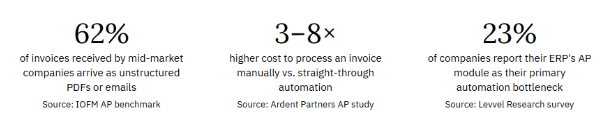
- ERP systems are designed to be systems of record, while AP automation is built to handle invoice capture, extraction, validation, and exception management before data reaches the ERP.
- Most manual effort in Accounts Payable occurs before invoice posting, making AP automation critical for improving efficiency and reducing processing costs.
- Organizations processing high invoice volumes, non-PO invoices, or multiple invoice formats often see the strongest ROI from dedicated AP automation.
- The most effective AP environments use AP automation and ERP systems together, with automation handling upstream processes and ERP managing payments, posting, and reporting.
- Key AP performance metrics such as cost per invoice, straight-through processing rate, cycle time, and exception rate should be benchmarked before evaluating automation platforms.
Your ERP Handles Finance.
It Wasn’t Built for AP.
Most finance teams discover the gap between ERP capabilities and dedicated AP invoice processing automation the hard way — after months of workarounds, manual exceptions, and a growing queue that the ERP promised to solve. This guide shows where ERP capabilities end and dedicated AP automation begins, so you can make an informed decision before you get stuck.
If you’ve ever sat through an ERP vendor demo and watched them click through a sleek invoice approval screen, you’ve probably thought, “We already have that.” And you’re right — partially. Your ERP does process invoices. It records payments. It holds your vendor master. What it doesn’t do, in most cases, is automate the work that happens before the invoice reaches the ERP.
That’s the gap. And it’s where AP invoice processing automation earns its value.
This isn’t an argument against ERPs — they’re essential infrastructure. It’s a precise map of what each system actually does well, what each does poorly, and how finance teams at different stages of maturity should think about combining both. By the time you finish this guide, you’ll have a clear framework to evaluate your own AP environment — and a set of questions to ask any technology vendor you meet.
The question isn’t “ERP or AP automation.” It’s “which problems does each system own — and where is the gap between them in my specific operation?”
What ERPs were actually designed to do
Enterprise Resource Planning systems were built as systems of record. Their core purpose is consolidating financial data — general ledger, payables, receivables, payroll, and procurement — into a single authoritative source that supports reporting, compliance, and period-end close.
That’s a different mission than processing efficiency. ERPs are optimised for accuracy and auditability, not for speed and exception handling. When SAP, Oracle, NetSuite, or Dynamics were architected, the assumption was that invoices would arrive in structured formats, from known vendors, with clean data. The system stores the result of invoice processing. It was never intended to perform the upstream work of getting an invoice to that state.
Where ERP AP modules genuinely deliver
- Three-way matching on PO-based invoices in structured formats (EDI, supplier portals)
- Payment scheduling, approval workflows, and disbursement tracking
- Vendor master management and banking detail records
- GL coding for invoices with clear account mappings
- Audit trails, period-end accruals, and compliance reporting
Where ERP AP modules consistently fall short
- Unstructured invoice capture — PDFs, emails, scanned paper, portal downloads
- Intelligent data extraction and validation before ERP entry
- Exception management at scale (mismatches, missing POs, duplicate detection)
- Real-time processing status visibility for vendors and internal stakeholders
- Non-PO invoice routing with dynamic approval logic
- Multi-format remittance matching across complex payment scenarios
This isn’t a criticism of ERP vendors — it reflects a fundamental design trade-off. Systems built for data integrity and compliance aren’t optimised for the ambiguous, variable, high-volume work of preprocessing invoice data. That’s precisely what dedicated AP invoice processing automation was built to handle.
Capability map: ERP vs. dedicated AP automation
The table below maps 18 key capabilities across the full AP invoice processing lifecycle. This is the framework we recommend finance teams use when assessing their own technology gaps — not to identify what to replace, but to understand what each system genuinely owns.
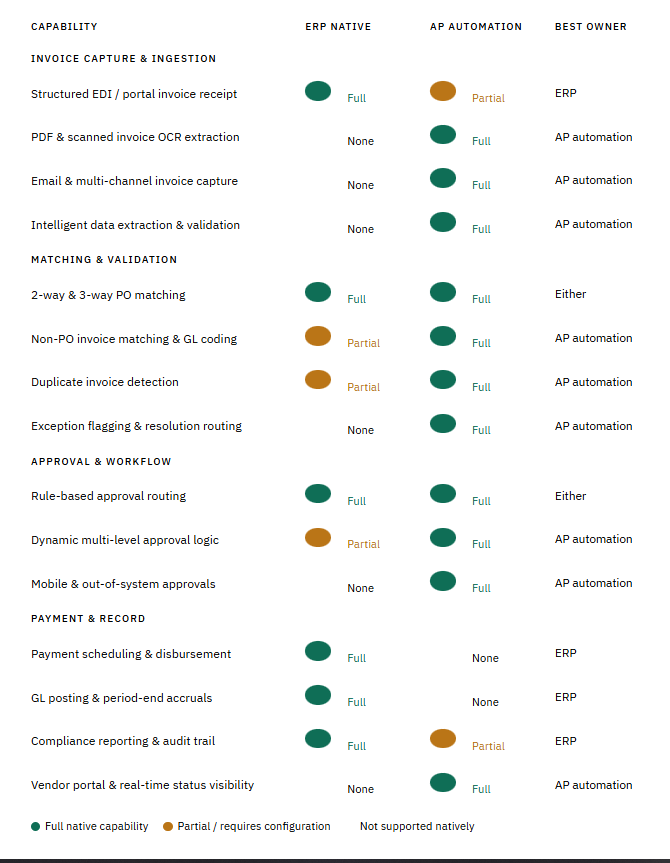
The pattern is clear: ERPs own the downstream — payment, posting, reporting. AP automation owns the upstream — capture, extraction, validation, and exception handling. The two systems are complementary by design, not competitive.
Where the handoff happens: the AP invoice processing lifecycle
A useful way to think about the ERP-versus-automation question is to map the full lifecycle of a single invoice — from the moment it arrives to the moment it’s posted in your GL. The handoff point between AP automation and ERP isn’t arbitrary; it’s structural.
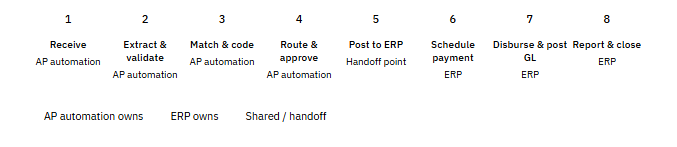
Notice that the first four stages — where most of the manual work, exception handling, and processing cost lives — are entirely in the AP automation domain. The ERP doesn’t see the invoice until it’s clean, matched, approved, and ready to post. That division of responsibility is intentional: it means your ERP stays accurate because only validated data enters it.
AP automation doesn’t compete with your ERP. It acts as the quality filter that makes your ERP more reliable — because nothing unverified reaches it.
The “good enough” trap: when ERP AP modules create hidden costs
The most common objection finance teams raise when considering dedicated AP invoice processing automation is “Our ERP already does this.” It’s worth examining that assumption carefully — not because it’s wrong, but because “does this” is doing a lot of heavy lifting.
ERP AP modules process invoices. They do not automate the work that precedes processing. That distinction matters because the hidden cost of AP operations lives almost entirely in pre-processing: the time spent gathering, extracting, validating, and routing invoices before they can enter the ERP.
Scenario A: 500 invoices/month, predominantly PO-based, structured formatsERP likely sufficient
If the vast majority of your invoices arrive via EDI or structured supplier portals, with PO references, and your vendor base is stable and relatively small — your ERP’s native AP module may be adequate. The structured data flow reduces the extraction and validation burden. Evaluate AP automation only if your exception rate exceeds 15% or your team is growing faster than your invoice volume.
Scenario B: 1,000–5,000 invoices/month, mixed formats, 30%+ non-POAP automation gap likely significant
At this volume and format mix, your team is almost certainly performing significant manual extraction, validation, and exception handling before invoices reach the ERP. The ERP sees clean data because your AP team works hard to make it clean — not because the process is automated. This is the profile where dedicated AP invoice processing automation delivers the clearest measurable ROI.
Scenario C: 5,000+ invoices/month, multi-entity, global vendors, complex approval chains ERP-only approach unsustainable
At this scale, the absence of a dedicated AP automation layer creates compounding risk: processing delays that cascade into payment terms violations, duplicate payment exposure across entities, audit trail gaps, and an AP team operating permanently in reactive mode. The question here isn’t whether to implement AP automation — it’s which platform and integration architecture to prioritise.
AP maturity model: matching technology to your stage
Not every organisation needs the same solution. A useful way to frame the ERP vs. AP automation decision is through the lens of AP maturity — where your operation sits today and where the gaps appear as you scale.
Stage 1 — Manual
Spreadsheets and email: Invoice processing is largely manual. Limited ERP integration. The process has a high error rate, low visibility, and is entirely reactive. Typically under 300 invoices/month.Priority: ERP implementation first
Stage 2 — ERP-dependen
ERP as the automation layer: ERP handles posting and payment. Pre-processing is still manual. Team size grows proportionally with invoice volume. 300–1,500 invoices/month.Priority: Start evaluating AP automation now
Stage 3 — Partially automated
Some automation, many gaps: OCR or basic capture is in place, but exceptions route manually. AP automation handles some invoice types but not all. 1,500–6,000 invoices/month.Priority: Extend AP automation coverage, integrate deeply with ERP
Stage 4 — Touchless processing
Straight-through processing at scale: 95%+ straight-through rate. AP automation and ERP fully integrated. Team handles genuine exceptions only. AP should be viewed as a strategic function, not as an operational bottleneck.
Priority: Optimise for cost per invoice and exception rate
Most mid-market companies sit at Stage 2 or early Stage 3 — where the ERP is doing its job, but the AP team is filling the gap between the ERP’s capabilities and the reality of how invoices actually arrive. That gap is exactly where AP invoice processing automation creates value that the ERP cannot.
The integration question: does adding AP automation mean replacing your ERP?
This concern surfaces in almost every AP technology evaluation, and it’s worth addressing directly. No — dedicated AP automation does not replace your ERP, and it shouldn’t. The two systems serve fundamentally different purposes and operate at different points in the invoice lifecycle.
Purpose-built AP invoice processing platforms are designed to sit in front of your ERP, not alongside or against it. They handle the upstream work — capture, extraction, validation, matching, approval — and pass clean, structured, approved records into the ERP via API integration. The ERP receives better data, faster, with less manual intervention. Both systems perform better together than either does alone.
That said, integration quality varies significantly between AP automation vendors. The right question to ask during evaluation isn’t “does it integrate with our ERP?” — virtually all platforms claim this — but rather: how deeply, how bidirectionally, and how close to real-time does that integration operate? A one-way nightly batch sync produces very different operational outcomes than a real-time bidirectional API connection.
Key questions for your ERP-AP integration evaluation
1. Does the AP automation platform push approved invoices to your ERP in real time, or via scheduled batch?
Real-time API: GL codes, vendor data, and approval status sync instantly. Vendor queries can be answered accurately within minutes of payment posting.
Batch sync: Creates lag between AP automation state and ERP state. Vendor-facing status accuracy suffers. Exception resolution is delayed.
2. Can the platform pull live data from your ERP — PO status, vendor master, GL codes — without manual export/import?
Bidirectional: AP automation can validate invoice data against live ERP records. Matching is accurate. No duplicate vendor master maintenance.
One-directional: Requires manual data synchronisation. Creates risk of stale reference data. ERP becomes a silo rather than a shared source of truth.
3. Does the platform have a pre-built connector for your specific ERP, or does integration require custom development?
Pre-built connector: Faster implementation, lower risk, predictable maintenance. Vendor owns the connector update cycle when ERP versions change.
Custom development: Adds implementation cost, timeline risk, and ongoing maintenance burden. Your IT team owns the integration, not the vendor.
Building the internal business case: what to benchmark before your next vendor meeting
Before entering any AP automation vendor evaluation, finance teams need a baseline picture of their current AP invoice processing performance. Without this, it’s impossible to evaluate claims made by vendors — or to build a credible internal business case for the investment.
The four metrics that matter most at the evaluation stage are
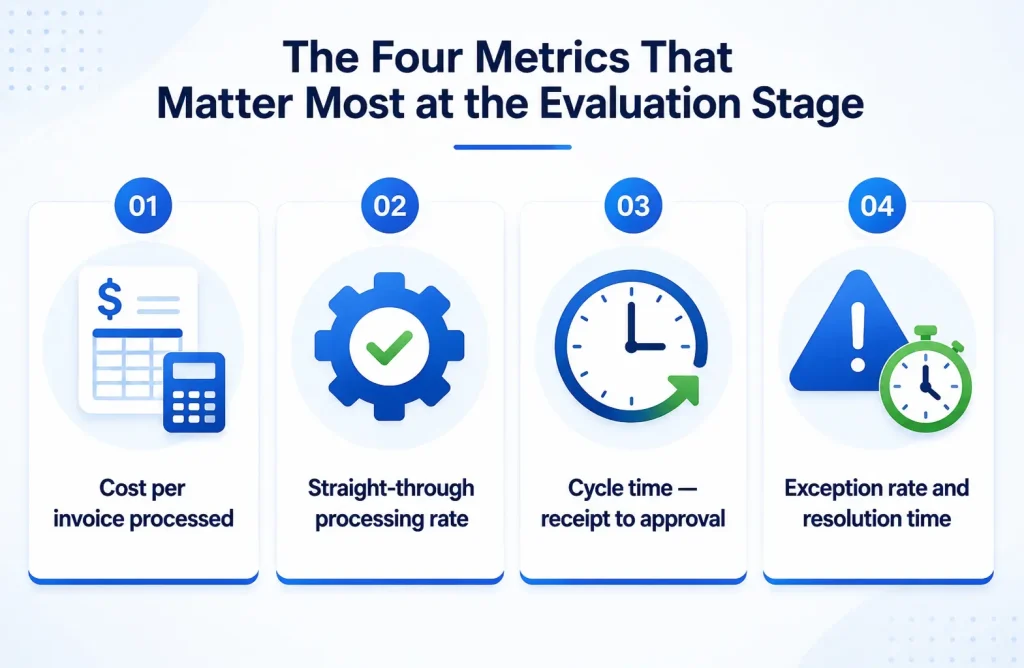
1. Cost per invoice processed
The fully loaded cost of processing a single invoice from receipt to GL posting — including staff time for data entry, exception handling, approval chasing, and vendor queries. Industry median for manual processing sits at $12–18 per invoice. Automated environments achieve $2–4. The gap between your current number and the benchmark is the primary lever in any ROI model.
2. Straight-through processing rate
The percentage of invoices that move from receipt to ERP posting without any manual intervention. Most ERP-only environments achieve 20–40% straight-through on clean PO-based invoices. Purpose-built AP automation targets 85–97% across all invoice types. This metric is the clearest indicator of where your team’s time is actually going.
3. Cycle time — receipt to approval
How many days pass between an invoice arriving and it being fully approved and queued for payment? Manual environments average 12–18 days. Automated environments operate at 2–4 days. The delta matters for two reasons: early payment discount capture, and vendor relationship quality.
4. Exception rate and resolution time
What percentage of invoices require manual intervention — mismatches, missing data, routing failures — and how long does it take to resolve each exception? High exception rates are the most reliable signal that your current AP invoice processing layer is under-equipped for the volume and format mix you’re managing.
What “good” looks like: the integrated AP stack
Organisations that have successfully resolved the ERP vs. AP automation tension don’t see it as a choice — they see it as an architecture. The ERP is the system of record. The AP automation platform is the processing engine. Together, they form a stack where each component does what it was designed to do.
In practice, that means:
- Every invoice, regardless of format or channel, enters the AP automation platform first
- Data extraction, validation, and matching happen before any human sees the invoice
- Exceptions are routed with context pre-loaded — the approver sees the invoice, the PO, the discrepancy, and suggested resolution in one view
- Only clean, approved records cross the API boundary into the ERP
- The ERP’s AP module handles payment, GL posting, and reporting — the work it was designed for
- Vendors interact with a portal that reflects real-time data from both systems
The teams that reach this architecture don’t describe it as a technology project. They describe it as the moment their AP function stopped being a bottleneck and started being an asset.
The ERP-plus-AP-automation stack isn’t about adding technology for its own sake. It’s about ensuring each part of your invoice processing chain is handled by a system designed for that work, with seamless handoffs between them.
Summary: the honest evaluation framework
If you’re currently weighing whether your ERP’s AP module is sufficient or whether dedicated AP invoice processing automation belongs in your technology roadmap, the answer depends on four honest assessments of your current operation:
- What percentage of your invoices arrive in unstructured formats — PDFs, emails, scanned documents — that require human interpretation before they can be entered into the ERP?
- What is your current exception rate, and how much of your team’s week is spent resolving exceptions rather than processing clean invoices?
- Is your AP headcount growing proportionally with invoice volume — and if so, is that a sustainable trajectory?
- Are you consistently capturing early payment discounts, or is processing cycle time the barrier?
If the answers to questions 1, 2, and 3 point to a significant manual workload before the ERP, the gap is likely larger than your ERP vendor’s roadmap will close. That’s not a failing of your ERP — it’s a structural limitation of what general-purpose financial systems were designed to do.
The next step isn’t a vendor demo. It’s building a clear picture of your baseline — so that when you do evaluate platforms, you’re comparing specific outcomes to specific metrics, not marketing claims to gut feeling.
Ready to benchmark your AP operation?
Before any vendor conversation, the most valuable 30 minutes you can spend is mapping your current cost per invoice, straight-through rate, and exception volume. We’ve built a structured worksheet to help.
Book My AP Assessment ↗
Calculate My ROI ↗




