








Key Takeaways
- Finance process automation goes beyond eliminating manual tasks by automating data capture, approvals, reconciliations, reporting, and financial workflows while maintaining compliance, auditability, and internal controls.
- Finance automation maturity progresses through four stages—from manual processes to adaptive AI-driven automation—and identifying the maturity of each finance process helps prioritize the highest-impact automation opportunities.
- The business value of finance automation extends beyond labor savings to include stronger cash flow management, improved working capital, reduced payment errors, enhanced fraud prevention, and better audit readiness.
- Successful automation projects focus on exception handling, seamless ERP integration, configurable workflows, and measurable touchless processing rates rather than relying solely on AI-powered features or marketing claims.
- Organizations achieve the best long-term results by continuously optimizing automation rules, monitoring process performance, and treating finance automation as an ongoing transformation rather than a one-time implementation.
Ask five finance leaders to define “finance automation” and you’ll get five different answers. One means the OCR tool is bolted onto accounts payable. The other means a fully orchestrated close process. A third means a chatbot that answers “where’s my invoice?” questions. None of them are wrong — but none of them are the whole picture either.
That vagueness is a problem. Vendors sell “automation” the way restaurants sell “fresh” – as a word that sounds good and means almost nothing until you ask what’s actually on the plate. If you’re evaluating tools, building a business case, or trying to figure out why your last automation project underdelivered, you need a sharper definition than the marketing copy gives you.
This guide breaks finance process automation into its real components, gives you a framework to place your own team on a maturity spectrum, and shows you how to think about the ROI case – so that when you do sit down with vendors, you’re asking better questions than “does it use AI?”
A Working Definition
Finance process automation is the use of software to execute finance and accounting tasks – data capture, matching, routing, calculation, posting, and reporting – without a human performing each step manually, while preserving the controls, audit trail, and exception handling that a finance function requires.
The key phrase is the second half of this definition. Automation that strips out controls to move faster isn’t automation — it’s risk with better UX. Anything calling itself finance automation should be judged on both speed and whether it holds up under audit, not just the former.
Under that definition, finance automation isn’t one tool. It’s a layer that can sit across almost every recurring finance process:
- Accounts payable — invoice capture, PO matching, approval routing, payment scheduling
- Accounts receivable — invoice generation, dunning, cash application, collections prioritization
- Reconciliation — bank recs, intercompany recs, sub-ledger to GL matching
- Close and consolidation — journal entry automation, variance analysis, checklist orchestration
- Reporting — data aggregation, board deck generation, management reporting
- Expense and travel — receipt capture, policy checks, reimbursement
Most companies don’t automate all of these at once. They automate in layers, and which layer you’re on says a lot about how much value you’re actually capturing.
The Four Stages of Finance Automation
Rather than treating automation as binary — automated or not — it’s more useful to think of it as a spectrum. Most finance teams sit somewhere between the first and third stage without realizing how much room is left above them
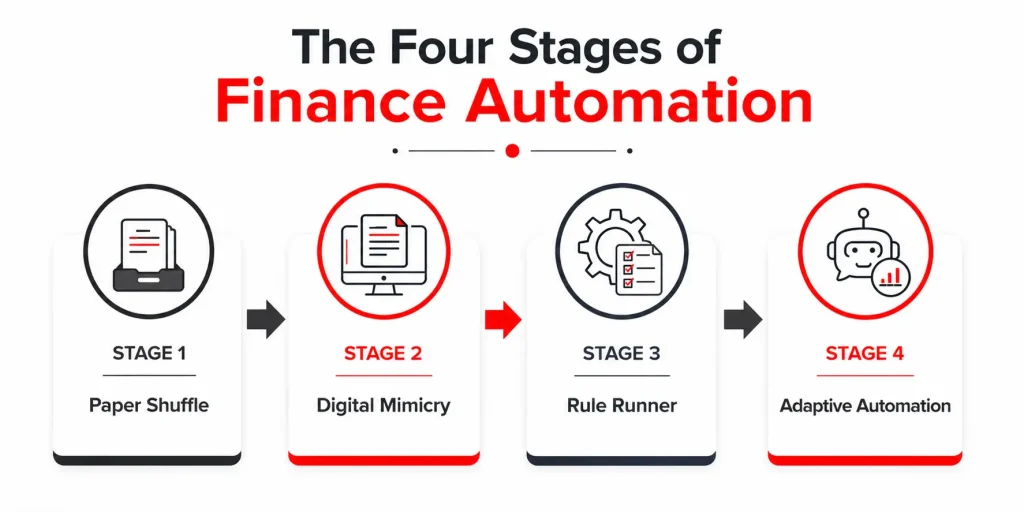
Stage 1 — Paper Shuffle. Work happens in spreadsheets, email, and physical or scanned documents. Data is re-keyed at every handoff. Nothing talks to anything else. This is where most finance functions start and where a surprising number still live for at least part of their process.
Stage 2 — Digital Mimicry. Paper forms became PDF forms, which became web forms, but the underlying workflow is untouched — a human still reads, decides, and routes every item. This stage feels modern because the interface improved, even though the labor didn’t shrink. It’s the stage most likely to get mistaken for “automated” during a sales demo.
Stage 3 — Rule Runner. Deterministic logic now handles the predictable path: a three-way match within tolerance, recurring journal entries, and standard approval chains under a threshold. Exceptions still land on a human’s desk, but the majority of volume — often 70-85% for a mature AP process — moves without touch. This is where most finance automation deployments plateau.
Stage 4 — Adaptive Automation. The system doesn’t just execute rules; it improves them – learning coding patterns, flagging anomalies before they become reconciling items, and routing exceptions to the right person based on resolution history rather than a static org chart. Few finance functions are fully here, but most of the ROI in modern finance automation lives in the gap between Stage 3 and Stage 4.
Knowing which stage a given process sits at – not your finance function as a whole, since AP might be at Stage 3 while intercompany recs are still at Stage 1 – is more useful than any vendor’s maturity model, because it’s yours, not theirs.
Where Does Your Finance Function Actually Sit?
Score each process area honestly. Most teams find they’re not uniform anywhere — and that unevenness is usually where the next automation investment should go.
| Process Area | Lagging | Average | Leading |
| Invoice processing | Manual keying, paper/email intake | OCR capture, manual matching | Touchless 3-way match with rule-based exception routing |
| Approvals | Email chains, no audit trail | Workflow tool, static rules | Dynamic routing based on risk/amount/history |
| Reconciliation | Manual spreadsheet matching | Templated recs, manual sign-off | Auto-matched with system-flagged exceptions only |
| Close process | Ad hoc checklist, tribal knowledge | Standardized checklist, manual tracking | Orchestrated workflow with real-time close status |
| Reporting | Manual data pulls into decks | Templated dashboards, some manual refresh | Live, self-service reporting with drill-down |
If most of your rows land in “Average”, that’s not a failure — it’s the most common starting point for a MOFU evaluation. The honest next question is which row, if moved to “Leading”, would yield the greatest time and risk reduction for the effort involved. That’s usually a better first automation project than trying to move everything at once.
What the ROI Case Actually Looks Like
Conversations about the ROI of finance automation often get derailed by vague claims — “save 40% of processing time” — without showing the arithmetic. Here’s an illustrative example for a mid-sized AP function, built to show the shape of the calculation rather than a number you should copy-paste into your own business case.
Illustrative example — AP automation for a company processing 4,000 invoices/month:
- Manual processing cost: ~12 minutes per invoice at a fully loaded cost of $35/hour ≈ $7/invoice
- At Stage 3 automation (70% touchless rate), average cost drops to roughly $2.80/invoice blended across automated and exception volume
- Monthly savings: (4,000 × $7) − (4,000 × $2.80) ≈ $16,800/month, before accounting for early-payment discounts captured or late-payment penalties avoided
The real business case has three components, not one:
- Labor cost avoided — the number above, and the easiest to quantify
- Working capital impact — faster processing means more early-payment discount capture and fewer late fees; this is often larger than the labor savings but gets left out of business cases because it’s less obvious
- Risk reduction — fewer duplicate payments, faster fraud detection, cleaner audit trails; hard to put a single number on, but real enough that most CFOs weight it heavily in the decision
If a vendor’s ROI pitch only covers labor savings, ask them to walk through the other two. That’s usually where the actual disagreement between vendors — and the actual differentiation — lives.
Common Misconceptions Worth Retiring
Some of the most common misconceptions are:
- “Automation means AI.” Most of the value in finance automation still comes from Stage 3 rule-based processing, not machine learning. AI helps most at the edges — anomaly detection, coding suggestions — not as a replacement for solid deterministic logic.
- “It replaces headcount.” In most implementations, it reallocates headcount from data entry and chasing approvals toward exception handling, analysis, and vendor/customer relationship work — often without a net reduction in team size, especially in growing companies.
- “It’s a one-time project.” Rule sets, approval thresholds, and exception patterns drift as the business changes. Finance automation that isn’t revisited quarterly degrades back toward Stage 2 without anyone noticing, because the interface still looks automated even as more exceptions quietly get routed to manual handling
What to Look for When Evaluating Finance Automation Platforms
Once you know your position on the spectrum and which process is the priority, the evaluation questions become sharper:
- Does it show its work? Ask to see the audit trail for a single transaction, end to end, not just a summary dashboard.
- How does it handle exceptions, not the happy path? Every vendor demo nails the clean invoice. Ask what happens with a duplicate, a partial match, or a vendor name mismatch.
- What’s the actual touchless rate, not the theoretical one? Ask for a reference customer with a similar transaction profile and get their real number.
- Can it flex without a services engagement? Rule and threshold changes that require a vendor ticket every time slow you back down toward Stage 2 behavior even on Stage 3 tooling.
The Takeaway
Finance process automation isn’t a single feature or a single tool – it’s a spectrum your processes move along, unevenly, over time. The teams that get the most value aren’t the ones with the most automated-sounding tech stack; they’re the ones who know precisely which processes sit where, what moving each one up a stage is actually worth, and what “automated” needs to mean for their audit and control requirements.
That clarity is worth having before the first vendor call, not after.




