







Key Takeaways
- Manual supplier onboarding creates hidden costs through delays, compliance risks, data errors, and excessive administrative effort across procurement, finance, and compliance teams.
- Supplier onboarding automation streamlines the entire lifecycle—from supplier registration and document collection to compliance screening, approvals, ERP integration, and ongoing monitoring.
- Organizations that automate onboarding can significantly reduce cycle times, lower operational costs, improve supplier experience, and strengthen regulatory compliance.
- Successful implementations depend on redesigning workflows, ensuring strong data governance, planning for re-certification requirements, and maintaining clear communication with suppliers.
- The strongest business cases combine labor savings, compliance risk reduction, and faster supplier activation to demonstrate measurable ROI and long-term business value.
Slow, manual supplier onboarding automation costs more than time, it delays first transactions, creates compliance gaps, and quietly damages supplier relationships before they begin. This guide covers exactly how supplier onboarding automation works, what to compare across solution types, and what realistic ROI looks like in practice.
Every new supplier your organisation adds goes through the same process: forms sent by email, documents chased across departments, compliance checks run manually, bank details entered into ERP by hand, and approval chains that stall when the right person is unavailable.
It feels manageable until you examine the aggregate. Organisations adding dozens or hundreds of suppliers per year are running a process with compounding inefficiencies — and the costs sit across multiple functions, making them easy to overlook in any single budget line.
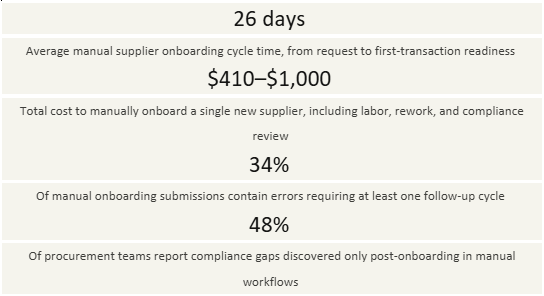
The downstream costs are just as significant. When a new supplier isn’t onboarded correctly — wrong payment terms, missing tax documentation, or incomplete risk classifications — the errors surface later as invoice exceptions, payment delays, or audit findings. The cost of fixing them at that stage is 3–5x higher than catching them during onboarding.
Why this matters now: Supply chain diversification trends, ESG reporting requirements, and tightening payment regulation (particularly in the EU and UK) are all increasing the compliance burden on supplier onboarding. The volume and complexity of what must be collected, verified, and maintained is growing — which makes manual onboarding processes increasingly untenable at scale.
How supplier onboarding automation works
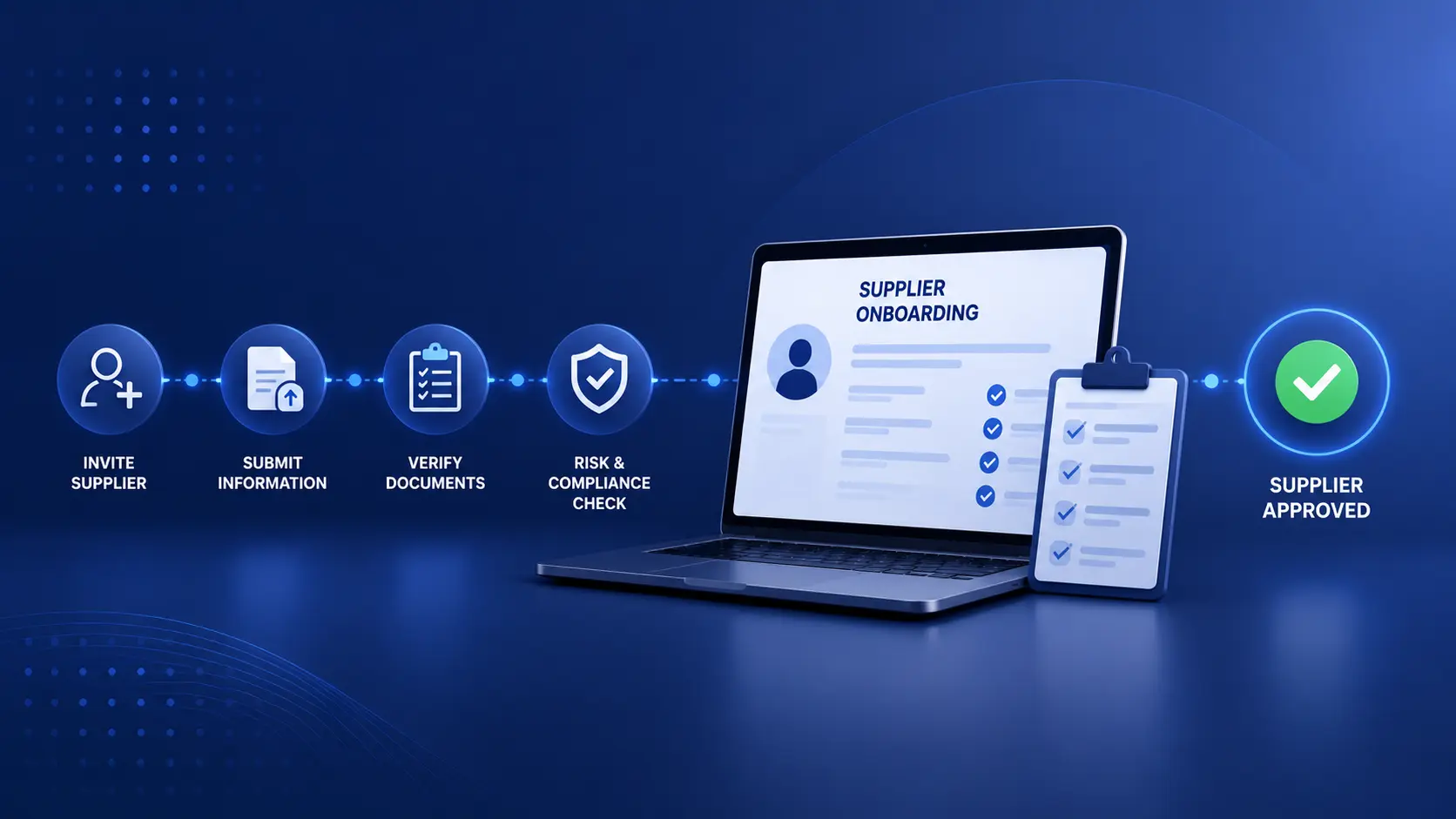
Supplier onboarding automation replaces the manual hand-offs, data re-entry, and email-based coordination in your current process with structured digital workflows. A modern platform handles these stages end-to-end:
1. Supplier self-service intake portal
New suppliers are invited via a branded portal where they complete registration; upload required documents (certificates, W-9s, insurance, and bank details); and accept terms — eliminating the back-and-forth of email-based collection.
2. Automated data validation and completeness checks
The system validates submissions in real time: mandatory fields are enforced, document types are verified, and tax ID formats are checked against country-specific rules. Incomplete submissions bounce back to the supplier automatically before they enter your review queue.
3. Compliance screening and risk scoring
Submissions are screened automatically against sanctions lists, adverse media databases, and configurable risk criteria. High-risk suppliers are flagged for enhanced due diligence; standard suppliers are cleared for the next stage without requiring manual review.
4. Approval routing and stakeholder sign-off
Based on supplier category, spend tier, or risk classification, approval tasks are routed automatically to procurement, legal, finance, or compliance stakeholders. Escalation rules trigger if approvers don’t act within defined windows.
5. ERP provisioning and master data creation
Once approved, validated supplier data is pushed directly to your ERP, accounts payable system, or procurement platform — creating the vendor record without manual data entry and eliminating the transcription errors that come with it.
6. Ongoing monitoring and re-certification
The platform tracks certificate expiry dates, triggers re-certification workflows when documents lapse, and re-screens suppliers against sanctions lists on a scheduled basis — keeping your supplier base compliant without manual calendar management.
Solution types: what to compare before you shortlist
The supplier onboarding automation market ranges from standalone supplier portals to full procure-to-pay suites with embedded onboarding modules. Understanding where each type fits saves significant time during vendor evaluation.
| Solution type | Best fit | Key strengths | Limitations | Time to value |
| Standalone supplier portal e.g. Tealbook, Supplier.io | Orgs wanting rapid deployment without replacing existing ERP | Fast setup, supplier-friendly UX | Limited workflow depth; ERP sync often requires custom work | 4–8 weeks |
| P2P suite onboarding module e.g. Coupa, Ivalua, Jaggaer | Mid-large orgs already invested in a P2P platform | Native integration with sourcing & PO workflows | Onboarding module quality varies by vendor; implementation 6–18 months | 6–18 months |
| ERP-native vendor management e.g. SAP SLC, Oracle SIM | Enterprises deeply committed to SAP or Oracle | Tightest ERP data integrity | Rigid configuration; supplier portal UX often poor | 12–24 months |
| Mid-market SRM tools e.g. Precoro, Gatekeeper, Zip | 50–500 employee organisations; faster procurement cycles | Affordable, modern UX, rapid deployment | May lack advanced risk screening or complex workflow logic | 2–6 weeks |
| Compliance-led platforms e.g. Hellios, Achilles, Veriforce | Regulated industries (energy, pharma, public sector) | Deep sanctions screening, audit-ready documentation | Less flexible for general procurement workflows | 8–16 weeks |
Critical evaluation question: When comparing platforms, ask each vendor to demonstrate their exception-handling workflow — specifically, what happens when a supplier submits a document that fails validation, or when a screening match is flagged. Platforms that handle exceptions gracefully and give your team clear resolution paths are worth more than those with polished intake flows but poor remediation UX.
Case study: a global distributor’s onboarding transformation
To illustrate what supplier onboarding automation delivers in practice, consider a mid-sized distribution company with operations across five countries, adding approximately 180 new suppliers per year. Their onboarding process was managed through email and spreadsheets, with compliance checks run manually by a two-person vendor management team.
Global distribution company — 14-month automation programme
~600 employees · 180 new suppliers/year · 5-country operations
Starting state: 26-day average onboarding cycle, manual sanctions screening, ERP vendor records created by hand, two FTEs dedicated exclusively to supplier onboarding administration.
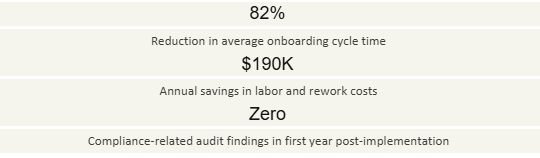
The programme was structured in three phases. Phase one focused on the supplier intake portal and data validation (weeks 1–8). Phase two added automated compliance screening integrated with third-party sanctions databases (weeks 9–20). Phase three completed ERP provisioning integration and launched ongoing re-certification workflows (months 6–14).
Phase 1 · Weeks 1–8
Intake & validation h3
The supplier portal is live. 34% reduction in incomplete submissions in first month.
Phase 2 · Weeks 9–20
Compliance screening
Automated sanctions checks. Vendor team redeployed to strategic relationship work.
Phase 3 · Months 6–14
ERP integration & monitoring
Full ERP sync live. Re-certification workflows launched. Cycle time at 4.6 days.
“We were so focused on the efficiency gains that we underestimated the compliance value. Automated screening caught two sanctions matches in the first three months that our manual process would almost certainly have missed.”
— Head of Procurement, global distribution company
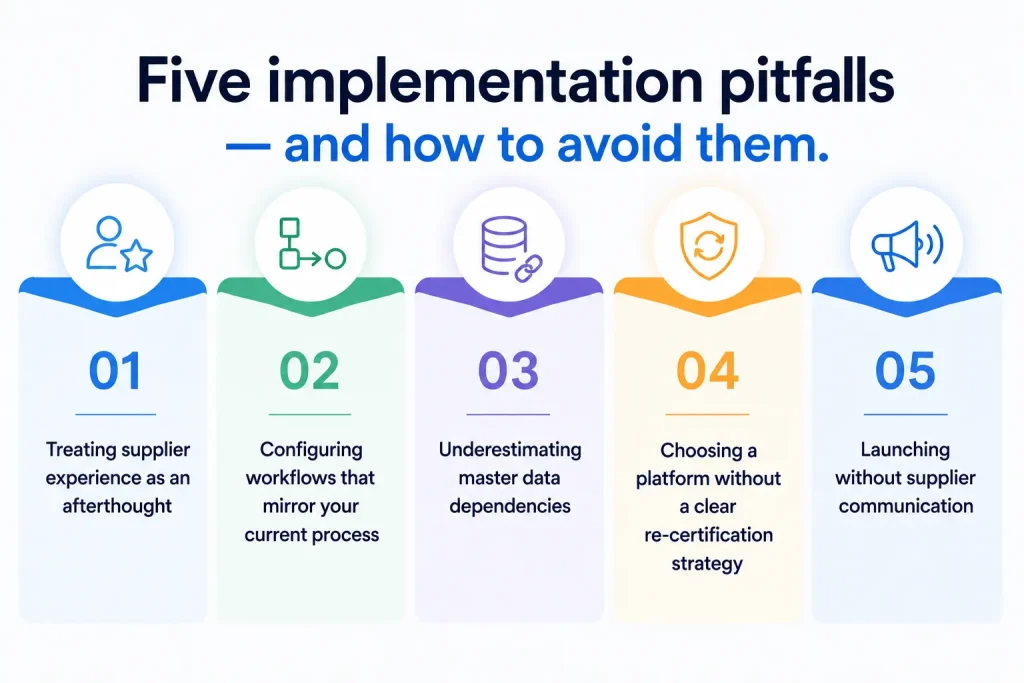
Five implementation pitfalls — and how to avoid them
Supplier onboarding automation projects that underperform almost always trace back to the same set of avoidable decisions. Here is what to watch for.
1. Treating supplier experience as an afterthought
Your automation is only as effective as the quality of the data that suppliers submit through it. Portals with confusing navigation, unclear field requirements, or broken mobile flows produce exactly the kind of incomplete, error-prone submissions you were trying to eliminate. Pilot your portal with three to five actual suppliers before go-live – not just internal testers.
2. Configuring workflows that mirror your current process
Implementation is the moment to question whether your existing approval chains, document requirements, and risk tiers still make sense. Organisations that digitise their current process without redesigning it automate the inefficiencies rather than removing them. Bring procurement, legal, and finance into a workflow design session before any configuration begins.
3. Underestimating master data dependencies
Automated ERP provisioning is only as reliable as the data mapping between your onboarding platform and your ERP. Spend time upfront defining exactly how supplier categories, payment terms, GL codes, and tax classifications should flow between systems. Misaligned mappings discovered post-go-live require expensive rework.
4. Choosing a platform without a clear re-certification strategy
Many teams invest heavily in the initial onboarding flow and overlook what happens after a supplier is approved. Insurance certificates expire. Business registrations lapse. Risk profiles change. Select a platform with native re-certification workflow capability — and define your re-certification triggers before you sign a contract.
5. Launching without supplier communication
Suppliers who receive an unexpected portal invitation with no context will frequently ignore it, submit incomplete information, or call your team directly — undermining your automation from day one. Build a simple supplier communication program: an introduction email explaining the new process, an FAQ document, and a named contact for technical questions.
Pre-evaluation checklist for your team
Before you begin vendor conversations or build an internal business case, use this checklist to establish the baseline information your evaluation will need.
Document your current average onboarding cycle time, cost per onboarding, and error/rework rate as a baseline
- Map all document types and data fields currently collected from new suppliers across all geographies
- Identify which compliance checks are mandatory (sanctions, credit, insurance) vs. discretionary
- Confirm which ERP or AP systems any solution must integrate with, and assess available integration methods (API, native connector, middleware)
- Establish your annual new supplier volume and the breakdown by supplier type and geography
- Define your re-certification requirements: which documents need renewal, and how frequently
- Identify all internal stakeholders who currently participate in supplier approval and confirm their appetite for a new workflow
- Assign a named business-side project owner with cross-functional authority before vendor demos begin
Building your business case
The most persuasive internal business cases for supplier onboarding automation combine three categories of ROI: direct labor savings (FTE time freed from manual administration), compliance risk reduction (quantified as potential fine exposure avoided), and speed-to-activation value (revenue or savings enabled by faster supplier readiness). Build all three into your model — the compliance and speed arguments often outweigh the labor savings alone.
How to move forward from here
The next step depends on where your team is in the evaluation process.
Still building the internal case?
Run a 30-day manual audit: track cycle time, staff hours, and error rates for every supplier onboarded. Internal data from your own process is far more persuasive to leadership than industry benchmarks — and often reveals costs that weren’t previously visible.
Actively shortlisting solutions?
Prioritise vendors with confirmed ERP connectors for your specific system, built-in re-certification workflows, and customer references in your sector. In demos, always test exception handling — not just the clean path. Ask for median time-to-value, not just time-to-go-live.
Ready to plan implementation?
Structure a phased rollout: intake portal and validation first, compliance screening second, ERP provisioning third. Each phase delivers measurable value independently and builds internal confidence before the next layer of complexity is added.
Are you ready to scope supplier onboarding automation for your organisation? Get a tailored breakdown based on your supplier volume, current process, and tech stack — in plain language, without a sales pitch. Wait no more and estimate your ROI.




