







Key Takeaways
- Manual purchase order processes create significant costs through labor-intensive approvals, frequent errors, delayed procurement cycles, and inefficient invoice reconciliation activities.
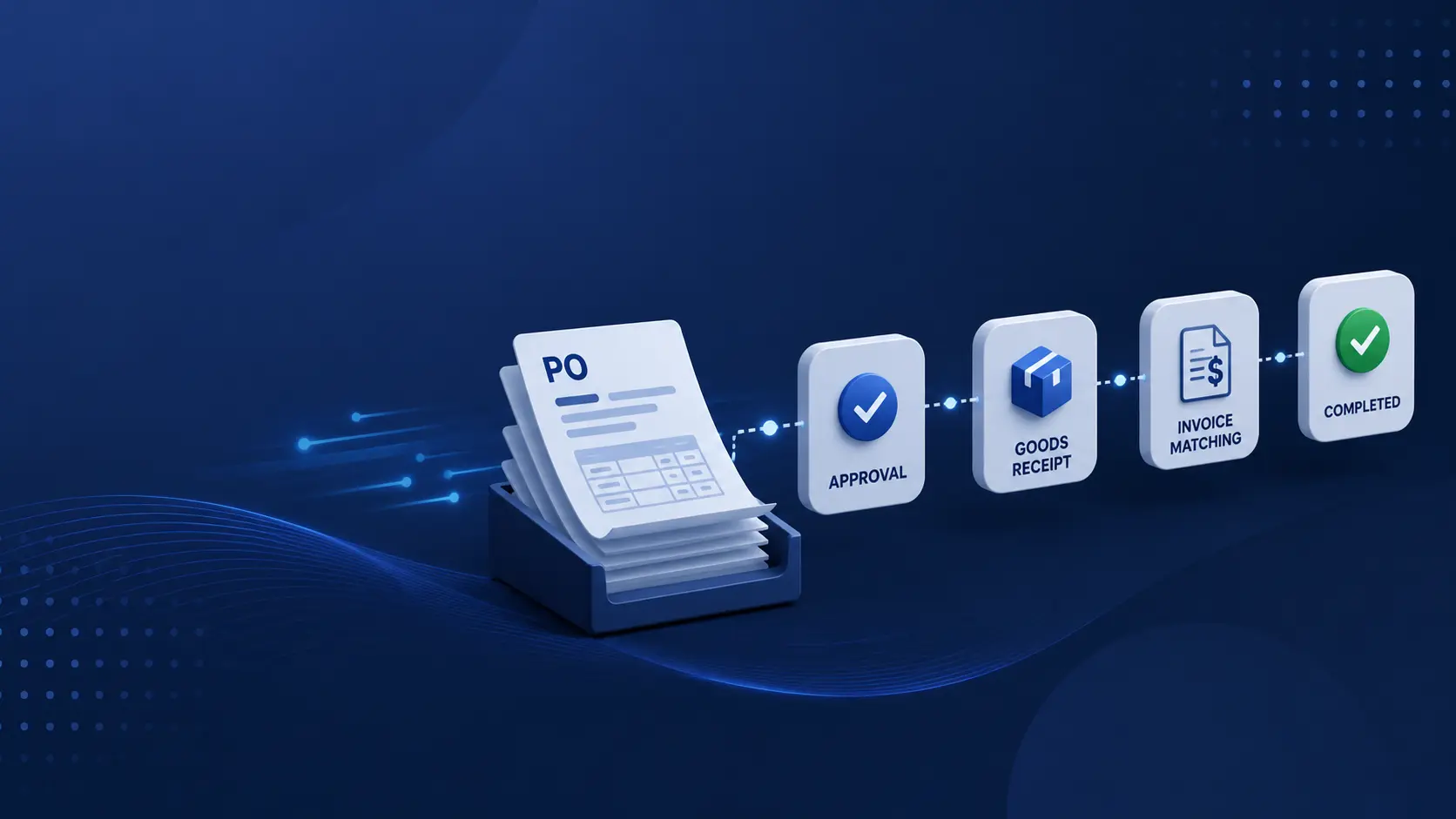
- Purchase order automation streamlines the entire procurement workflow by automating requisition capture, approval routing, PO generation, vendor communication, three-way matching, and ERP synchronization.
- Organizations that implement purchase order automation commonly achieve faster approval cycles, lower processing costs, fewer exceptions, improved compliance, and stronger supplier relationships.
- Successful automation projects depend on clean vendor data, optimized approval workflows, supplier readiness, and strong business ownership rather than relying solely on technology implementation.
- A phased deployment approach—starting with approval automation, followed by three-way matching and ERP integration—typically delivers faster ROI while reducing organizational change management risks.
Manual purchase order workflows drain time, introduce errors, and slow down procurement cycles. Here’s everything you need to evaluate purchase order automation — from how it works to what ROI looks like in practice.
If your procurement team is still routing purchase orders through email chains, spreadsheets, or a shared inbox, you already know the pain points: approvals that stall over weekends, duplicate orders slipping through, and finance spending hours reconciling invoices at month-end.
What’s less obvious is the total cost. Industry benchmarks reveal a striking gap between organisations that have automated their PO workflows and those that have not.
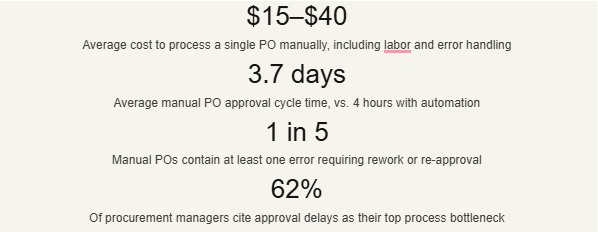
These numbers compound quickly. A company processing 500 POs per month at $25 each spends $150,000 annually on a process that automated organisations handle for under $3 per PO.
Key insight
The cost of inaction isn’t just the direct processing expense — it’s the downstream impact: delayed vendor payments that erode supplier relationships, missed early-payment discounts, and procurement staff diverted from strategic sourcing work.
How purchase order automation works
Purchase order automation is not a single technology — it’s a coordinated set of workflow rules, integrations, and intelligent routing that replaces manual hand-offs at each stage of the procurement cycle.
A modern purchase order automation system typically covers these key stages:
1. Purchase requisition intake
Requestors submit needs via a structured form or integrated catalogue. The system auto-populates vendor data, GL codes, and cost centres, with no manual entry required.
2. Rules-based approval routing
Approval workflows trigger based on spend thresholds, department, vendor type, or project code. Escalations happen automatically if approvers don’t respond within a defined window.
3. PO generation and vendor dispatch
Once approved, a formatted PO is auto-generated and transmitted to the vendor via email, EDI, or supplier portal — with a confirmation loop back to the requester.
4. Goods receipt and three-way matching
The system matches the original PO, goods receipt note, and supplier invoice automatically. Exceptions are flagged for human review; clean matches proceed to payment.
5. ERP sync and audit trail
All PO data, approvals, and matching records sync to your ERP or accounting system with a complete, timestamped audit trail — ready for internal review or compliance reporting.
Types of automation: what to compare
Not all purchase order automation solutions are built the same. The right fit depends on your transaction volume, existing tech stack, and the level of process customisation your procurement workflows require.
| Approach | Best for | Strengths | Limitations |
| ERP-native modulese.g. SAP Ariba, Oracle Procurement | Enterprises already on SAP/Oracle | Tight integration, single vendor | High licensing cost, long implementation |
| Best-of-breed P2P platformse.g. Coupa, Ivalua, Jaggaer | Mid-to-large procurement orgs | Rich feature set, strong analytics | 6–18 month deployment, requires IT resources |
| SMB-focused automation toolse.g. Precoro, Procurify, Tradogram | Small to mid-market teams (50–500 employees) | Fast setup, affordable, user-friendly | May lack advanced customisation |
| AI-powered document automationOCR + ML for invoice & PO extraction | High-volume, multi-format document flows | Handles unstructured data, reduces data entry | Needs training data, exception oversight required |
Be cautious of vendors who use the term “fully automated”; they often downplay the remaining exception-handling work. Ask any shortlisted vendor: what percentage of POs in a typical deployment still require human intervention? Best-in-class systems see under 5% exception rates — anything higher means your team is still doing significant manual work.
Real-world results: a mid-market case study
To ground this in practice, consider what a mid-sized manufacturing company with roughly 300 employees and 800 monthly POs can expect from a phased rollout of purchase order automation.
Mid-market manufacturer — 18-month automation journey
300 employees · 800 POs/month · Multi-site operations
Starting state: PO approvals routed via email, no three-way matching, 4.1-day average cycle time, three AP staff dedicated full-time to PO processing.

The implementation followed a three-phase approach: first automating approval routing (90 days), then adding three-way matching (months 4–6), and finally integrating with their ERP for full-cycle visibility (months 7–12). The phased rollout was critical — it allowed the AP team to adapt incrementally rather than absorbing a full process change at once.
“The approval routing piece alone paid for the platform in the first quarter. But the real ROI came when we got three-way matching working; our invoice exception rate dropped from 22% to under 4%.
— VP of Finance, mid-market industrial manufacturer
Common pitfalls — and how to avoid them
Teams that struggle with purchase order automation rollouts tend to run into the same set of avoidable problems. Here’s what to watch for in your evaluation and deployment.
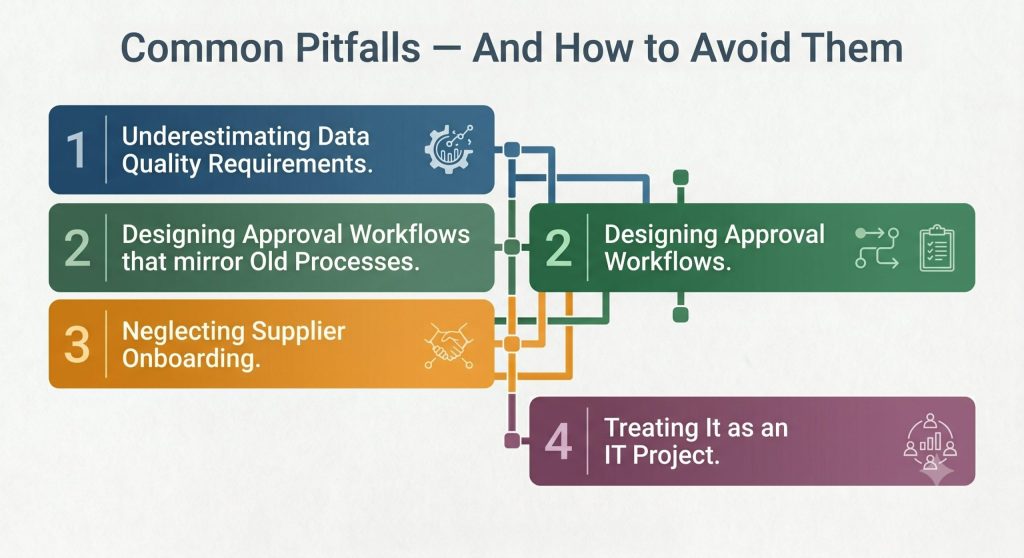
1. Underestimating data quality requirements
Automation amplifies whatever is already in your vendor master data. If supplier records are inconsistent, duplicate, or missing fields, your automated PO generation will produce errors at scale. Audit and clean your vendor database before go-live, not after.
2. Designing approval workflows that mirror old processes
One of the most common mistakes is digitising your existing approval chain without questioning whether it makes sense. If a $500 office supply order requires three approval layers because that’s how it’s always been done, automation will simply make that inefficiency happen faster. Use the implementation as an opportunity to redesign approval thresholds from scratch.
3. Neglecting supplier onboarding
Your automation is only as good as your suppliers’ ability to receive and respond to automated POs. Build a parallel supplier onboarding workstream — even a simple vendor portal with structured PO acknowledgement reduces the back-and-forth that undermines cycle time gains.
4. Treating it as an IT project
Purchase order automation touches procurement, finance, AP, and operations. Implementations that live inside the IT function without a business-side project owner consistently take longer and see lower adoption. Assign a named business owner with authority to make process decisions.
Evaluation checklist for your team
Before shortlisting vendors or building a business case, use this checklist to ensure your organisation is ready to evaluate purchase order automation effectively.
- Document your current PO cycle time, error rate, and cost-per-PO as a baseline
- Map your existing approval rules and identify which are genuinely necessary vs. inherited from old processes
- Confirm which ERP or accounting systems any solution must integrate with
- Establish your monthly PO volume and growth trajectory — this affects licensing model choices
- Identify your top 20 suppliers by volume and assess their current order-receiving capabilities
- Define your non-negotiable compliance or audit trail requirements (SOX, ISO, internal policy)
- Assign a business-side project owner with decision-making authority before vendor conversations begin
- Run a vendor demo using a real, messy edge-case from your own data — not their prepared demo script
Before you build your business case The strongest internal business cases for purchase order automation pair hard cost savings (labor, error correction, early-payment discounts captured) with softer gains: faster procurement cycles enabling better contract terms, and finance staff freed for higher-value analytical work. Build both into your ROI model.
What should your next step be?
If you’ve read this far, you’re likely past the awareness stage and actively evaluating whether purchase order automation is the right investment for your organisation — and which approach fits your context.
The most productive next steps typically fall into one of three categories depending on where your team is in the process:
Still building the internal case?
Run a 2-week manual audit of your current PO process: track cycle times, exception rates, and staff hours per PO. Real internal data is far more persuasive to leadership than industry benchmarks.
Actively shortlisting vendors?
Prioritise solutions with live ERP connectors for your specific system, transparent pricing at your PO volume, and customer references in your industry vertical. Ask every vendor for their median time-to-value, not time-to-go-live.
Ready to start implementation planning?
Scope a phased rollout: approval routing first, three-way matching second, full ERP integration third. Each phase delivers independent value and lets your team build confidence before the next layer.
Ready to evaluate purchase order automation for your team? Get a personalised breakdown of what automation could mean for your specific PO volume, team size, and tech stack.
Wait no more and calculate your potential ROI today. For more information, contact us, and we will be pleased to serve you.




