







You’ve seen the case for automation. Now comes the harder question: why do so many AP teams start the journey and end up with a system nobody uses?
Most AP teams considering automation have already done the math on manual processing. They know email-based approval chains are slow, auditable only in theory, and quietly costing them early-pay discounts they’ll never recapture. What they haven’t resolved is the harder question underneath: how do we actually make this work inside our organization?
This guide is for teams past the “should we automate?” stage who are now wrestling with how to choose the right approach, get internal buy-in, and avoid the implementation traps that leave expensive software underused twelve months after go-live.
The signals that mean you’re genuinely ready
Not every AP team is at the same readiness point. Automation works best — and stalls least — when certain organizational conditions are already in place. Here’s what readiness actually looks like in practice:
- Volume has outgrown your team
Invoice volume is growing faster than headcount can scale. Manual routing takes hours that your team doesn’t have. - Approval delays are measurable
You can actually quantify how many days invoices sit waiting — and you know which departments are the bottleneck. - You’re losing early-pay discounts
Suppliers offer 2/10 terms. You’re capturing fewer than 30% of those discounts because approval cycles miss the window. - Audit prep is manual and painful
Reconstructing an approval trail means searching inboxes. That’s the signal you need a system of record, not just email. - You have ERP infrastructure
AP automation connects to your ERP for GL coding and payment release. Without that foundation, the ROI math doesn’t work. - Approvers are identifiable and stable
You can name who approves what, for which spend categories, and up to which thresholds, even if you can’t enforce it yet.
Watch out
Teams that automate without stable vendor master data or defined approval hierarchies typically spend the first 90 days in exception-handling mode. The system runs; they just spend all their time managing what it can’t route.
Why most AP automation projects underdeliver
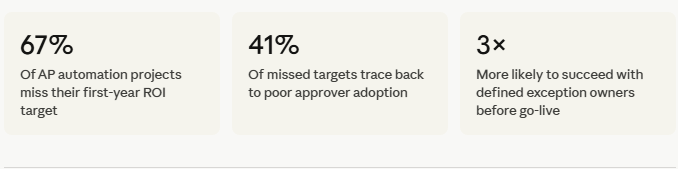
AP automation has a delivery gap that rarely shows up in vendor case studies. Projects go live, then adoption plateaus. Approval cycle times improve modestly — but not the 60–70% reduction that was in the business case. Here’s what actually causes it:
The workflow was digitized, not redesigned
The most common reason automation underdelivers is that teams configure the new system to mirror their existing approval chain exactly — including every redundant step, every low-value sign-off, and every escalation that nobody ever challenged. Digitising a broken process just makes it faster to be broken.
Before you configure your first routing rule, audit your approval policy. Ask: does a $400 recurring software subscription genuinely need VP sign-off? If the answer is “that’s just how we’ve always done it,” then that’s exactly what you should fix first.
Approvers were trained last or not at all
AP teams invest heavily in configuring the system and almost nothing in preparing approvers—who are usually in operations, marketing, or engineering and don’t think of invoice approval as part of their job. When the system sends them a notification they don’t recognize, they ignore it. Invoices sit. The AP team chases. Nothing has changed.
The vendor master wasn’t ready
Rules-based routing depends on clean data: vendor category, payment terms, risk classification. If your vendor master has duplicate records, missing fields, or inconsistent categorization — your routing rules misfire on a significant percentage of invoices from day one. Data readiness is a go-live prerequisite, not an afterthought.
Exception handling wasn’t designed
Every accounts payable approval workflow has exceptions. Invoices that don’t match a PO. Vendors that don’t exist in the system yet. Amounts that cross a threshold mid-approval. Teams that don’t design their exception queues before go-live find those queues becoming the new email chain – unmanaged, unowned, and growing.
The three phases that separate successful implementations
Teams that get full value from AP workflow automation don’t just configure software and go live. They move through three distinct phases, and they are careful not to skip ahead.
Phase 1
Standardize before you automate
Audit your current approval policy. Rationalize your approval tiers — most mid-market companies need no more than three. Clean your vendor master. Define who owns exceptions. This phase happens before any software is touched, and it’s where most of the ROI is actually created.
Phase 2
Automate high-volume, low-complexity invoices first
Start with recurring, PO-backed invoices from approved vendors — utilities, SaaS subscriptions, and known suppliers. These are the easiest to route correctly, produce early wins, and build organizational confidence. Save the complex edge cases for phase three, when your rules engine is tuned and your team is comfortable.
Phase 3
Expand coverage and optimize with data
Once your baseline is running, use the cycle-time reporting your platform provides to identify where approvals still stall. Which departments have the highest exception rates? Which approvers consistently breach SLA? This data drives your next round of rule refinement – and surfaces the policy conversations that genuinely move the needle.
Which approval model actually fits your org structure
There’s no universally correct accounts payable approval workflow structure. The right model depends on your org’s size, complexity, risk tolerance, and how distributed your spend authority is. Here’s how to think through it:
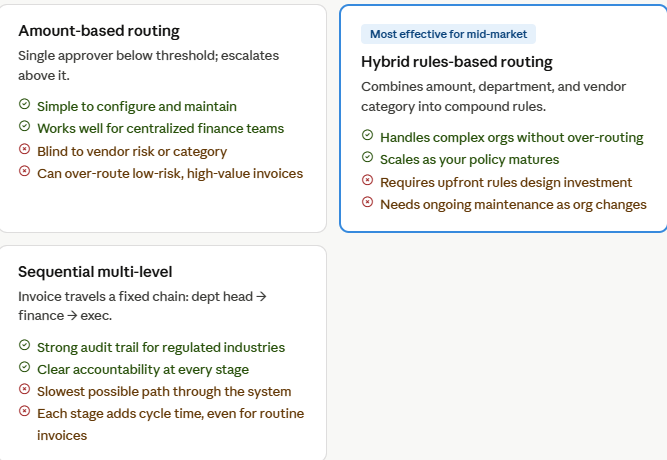
If you’re currently using sequential multi-level approval for all invoices, the highest-impact change you can make — before touching any software — is to introduce dollar thresholds that exempt routine invoices from upper-level review. That single policy change typically reduces average approval time by 35–50%.
Objections your team will raise — and how to answer them
Internal resistance to AP workflow automation rarely comes from the AP team. It comes from the people the workflow touches: department heads, budget owners, and IT. Here’s what you’ll hear — and what’s actually true:
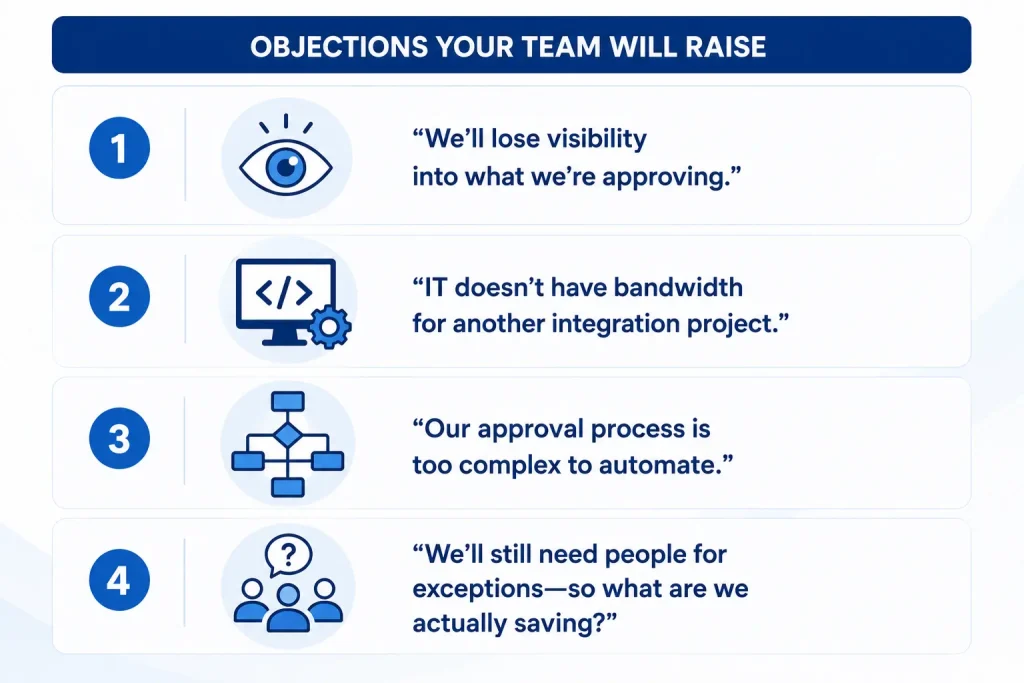
“We’ll lose visibility into what we’re approving.”
The opposite is true. Automated workflows give approvers full invoice context — line items, PO match status, vendor history, GL coding — in a single view. Email chains require approvers to chase context across attachments and forwarded messages. Automation improves the quality of approval decisions, not just the speed.
“IT doesn’t have bandwidth for another integration project.”
Modern AP automation platforms connect to major ERPs (NetSuite, SAP, Oracle, and Sage) via pre-built connectors. The vendor’s implementation team typically handles implementation, which takes weeks, not quarters. IT involvement is real but bounded—usually 2–4 weeks of configuration review and UAT.
“Our approval process is too complex to automate.”
Complexity is precisely what automation handles well — once it’s mapped. The real question is whether your complexity is structural (genuinely different entities, currencies, approval policies) or historical (rules that accumulated without anyone questioning them). Most “complex” AP workflows contain significant over-engineering that gets rationalized during the automation design phase.
“We’ll still need people for exceptions—so what are we actually saving?”
You’re saving the time currently spent on the 70–80% of routine invoices. When AP staff spend less time routing, chasing, and re-entering, they handle exceptions faster and with more focus. Teams that automate their standard workflow typically see exception resolution time drop by 40%—because AP’s bandwidth is no longer consumed by the predictable work.
How to calculate ROI your CFO will believe
The business cases that get approved don’t rely on the most aggressive assumptions — they use numbers the finance team already owns. Here’s how to construct one that holds up to scrutiny.
Start with what you can measure today
- Total invoices processed per month × your current cost-per-invoice (industry average: $12–$18 for manual; benchmark yours against AP staff hours)
- Average approval cycle time in days × invoices per month × your average invoice value × your early-pay discount rate
- Annual late payment penalties from the last 12 months (pull from your ERP — this number is usually higher than expected)
- AP staff hours per week spent on routing, chasing approvals, and re-keying data
- Last audit preparation: how many hours did it take to reconstruct approval trails?
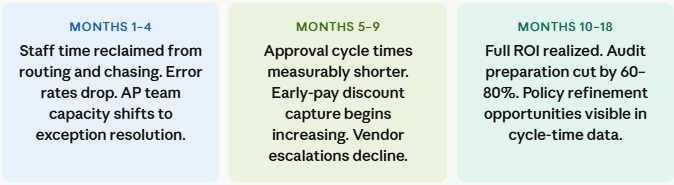
Map the gains across a realistic timeline
What to demand from a vendor before signing
Most AP automation demos show you a clean, linear workflow with a happy path invoice. What matters is how the platform handles everything else. These are the questions that reveal whether a vendor has real enterprise depth or a polished front-end:
- Walk me through a 3-way match exception on a partially received PO. Show me; don’t describe it.
- How does the system handle an approver who is on leave with no delegation configured? What fails, and what’s the fallback?
- Can a non-technical AP manager modify routing rules without a vendor support ticket or IT involvement?
- What does your implementation timeline look like for an org our size — and what are the three most common causes of delays?
- Show me the audit export. What’s included, what’s not, and how long does it take to pull for a 12-month period?
- What’s your average customer approval cycle time reduction at 6 months post-go-live, and what defines your top quartile versus your bottom quartile?
Vendors who can answer the last question with data — and who are willing to discuss what their bottom-quartile customers have in common — are the ones worth shortlisting. The ones who redirect to case studies are telling you something.
The real measure of a successful AP automation implementation
Twelve months after go-live, the teams that got it right aren’t the ones who chose the most powerful platform. They’re the ones who spent as much time on policy design and change management as they did on configuration. Their approvers know what they’re approving and why. Their exception queues are managed and trending down. And their AP team has shifted from invoice traffic management to genuine financial process ownership.
That outcome doesn’t come from software. It comes from treating the accounts payable approval workflow as a business process that the software serves — not a technical problem the software solves.
See where your current AP workflow is losing time. Book your AP workflow assessment.




