







Key Takeaways
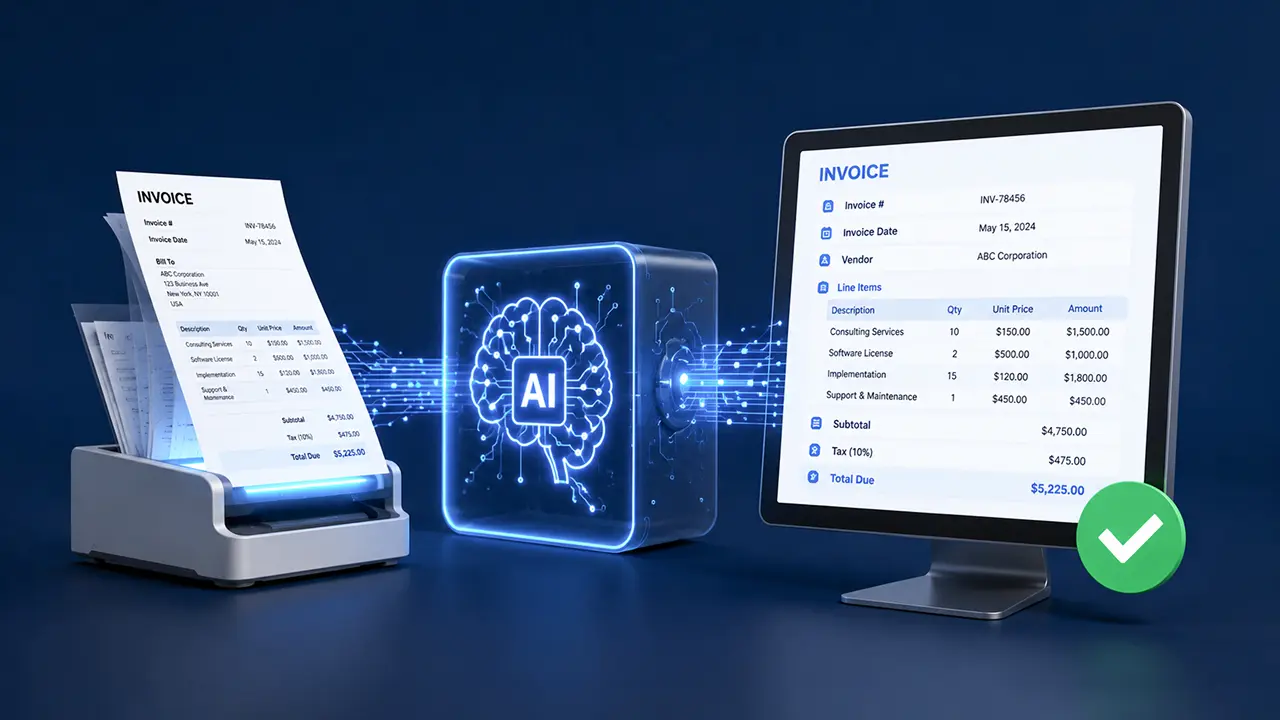
- AI invoice processing eliminates the limitations of template-based OCR by understanding invoice content regardless of format, language, or layout.
- Unstructured invoices account for a disproportionate share of AP workload, creating delays, errors, and increased processing costs.
- Organizations that deploy AI-powered invoice automation commonly achieve 75–90% straight-through processing rates and significantly reduce manual effort.
- The most effective solutions combine document intelligence models, large language models, confidence scoring, and continuous learning capabilities.
- Long-term success depends not only on the technology itself but also on ongoing optimization, exception management, and integration with existing ERP and AP workflows.
Most invoices don’t follow a template. AI invoice processing is changing how organizations deal with that reality — without ripping out existing workflows.
If you’ve tried to automate accounts payable before, you’ve faced the same challenge. An invoice from your logistics vendor looks nothing like one from a software contractor. A supplier in Germany formats their VAT differently than a supplier in Singapore. A subcontractor sends a handwritten PDF with line items in the body of an email.
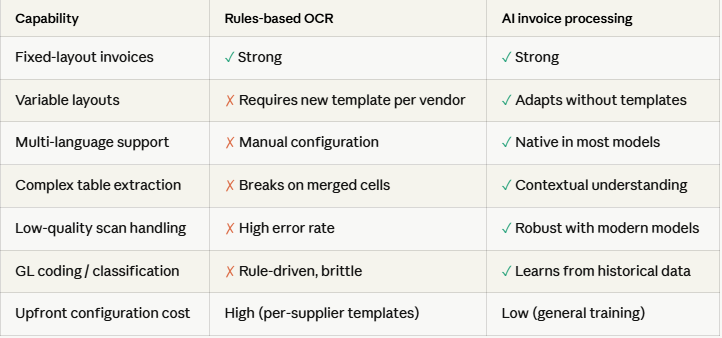
Traditional automation tools — rules-based OCR, template matchers, rigid EDI pipelines — were built around the assumption that invoices would be consistent. That assumption fails constantly in the real world. The result is a backlog of exceptions that land in someone’s inbox every morning.
The core problem: Structured automation solves the easy 60%. The remaining 40% — the unstructured, variant, and exception invoices — consume disproportionate time, create payment delays, and introduce error risk at scale.
The real cost of manual invoice handling
Before evaluating any solution, it helps to understand what unstructured invoice processing actually costs your organization. The numbers are often larger than finance teams realize, because costs are distributed across departments and time.
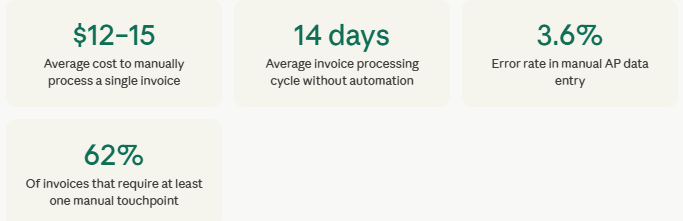
Beyond direct cost, late payments from processing bottlenecks erode supplier relationships and forfeit early-payment discounts. When processing delays cause payment terms to go unmet, AP metrics rarely capture the downstream impact on procurement negotiations — but it’s real.
How AI invoice processing actually works
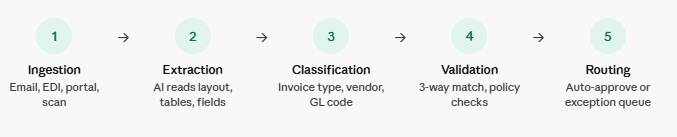
Modern AI invoice processing is fundamentally different from the OCR tools of a decade ago. Rather than pattern-matching against a fixed template, AI models learn to understand the semantic meaning of invoice documents — regardless of layout, language, or format.
Here’s the typical processing pipeline:
The role of large language models (LLMs)
Where traditional tools stop at character recognition, LLM-based systems understand context. They can infer that “inv date” and “bill date” refer to the same field. They recognize that a number formatted as “1.234,56” in a German invoice represents a different value than an American “1,234.56”. They can extract line items from tables that span multiple pages, even when the table headers only appear on the first page.
This contextual intelligence is what allows AI invoice processing to handle unstructured documents — not just the clean, consistent ones that template-based tools were designed for.
Technical note: The most capable AI invoice systems combine document foundation models (trained specifically on financial documents) with general-purpose LLMs for reasoning. Neither alone performs as well as the two in combination.
Structured vs unstructured: what’s the actual difference?
When finance teams talk about “unstructured invoices”, they usually mean a mix of document challenges. Understanding the specific types helps when evaluating vendor capabilities.
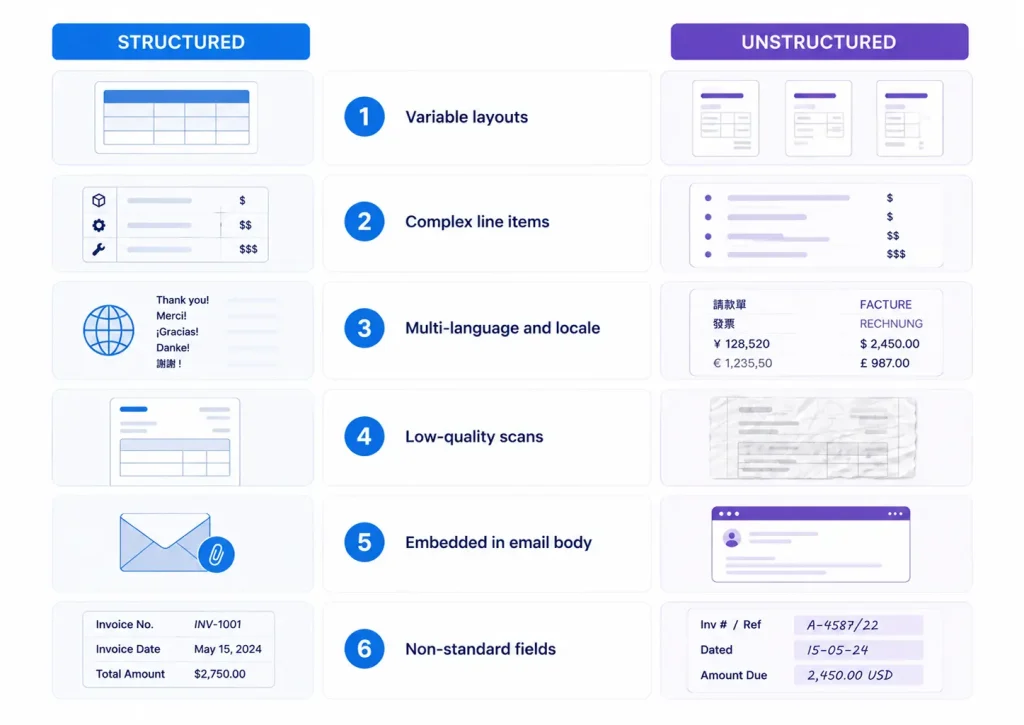
1. Variable layouts
No fixed position for key fields — header info may appear at the top, bottom, or middle depending on the vendor’s design.
2. Complex line items
Multi-page tables, merged cells, nested descriptions, or free-form service descriptions instead of discrete SKUs.
3. Multi-language and locale
Different languages, date formats, currency notations, and tax structures across international suppliers.
4. Low-quality scans
Skewed, noisy, or low-resolution scans that defeat standard OCR, especially from field offices or older suppliers.
5. Embedded in email body
Invoice details written inline in emails rather than as attached documents, requiring email parsing alongside document extraction.
6. Non-standard fields
Custom fields, footnote charges, split taxes, or service surcharges that don’t map cleanly to standard AP schemas.
Real-world results: three use cases
Benchmarks matter less than outcomes. Here are three representative scenarios where AI invoice processing delivers measurable impact.
Manufacturing: Mid-size industrial components distributor
The company managed invoices from 600+ suppliers across 12 countries. Template-based OCR covered roughly 40% of volume — the rest required manual entry. After deploying AI invoice processing with a 3-way match engine, straight-through processing reached 78% within 90 days.
67% reduction in manual touchpoints
Cycle time: 14 days → 3.5 days
$380K annual AP labor savings
Professional Services: Regional law firm (180 attorneys)
Legal invoices are notoriously complex — LEDES billing formats, matter codes, timekeeper entries, and narrative descriptions must match matter files. The firm’s AP team spent 60% of their time on billing review. AI processing, trained on their specific matter coding schema, automated classification and flagged policy violations.
55% fewer billing disputes
Review time cut from 4 hrs to 45 min/day
94% extraction accuracy on LEDES format
Retail / Multi-location Franchise group (85 locations)
High invoice volume from hundreds of local vendors — utilities, maintenance, and food service suppliers — each with unique formats. Many were paper invoices scanned at the location level with poor image quality. AI invoice processing with image enhancement handled extraction, with auto-routing to location-level cost centers.
Processed 3,200 invoices/month vs 900 before
Captured $120K in early payment discounts
91% straight-through rate on utility invoices
What to look for in an AI invoice solution
The market for AI invoice processing tools has grown significantly. Not all solutions handle unstructured documents equally. When evaluating options, these capabilities separate strong performers from the rest.
1. Extraction accuracy on real-world documents
Ask vendors for accuracy metrics on your invoice types specifically, not just on benchmark datasets. A solution that scores 98% on clean PDFs may struggle on your particular mix of scanned paper invoices and multi-language suppliers. Request a pilot with a representative sample of your own invoice backlog.
2. Confidence scoring and exception handling
The best systems don’t just extract data — they tell you how confident they are in each extracted field. Low-confidence extractions are automatically routed for human review rather than processed straight-through. This is what makes high automation rates sustainable without sacrificing accuracy.
3. ERP and AP system integration
AI extraction is only valuable if extracted data flows cleanly into your downstream systems. Evaluate integration depth with your specific ERP — not just whether a connector exists, but whether it handles your chart of accounts, cost center structure, and approval workflows
4. Continuous learning from corrections
When human reviewers correct an extraction or reclassify a GL code, the best systems learn from those corrections and improve over time. This active learning loop is what drives automation rates from 60% at go-live toward 85–90% over six to twelve months.
Red flag: Vendors who quote automation rates without specifying what percentage of invoices were excluded from the calculation. “95% automation” sometimes means “95% of the easy invoices” — with the complex ones still handled manually and not counted.
5. Audit trail and compliance support
Every extraction decision, confidence score, human correction, and approval action should be logged with full traceability. This is non-negotiable for organizations subject to SOX compliance, VAT audit requirements, or internal controls frameworks.
Implementation: what to expect
Finance teams often underestimate the implementation effort — and vendors sometimes overestimate how much they underestimate it. Here’s an honest picture of a realistic deployment timeline.
Weeks 1–3: Discovery and data audit
Map your current invoice volume by type, source, and supplier. Identify your top 20 suppliers by invoice frequency — these typically account for 60–70% of volume and should be the pilot focus. Audit your current ERP field mapping and GL code structure.
Weeks 4–6: Pilot deployment
Run AI extraction in parallel with existing processes. Compare outputs, identify systematic errors, and configure exception routing rules. This phase produces real accuracy data against your specific invoice mix — more valuable than any vendor benchmark.
Weeks 7–10: Integration and workflow design
Connect extraction output to your ERP, configure approval workflows, and train the AP team on the exception review interface. Change management at this stage determines adoption quality — involve the AP team early, not just at rollout.
Weeks 11–16: Scaled rollout and optimizatio
Expand from pilot suppliers to a full vendor base. Review the learning loop — are corrections feeding back into the model? Track automation rate, exception rate, and cycle time weekly. Most organizations see meaningful improvements in metrics by week 12.
Success metrics to track from day one
- Straight-through processing rate (target: 75%+ within 90 days)
- Average invoice cycle time (from receipt to payment ready)
- Exception rate by invoice type and supplier
- Extraction accuracy by field (header vs. line item vs. tax)
- Early payment discount capture rate
- AP labor hours per invoice processed
- Supplier payment complaints and disputes
AI invoice processing isn’t a single product — it’s a category that spans from lightweight OCR tools with some ML features to purpose-built document intelligence platforms. The right fit depends on your invoice volume, the complexity of your supplier mix, and how deeply you need to integrate with downstream systems.
What’s consistent across successful deployments: the organizations that see the highest automation rates treat AI invoice processing not as a one-time software deployment but as an ongoing capability they actively tune and improve. The technology provides the foundation — the operational discipline provides the results.
Ready to evaluate AI invoice processing for your AP team? Contact us today and see how AI handles a sample of your actual invoices — including the unstructured ones your current system struggles with.




